Our Community is in read-only mode until April 8th, learn more here. You can still search existing threads or get help via Dropbox Support, the Dropbox Help Center, or Learn.
Admin Console
8 TopicsEmojis in filenames are finally here! 🥳
Hey everyone! We’ve got some exciting news - Dropbox now supports way more characters in filenames and folders! Emojis are now supported across all surfaces, and it’s available to everyone! That means support for emojis like 🚀, 🎵, 🏴☠️, plus rare scripts like 𩸽, اللهِ, and even mathematical symbols like 𝛑 or 𝔸. This long-requested update fixes the issue of files not syncing properly due to unsupported characters, so everything now works just as expected. Whether you’re jazzing up a folder name with a little ✨ flair ✨or using your native language to stay in flow, we hope this update brings a little extra delight to your day and the way you work. Give it a go and let us know what you think! And of course, thank you to Link1328 for the idea and everyone who contributed to the thread! Let us know what you think, share your feedback or any other requests for characters to support below 👇 Happy organizing!1.8KViews10likes15Comments🌟🤝Community Spirit Badge 🤝🌟
Hey everyone! 🌟 It’s Theresa here. You’ve probably seen me hanging out in the Community, jumping into conversations and joining discussions (if you haven’t seen me before, well, hello 👋). And while doing that, I’ve noticed something pretty great (well, we all have here on the Dropbox Community Team) – so many of you are out here making this Community an amazing place. Whether you're helping others, sharing useful tips, or just bringing good vibes ✨, your contributions really stand out. To recognise and celebrate this, we’ve created a brand-new badge… This badge is all about celebrating the people who make this space feel like home. It’s for those who do more than just answer questions – the ones who offer a helping hand 🤝, share great tips 💡, and keep the good vibes flowing. Whether you're solving tricky problems 🧩, sharing useful resources 📚, or just making the Community a fun place to hang out 😃, we see you and we appreciate you. The Community Spirit Badge is a one-time award 🏆, so if you earn it, you know you're doing something special. It's a little extra recognition for those who truly bring the Community to life. We’re so excited 🎊 to launch this new badge and can’t wait to start recognizing the amazing individuals who truly bring the spirit of this Community to life. And if you spot someone who you think deserves the Community Spirit Badge, don’t hesitate to tag me Theresa within the thread. T 💙 (Dropbox Community Manager)856Views5likes0Comments
We've updated the Admin Console!
Hi folks, I’m Anastasia and I’m part of a team focused on delivering a better admin experience for teams. We are thrilled to announce that we’ve updated the admin console! Our team has been hard at work developing this based on feedback from our admins, and we can't wait for you to try it out and share some feedback with us. 🙂 The changes to the admin console make it easier for you to: Tackle to-dos on the Dashboard homepage Protect your team’s content, with enhanced monitoring and settings on the Security page Manage member access to folders and add-ons on the Members page Some changes you’ll want to know about: We’ve replaced the Insights page with a new Dashboard homepage Our activity logs are now all under Security (formerly in the Activity page) We hope you love it, but please share any and all feedback with us so that we can make the admin console the best it can be. Thank you for your continued support! Anastasia7.1KViews6likes11CommentsIntroducing:: On Team / Off Team viewer info
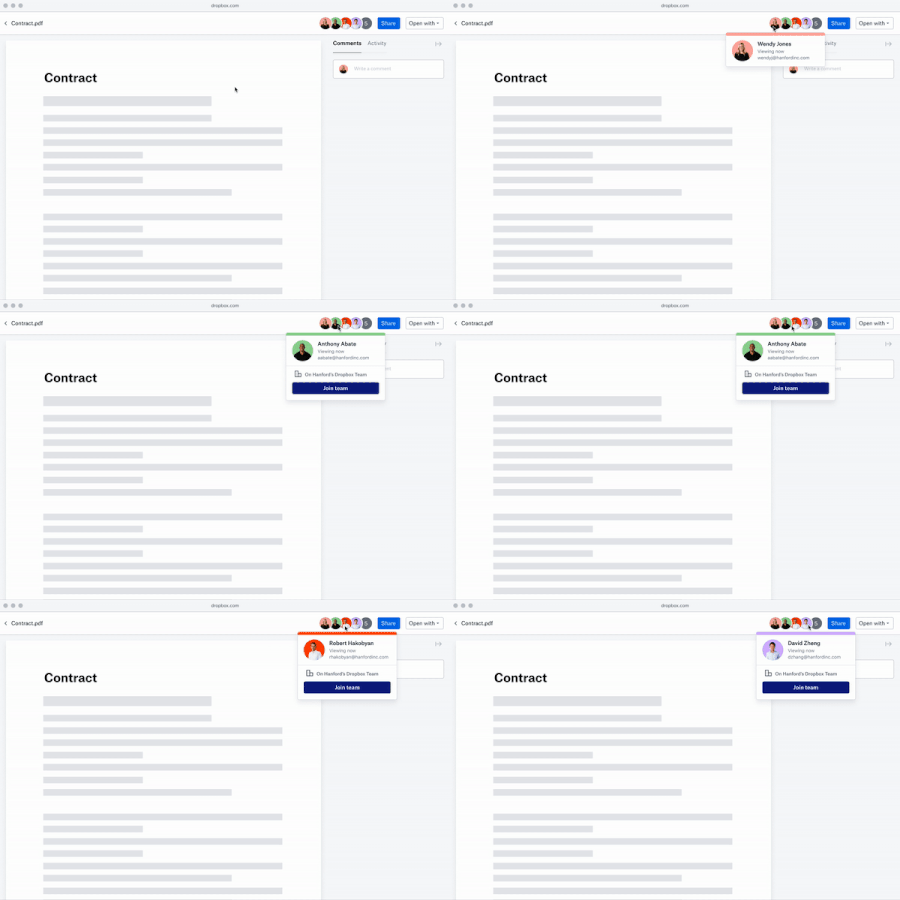
Overview Viewer info now shows whether a person who has viewed a file is a member of a Dropbox Business team or not. This allows Team Admins to invite people to join their team, regular team members to suggest people that should be invited to a team, and non-team members to request to join a team - all directly from a file they are viewing. Audience All teams For more details on viewer info see check out this article on Dropbox Help Center3.1KViews1like0Comments
Introducing:: Team Invite Link
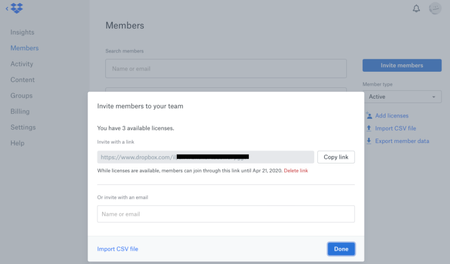
Overview All Dropbox Business admins can now use the Team Invite Link, which allows them to seamlessly expand their teams. Now, via the Invite Members Modal, admins can easily generate a link that they can share to multiple users through their preferred communication channels (Slack, Email, Messenger). Recipients of the link just need to click, and they’ll seamlessly be walked through joining the team! The admin who generated the link will also receive email notifications whenever a team member successfully signs up, or fails to join due to a lack of licenses. Audience All teams More ideas If you have more ideas on how we can improve our product then check out our Paper ideation board here, or our Dropbox Business ideation board here. Request improvements, suggest ideas, we’ll review them and try and improve our product.2.1KViews0likes0CommentsIntroducing:: Smart Sync Auto-Evict
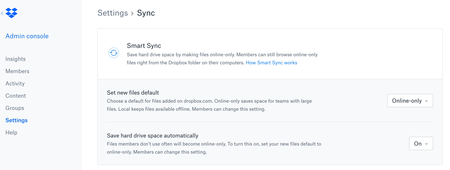
Overview Smart Sync Auto-Evict reduces manual effort and time for users by detecting content that hasn’t been modified in a while and evicting it automatically. Available via the “Settings” tab in the Admin console, under “Sync”, Admins can now enable this feature for their team. With this feature, business users have the content they actively work on at their fingertips and they can free up their device from content they’re unlikely to use. For those not already familiar with the original Smart Sync feature, please see the overview here: https://www.dropbox.com/smart-sync Audience All teams2.3KViews1like0CommentsIntroducing:: The updated Insights Dashboard
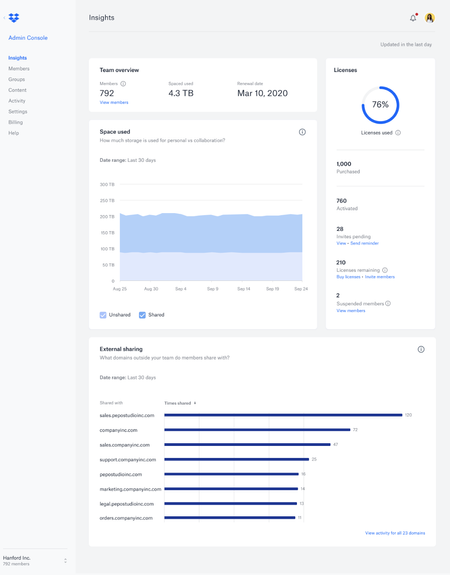
Overview The new Insights dashboard helps team admins navigate through large amounts of data by highlighting the most important and interesting stats about their team, and offering relevant drill down options. Accessed via the Insights tab on the left in the Admin console, the new dashboard provides a quick and easy way of understanding how Dropbox is being used and what’s its value to an organization. It surfaces key elements and facilitates further investigation of them through the new activity page, while also distilling large amounts of data into accessible and digestible charts. The new dashboard will provide admins better visibility in the areas of Control, Security and the overall state of their team. Audience All teams Coming Soon…. Stay tuned for further updates and inclusions to the dashboard very soon…3.3KViews6likes0CommentsIntroducing:: Data Governance Add-Ons
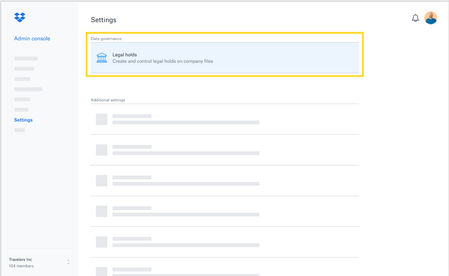
Overview 10 Year Extended Version History An account’s version history depends on the type of Dropbox account. Dropbox Business teams can purchase an extended version history add-on that allows them to recover any file/folder deleted or changed in the last 10 years. Legal Holds Legal Holds is a feature available to Dropbox business teams that have purchased the Data Governance add-on. Placing a legal hold on a team member or a number of team members allows team admins to hold all content a team member(s) views or modifies regardless of their actions on the content. Members affected by a legal hold will not be notified of the hold and will still maintain their permissions to create, edit, delete, and even permanently delete files. Audience All teams Currently, these add-ons can only be purchased through an Account Executive with Dropbox Sales. If you do not already have an account executive, you can contact the team via this form or call 1 855-237-6726.3.2KViews4likes0Comments