We're making some changes to the Dropbox Community 👩💻 - Find out more here.
Android
56 Topics
Make offline files visible in the Android file-system
I think you should make files stored offline on Android available in the file system. As it is now, the dropbox files marked as 'available offline' are hidden from the rest of the operating system. This gives a number of problems: 1: When opening a file in an app, that app may put the file path in its 'most recently used documents'-list. However, since the path it gets from the Dropbox-app is not long-lived, the 'most recently used documents'-list becomes unusable, since the links on it become dead rather quickly. 2: It makes using browsing apps, like photo viewers or podcast players, on your offline files impossible. 3: Some apps expect content to be found on the file system. For example, the samsung app used to download content onto a samsung smart watch, expects to find files in the file system. It cannot be used to download files from dropbox onto the smart watch. 4: Sometimes a smart phone is used a bit like a computer. Like uploading files to an FTP-server and the like. A FTP-client typically expects to find files on the file system, and allows them to be selected and uploaded. This does not work with Dropbox. A possible work-around is to export the contents from the dropbox offline folder onto the phones regular file system. This is unsatisfactory because: 1) It feels cumbersome. The number of clicks to send a podcast episode to a smart watch, or to download a .pdf from dropbox and upload to an FTP-server, becomes a few too many. 2) For files which can be edited (like password manager saves, various profiles, text documents etc), the user needs to remember to copy the file back to Dropbox, which is very error prone. Dropbox obviously already has technology to synk a file system folder with dropbox. Could not this functionality be offered on smart phones also?23KViews91likes82Comments
Syncing Dropbox files to Android SD card - third party apps?
Hi everyone, As you may know, Dropbox doesn't sync files on Android any more as of last year or so (see this, for example). They used to be in sdcard>Android>data>com.dropbox.android>files, but the new "available offline" option stores them in the cache of the Db app, which other apps cannot access (you wouldn't be able to locate them with Files, for example), to ensure their safety, I would guess. The only way to use these files on your device apart from through the Db app is to "export" them after they were made "available offline" (so basically to properly download them locally), and it is thus impossible to do what Dropbox is meant to do in the first place : read and write synced files. I personally would like to edit note files on my computer and my phone and to get them synced by Db, but there seems to be no way to reach and edit locally stored (note) files with my note-taking app. The only workaround I found to this problem is using third party app that syncs files with your Dropbox repository, such as Dropsync or FolderSync, which were explicitly meant for that : "New files in your cloud account are automatically downloaded onto your device. [...] This is how Dropbox works on computers but not on Android. Two-way automatic synchronization should be an essential function of the official app. For whatever reason, it is not the case. Dropsync is here to fill the gap." [Dropsync app description] But then I am not too keen on adding more complexity to my workflow, increase the likeliness of some incompatibility or other "technical issues" to emerge in the future and, moreover, to potentially put my professional and personal data into more covetous digital hands than they already are in (free apps that manipulate my data? I sense what the product might be)... So my questions are : has anyone in here ever tried these solutions and did it work as planned? Any (unusual) worries to have regarding privacy with these solutions? And above all (@support people?), is there any way to circumvent the issue without these? Cheers16KViews8likes8Comments
Problem at mobile app sign in "please enter a valid email address"
Hello, Dropbox was not always syncing via camera upload so I decided to reinstall (on Windows 7 PC and Android phone). The phone icon looks different now (lighter blue) so I guess the Android app is new -- version 3.0.4.10 on Samsung Galaxy S5. I can't access the version on PC, none of the online methods work for me. I can log on to web as well as run the desktop app with a newly reset password. I have disconnected my phone from the account. When I try to sign in I get a banner message "please enter a valid email address". This banner is above the email entry field, unlike the red message UNDER the email entry field when the email is not even an email format.Solved9.5KViews1like5CommentsDropbox crashing on Android
For about a week now, Dropbox is crashing on my Android 5.1 phone (Kernel 3.10.65+). Latest version of Dropbox I have installed is v.114.2.12 I cleared app and phone cache, uninstalled, reinstalled, restarted, and still it doesn't work. It looks like it works on restart but when I try to access any files, it kicks me out of the app and to my home screen. I noticed that the app is still running in the background, but every time I put focus on it; it kicks me out to home screen again.Solved7.9KViews1like38CommentsIs it safe to clear my cache on Android? Will that delete my files?
I need to clear space on my android device there is a button of "clear data" in the "application infos" on the device it will clear for me around 1.50 GB my Q using this "clear data" button will free space on the device only or will delete files on my dropbox?? thanks in advanceSolved7.4KViews0likes4Comments
DropBox will not show any files
I'm running android 14 on a Google Pixel and after the most recent update I can no longer see any files. My admin looked and said I still am part of the group. I deleted and redownloaded the app, and power cycles my phone. Gives me a message that says Dropbox was updated, then says "can't connect to Dropbox, Make sure your online, or try again later.Solved5.9KViews0likes16CommentsCan't login on my phone
Dropbox stopped working on my android phone. Tried a different network but still wouldn't work/sync/etc. Uninstalled and re-install it onto the phone. Now I can't login. I get the following message. "sign-in failed. Unknown error, please contact Dropbox customer support" I tried changing my password via my laptop then signing in on phone with new one. Still get the same message. Working fine on both my laptop and my Surface tablet. Reinstalled twiced but get the same message each time.Solved5.5KViews0likes35Comments
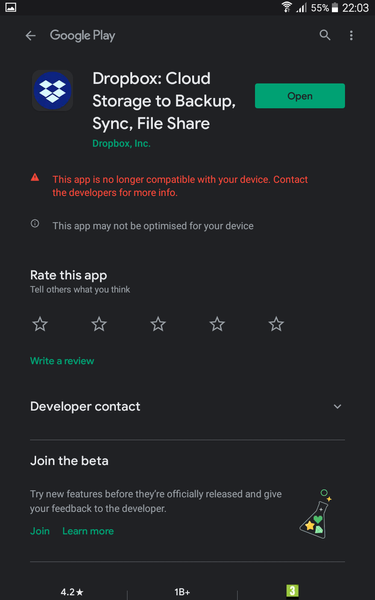
I'm getting an error that the mobile app is not compatible with my Android device. Why is that?
As per my first image from the Android Play Store, It explains that the latest version of Dropbox is no longer compatible with my Samsung Galaxy TM235 :tired_face: The second screenshot shows the error when trying to login to either the latest version or the default build App that was on the device(2.4.4.8) Regaudless of the build they both return the invalid Email error as shown. Lastly for anyone who might think that I've forgotten my Password there's another shot from the same device connected to Dropbox (it also ask do i wish to install Dropbox. which takes me round to the playsore and shows the first non-compatible error)Solved4.5KViews0likes6Comments