Our Community is in read-only mode until April 8th, learn more here. You can still search existing threads or get help via Dropbox Support, the Dropbox Help Center, or Learn.
Dropbox Backup
91 Topics
How to remove desktop from dropbox
Somehow, all links on my laptop Desktop were copied to a Dropbox folder called "Desktop"; if I did it, it was accidental I don't know why I need that and when I delete the Desktop folder in Dropbox, all the icons disappear from the computer desktop. I assume some kind of sync issue. What I am doing wrong? I only use Dropbox for sharing files so this is a new problem for me. Thanks41KViews2likes21Comments
How can I cancel my computer backup?
I apparently selected pc backup when I installed Dropbox and naturally I'm out of storage on my Dropbox account now. I don't want and have no need to have my pc backed up to it. I have the desktop app but am not able to find the preferences section to stop it from backing up. I did try just deleting My PC from Dropbox but a message comes up and says if I delete "My PC" it says it will be removed from my Dropbox and from the computer. If I delete it in Dropbox, does that mean I'll lose everything on my laptop too? Sorry if it sounds like a newbie question but I am. 🙂 Any help stopping the PC backup would be greatly appreciated.Solved25KViews2likes58CommentsTurning on dropbox backup but folder name is weird
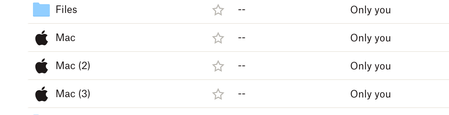
I had tested the Dropbox Backup feature in the past so I know that when turned on my Computers should be added as My Mac (Unique Mac Name). I decided to turn it back on again when setting up two new Macs that I have but the backup now creates the folders as just Mac, Mac (2), Mac (3) I've gone through the steps of unlinking Dropbox from each computer. Checking their names in System Preferences and also in the Security tab of my Dropbox account. The computer names are correct in Dropbox but the backup feature is still creating the folders as just MacSolved16KViews10likes56Comments
How do I delete Backups in Dropbox?
Hello, I've been trying to find out what is taking space in my Dropbox. When I go to Manage account it says I have 11.8 GBs of Backups out of 15 GB. However I cannot actually find out what backup this is nor delete it. All the steps I've checked on the site talks about installing a Desktop App then going to Sync and Backup. However there's no such thing. I'm using the latest Dropbox app downloaded from Dropbox website and running on Windows 11. Also if I go to Dropbox app in the taskbar and then click on my account name then go to Preferences there's an option for the tab called Backups. However this tab opens up just the folders however I've not selected any folders to be backed up. There's no way to actually delete backups. I've tried unlinking all devices from my account, deleting all files in the directories and still there's this 11GB just missing. Why can't Dropbox app just show what is taking the space and have an option to delete it?Solved8.3KViews4likes17Comments
Dropbox takes over the Documents folder
i am having this issue with a mac mini M1 - i am running the beta software that is supposed to work with the M1. I migrated data only using the migration assistant built into macs. Dropbox takes over my documents folder as soon as a sign in and the path changes showing it is now a dropbox folder - after doing a migration that folder is empty and if i restore to that folder the files disappear within a few minutes. I am likely saying goodbye as i am fed up with poor mac support and poor support in general. I spent 4 hours chatting with their support people BEFORE i did the migration because i anticipated issues and sure enough the issues are real.Solved6.6KViews2likes13Comments
Paths to files on my desktop have changed
I have uninstalled the DropBox, but it is still affecting the location of files on my desktop. For example, the path to files is: C:\Users\user\Dropbox\PC\Desktop\[file name], instead of C:\Users\user\Desktop\[file name]. What can be done to get rid of 'Dropbox\PC\' from the path? P.S. My OS is Windows 10 Pro x64 version 22H2 (OS build 19045.2965).Solved6.5KViews0likes41CommentsGet back share link after accidentally deleting then restored file
this may be a dumb question & totally not possible, but, i have a pdf i've shared and even created a QR code for the shared link to pass around as needed. i needed to edit the file and i accidentally deleted it. i quickly went to restore it from dropbox backup, but now the shared link is different. is there any way to change the shared link back to the way it was? i suspect i'm just screwed & have to redo my stuff, but thought i'd ask just in case 🙂Solved6.4KViews0likes8CommentsRestoring files deleted by accident using Overleaf via Dropbox
I'm using Dropbox in combination with overleaf in order to sync my LaTex projects from overleaf to my Dropbox folder. About two weeks ago, I accidently removed the files from an overleaf project from my dropbox. This implies that the files were also deleted on the overleaf site. I thought I would be able to restore the deleted files through dropbox backup mechanism, however when I look for the files in my dropbox folder, I can only find back one tex file from the approximately 10 files that were originally in the project. How can I recover these files, given that it hasn't been 30 days yet since i removed them?6.3KViews0likes9Comments
Dropbox computer backup: how to undo?
I uninstalled and reinstalled Dropbox because of some issues with syncing. In reinstalling, I thought I clicked on "no, I don't want dropbox to backup my computer" but apparently I clicked wrong because it started a backup that I couldn't stop in any way besides using the Pause Sync option. So I let it back it up all the way and then turned off the automatic backup on the website, hoping it will delete the backup, but it didn't. Now I have a backup of my computer on dropbox, which I don't want, and I can't just delete the folder because it deletes things in my computer too. I tried with a couple of files, and deleting them in Dropbox deletes the original file, almost as if it's not a copy. It also doesn't take up any space on Dropbox. This doesn't make a lot of sense to me, can you help me?Solved5.7KViews1like12Comments
How to remove files from dropbox backup without deleting them from my computer?
I allowed all my computer files to be backed up to dropbox. How can I remove these essential files from dropbox without removing them from my computer? I did stop the backup, but not before the program and set up files were backed up.Solved5.2KViews0likes9Comments