Our Community is in read-only mode until April 8th, learn more here. You can still search existing threads or get help via Dropbox Support, the Dropbox Help Center, or Learn.
Dropbox Backup
162 Topics
I'd like utilize Dropbox as a backup however I have some syncing-specific questions.
Hello, My goal was to use dropbox to backup the stuff on my computer, but need more clarification on how the syncing works. I'll list my questions below: 1. Can I upload a folder from my computer to dropbox, and then delete the folder from my computer without it also be deleted from dropbox? My goal is to use dropbox as a backup. 2. If folders are syncing between my computer and dropbox, and my laptop were to crash, would I lose all of the content in dropbox? 3. Is it possible to save content from my computer on dropbox without syncing, and still have it be visible on the dropbox on my computer? Thanks in advance!Solved24KViews4likes10Comments
Stop Dropbox from backing up external drive
I made the mistake of accepting a request from Dropbox to back up an external drive plugged into my Mac. I didn't stop to think the files in that drive were going to be huge video files that should NOT be backed up to Dropbox. How do I stop the backup of that external drive? The help section says go to the preferences of the Mac Dropbox app and uncheck folders I don't want to be synced. There is NO such option. The only option is to uncheck something about set up notifications for new external drives. There was another help suggestion that suggested right clicking "the backup" and pausing it. WHAT backup?? I don't see the external drive listed anywhere in my Dropbox folder, and right clicking the external drive icon on my desktop doesn't show any Dropbox options. How do I stop this backup without disabling ALL backups?? Thank you for any help on this....Solved19KViews5likes22Comments
Unable to stop or turn off desktop backup [SOLVED]
A while ago I turned on the new 'backup desktop/documents/downloads' feature. Now I want to turn it off, but I can't. There's no obvious 'turn this feature off' button. All the instructions I've seen point to a 'manage backups' or 'import' tab, which I don't have. I've upgraded to the latest Beta (Win 10), uninstalled, reinstalled, rebooted several times and nothing. I've just set Dropbox up again and I have unchecked the 'MY PC' box. But Dropbox is just merrily syncing all my stuff again. It's insane that Dropbox would enable this feature and not give users a simple way to turn the thing off. Does anyone know how I can do it?Solved16KViews3likes44Comments
Can't redirect into reparse point please choose different target path
So, I uninstalled Dropbox. Now I find that my folders; Desktop, Documents, Downloads, Music, Pictures, and God knows what else are all set to my Dropbox folder. When I go to 'restore' these folders to their correct, default Windows 10 path, I get the above error message. This is outrageous. What is the solution?Solved15KViews0likes67Comments
Backup folder name change
Hello! I have 2 macs, one personal and one for work. Both had backup enabled and when I went online, I saw both computers' backup directories. The directories were both in the format of "My Mac (computername)" However, recently I disabled the Dropbox backup on my work laptop because I didn't think it would be wise to backup my work stuff to Dropbox. But I was subsequently told it was OK, so I re-enabled the backup. While everything was uploaded to Dropbox just fine, the name of the work laptop backup directory is now simply "Mac (2)". I would like to rename the folder to the "My Mac" format I previously had, but it is not letting me rename the folder. Any assistance would be great. Thanks in advance.Solved11KViews13likes43CommentsComputer backup "can't backup without permissions" error for Documents folder. How can I fix this?
I'm trying to have DB back up my documents folder, but it keeps saying "cant backup without permission". Ive already set it to read and write for all users. How do I fix this?9.9KViews0likes16CommentsProblem with backup (folders not in default location)
Long Story - Short Version New pc/laptop. Installed 2nd hard drive/ssd Moved location of ALL my folders (public and private) to 2nd drive. Path D:\Users\XXXX(name of user)\folder(music, documents, videos etc) Installed upgraded dropbox with 1 year free gratis 100gb storage. because i bought a 2k laptop.... and discovered DropBox Backup& Sync.. It won't run because folders are not in default location. IE C:\user\XXXX\Folder Duh! Of course they ain't! And I dont want them there EVER! The repair option will move the folders back to C: and I DO NOT WANT THAT TO HAPPEN - EVER! And because of this, the backup funtion won't work. This is sloppy programming! I was using Glacier from Synology (which is FREE BTW) and i just point it at my folders and BOOM! backed up. This bit of software cant even backup if the files are not where DropBox programmers have decided they must be. Really Bad Idea. anyone these days with a pc or laptop, which can use a second drive WILL move their folders off the boot drive. unless they have a death wish, of course...Solved9.4KViews4likes25Comments
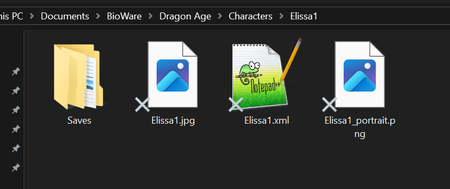
I see a grey X next to my Windows files and they can't be opened after disabling computer backup
Hello! I used to use the backup feature of Dropbox for my computer. Notably, this included my Documents folder (on Windows 10). At some point I turned off the backup feature because I thought I didn't need it any more. I thought this would stop the integration with my computer gracefully, but it seems that now many of my files in my Documents folder are no longer accessible, as if they were made online-only (but there is no longer an online version backing them). Some screenshots attached. The problem files appear with a grey X on the bottom left of the icon. If I try to open them, I get failure and an error message sometimes depending on the program trying to open it. I do not have OneDrive, which is the usual cause I see online for the grey Xs. How can I get my files working again? grey Xs on files that cannot be openedgrey Xs on files that cannot be opened what happens if I try to open a text file with an X using notepad++what happens if I try to open a text file with an X using notepad++9.4KViews0likes12CommentsUnderstanding Dropbox Backup
I am a scientist that has used Dropbox (DB) for about 12 years. I have a 2TB family plan and only have used 15% of it. My OS is Mac Sierra (10.12.6) with 32GB of RAM. I use the Finder a lot more than most Mac Users. My DB files are in a subfolder of my user (home) folder. Here are my 2 questions: 1. In the past I was told that only the desktop and files in documents can be backed up with DB backup. Is this still true or can my hard drive folders and files in my User (Home) folder be backup up with the new DB upgrades? 2. Given my work and the long time I have used DB, I have 250 GB within the DB main folder (with many subfolders and files. Will the backup, after it initially syncs, slow my computer's operations by eating up a lot of User memory, or is this an incremental backup that rapidly updates those new folders and files (the way SuperDuper does and also Time Machine). I cannot afford to have a slow computer due to RAM consumption.Solved8.6KViews0likes8Comments