2025 sparked some incredible conversations across our community 👩💻. Discover the highlights and see what’s ahead in 2026.
Dropbox Family
145 Topics
Clarifications regarding personal use plans vs business use plans
Hi, I am trying to figure out a general outline of all the plans, and here are my finds. Personal Use plans : (payed as an individual) 1. Basic 2 Gb 1 user free 2. Plus 2 TB 1 user 3. Family 2 TB 6 users 4. Professional 3 TB 1 user 5. Essentials 3 TB 1 user Commercial Use plans: (payed as a company) 1. Essentials 3 TB 1 user 2. Business 9 TB 3 users+ 3. Business Plus 15 TB 3 users+ 4. Enterprise Custom Custom But I also found another group of Business plans: 1. Professional 3 TB 1 user 2. Standard 5 TB 3 users+ 3. Advanced 15 TB 3 users+ Questions: 1. I see Essentials as being both in the list of personal plans as well as in the group of company payed plans. Is it correct? 2. Is Professional plan a company payed plan or a personal payed plan? 3. Standard is the same thing as Business ? Advanced is the same as Business Plus? Or are they different? 4. The 3rd group of plans (Professional, Standard, Advanced) are all company payed plans? 5. Are there plans that can be both personal payed as well as company payed plans? 6. I also want to know if all business plans are company payed plans or there are exceptions (personal plans that can be company payed for, or business plans that can be personally payed for). 7. Do Work account mean is a business account? (see question 6 for exceptions) Thank You, Dan4.1KViews0likes6Comments
What's the difference between a Family plan and a Professional plan?
I can’t find the differences between the family vs professional plan. I currently have the professional plan but want my wife to be able to upload her pictures to her own “Camera Backup_wife” folder and I believe that is not doable unless I’m mistaken? I read that a family plan would allow her to do this but I can’t find a comparison of the plans and so I’m wondering if I would loss features switching from Professional to Family? Will I still have large file transfers? And unlimited devices?Solved7.2KViews0likes3CommentsManaging your Dropbox subscription
The time may come when you want to change your Dropbox subscription and whether you need more or less from Dropbox, we want to make sure that you have all the information you need to do just that. Need more space? Why not move to a plan with more storage? If you’re changing plans because you need more space, you can check out the plan types here, but to give you a quick summary of space: Basic plan: 2 GB of space Plus plan: 2 TB of space Family plan: Shared 2 TB of space (up to 6 users) Professional plan: 3 TB of space If you’re maxing out the space in your account, you could try some space saving tips here, or it could be time to upgrade your dropbox account. Learn more about the plan that suits you best and make your choice. What happens when I cancel my Dropbox subscription or trial? So, you’ve decided to leave… we’ll try not to take it personally 😢 All joking aside, here are some of know when you decide to cancel your Dropbox subscription. Well, the first thing is that this doesn’t actually have to be goodbye, your account will downgrade to a Dropbox Basic account at the end of your billing cycle or trial. So that means; You’ll still have access to all of your files and folders Dropbox keeps deleted versions of your files for 30 days, in case you change your mind If you’re over your downgraded storage quota, Dropbox will stop syncing your files Changing your Dropbox plan to Basic is not the same as deleting your Dropbox account. Canceling or downgrading a Dropbox subscription Depending on how you subscribed to Dropbox, there are different ways to change or cancel your subscription. If you subscribed on mobile - you will need to unsubscribe on mobile too, through iTunes or Google Play, depending on your device type. Learn how to cancel a Dropbox subscription purchased on your computer. How to cancel a Dropbox subscription or trial on an iPhone or iPad On your iPhone or iPad, tap Settings and then your name. Tap Subscriptions (about midway through the screen) and find Dropbox in the list. Tap Cancel Subscription or Cancel Trial and confirm. Your account will downgrade to Dropbox Basic (free) at the end of your billing cycle. How to cancel a Dropbox subscription or trial on Android If you purchased Dropbox from an Android device, you can cancel a Dropbox subscription or free trial by following these steps: Open the Dropbox mobile app and head to the Account tab in the bottom right corner. Tap Manage your subscription and then How to cancel. Tap Cancel plan at the bottom of the screen. This will take you to your subscription in Google Play. Tap Cancel subscription. You’ll receive an email to your Google account to confirm your cancellation, and your account will downgrade to Dropbox Basic (free) at the end of your billing cycle. Cancel an individual Dropbox plan on desktop If you manage your Dropbox plan on desktop then here are some easy steps to follow to cancel your subscription on desktop. Follow the steps below, and you can update your plan to match your needs. Sign in to dropbox.com. Click your avatar (profile picture or initials) in the top-right corner. Click Settings. Click Plan. Click Cancel plan at the bottom of the page. Note: If you don’t see Cancel plan, you may have purchased Dropbox on your mobile device. If so, you’ll need to cancel your plan from the app store on your device. Select a reason for canceling. Click Continue canceling. You’ll receive an email confirmation that your subscription has been canceled. So, there you have it. Whether you want to change the features you have access to, or the amount of space you need, you can manage your Dropbox account to fit your needs. If you have any questions about managing your plan, drop them in the comments below and we can get you answers!12KViews1like2CommentsDid you know... you can search for images using just text?
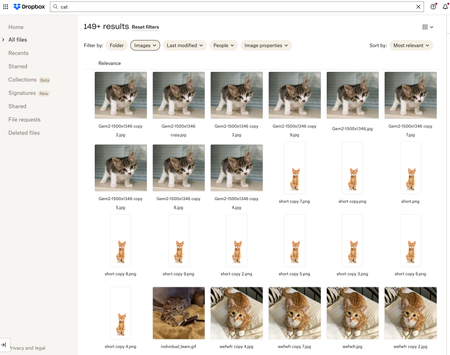
Hello Dropbox Community! My name is Lainie and I'm a Product Manager at Dropbox. Every now and again, I am going to post a "Did you know..." to 1) keep you informed of all of the cool technology that exists at Dropbox and 2) gather your feedback on how the features are performing. In today's, "Did you know..." I'll be talking about Image Search! Image search is allows you to use the Search Bar to search for the contents of the image using words to describe the image. For example, if you search for "cat" your search results will show files that 1) contain the word "cat" in the file name or body, AND 2) files that contain images of cat. No mention of the word "cat" is necessary! Pretty cool! If you haven't yet, I recommend that you check it out. Please respond to this thread and let me know... A) Did you know this feature existed? Do you use it? B) How can we make this even more useful for you? Have a great day! Lainie For more information, check out our Help Center Article on Image Search!9.4KViews9likes3Comments
How can I switch from a Family plan to a Standard account for teams?
Dropbox Plan Family Payment Method Card How did you upgrade? Direct from website Question or Issue As I would like to join a different family plan, how do I first change my current family plan to another standard plan? My family plan just renewed a couple of months ago.48Views0likes1Comment
Can we have a Dropbox Family plan? We're not interested in a Dropbox team.
I would like to see Dropbox offer a "family" or "home" level for one price. This would be same options as "professional" with say 5TB storage but sharable between house hold family members. Say husband/wife etc. Not interested in 3 users at $15/user/month. That is just out of scope for individual families. Something more basic to securely share information.84Views0likes2Comments
Seeking advice from a team member about using direct image links
I'm testing using the shared link pf images (combined with the edited URL via vercel ) to share a dropbox'd file on a bbcode social media. It seems to be working wonderfully and the idea of being able to update the file and have it update on my page without reuploading it to a third host like IMGBB, seems too good to be true! Is there any caveat to using this? Is it against terms of service in any way? I assume it is just inefficient enough that it's not likely to be abused like it was on discord haha. I will still use imgbb for misc coding images but for my client works, I hate having copies of them floating all over the place and possibly suffering compression; or being out of date because I cannot tinker with the html page every day. I hoped for feedback before I updated my whole code to dropbox links, thank you. 💫64Views0likes2Comments
We can no longer add an expiration date or password for our shared links on Family.
Hello, We used to be able to set a password or expiry time for shared files and folders in Dropbox Family. Now this this has been disabled with a prompt to upgrade to "Dropbox Professional". Have certain features been removed from the Dropbox Family plan ? Given that I'm on a "Grandfathered" plan (not sure that's the right word), I have not been notified that any features had been removed. I paid annually and assumed features would remain the same. Dropbox doesn't publicly list the Dropbox Family plan anymore, even though it's listed publicly. Thanks in advance.293Views1like6Comments
Clip webpages and notes to Dropbox
It would be a nice feature to have to be able to clip webpages, articles and notes to a designated folder in my dropbox account. Evernote is a good clipping tool, but its storage and recall functions are limited. It would be nice to clip a whole web page, with images, as well as a just the basics, even if it is a text file.155Views0likes1Comment