Your workflow is unique 👨💻 - tell us how you use Dropbox here.
Dropbox Family
107 Topics
Family plan is too expensive for what it offers
While I would like to have the ability for my wife and I to share a combined account with our own individual logins - it's not worth the extra $80/year, almost doubling the cost for only a limited increase in features. If it came with double the storage I might consider it, but even then I'm not sure I need that much more storage at the moment. Please reconsider the pricing on the family plan as I will never upgrade at anywhere near that price. It makes more sense to just have 2 Plus accounts since it comes with the extra storage. With the amount of competition out there for similar cloud storage, it's getting more difficult to justify the cost of dropbox, so I was really expecting a minimal increase in price, if any at all versus the Plus plan I am currently paying for.15KViews22likes32CommentsManaging your Dropbox subscription
The time may come when you want to change your Dropbox subscription and whether you need more or less from Dropbox, we want to make sure that you have all the information you need to do just that. Need more space? Why not move to a plan with more storage? If you’re changing plans because you need more space, you can check out the plan types here, but to give you a quick summary of space: Basic plan: 2 GB of space Plus plan: 2 TB of space Family plan: Shared 2 TB of space (up to 6 users) Professional plan: 3 TB of space If you’re maxing out the space in your account, you could try some space saving tips here, or it could be time to upgrade your dropbox account. Learn more about the plan that suits you best and make your choice. What happens when I cancel my Dropbox subscription or trial? So, you’ve decided to leave… we’ll try not to take it personally 😢 All joking aside, here are some of know when you decide to cancel your Dropbox subscription. Well, the first thing is that this doesn’t actually have to be goodbye, your account will downgrade to a Dropbox Basic account at the end of your billing cycle or trial. So that means; You’ll still have access to all of your files and folders Dropbox keeps deleted versions of your files for 30 days, in case you change your mind If you’re over your downgraded storage quota, Dropbox will stop syncing your files Changing your Dropbox plan to Basic is not the same as deleting your Dropbox account. Canceling or downgrading a Dropbox subscription Depending on how you subscribed to Dropbox, there are different ways to change or cancel your subscription. If you subscribed on mobile - you will need to unsubscribe on mobile too, through iTunes or Google Play, depending on your device type. Learn how to cancel a Dropbox subscription purchased on your computer. How to cancel a Dropbox subscription or trial on an iPhone or iPad On your iPhone or iPad, tap Settings and then your name. Tap Subscriptions (about midway through the screen) and find Dropbox in the list. Tap Cancel Subscription or Cancel Trial and confirm. Your account will downgrade to Dropbox Basic (free) at the end of your billing cycle. How to cancel a Dropbox subscription or trial on Android If you purchased Dropbox from an Android device, you can cancel a Dropbox subscription or free trial by following these steps: Open the Dropbox mobile app and head to the Account tab in the bottom right corner. Tap Manage your subscription and then How to cancel. Tap Cancel plan at the bottom of the screen. This will take you to your subscription in Google Play. Tap Cancel subscription. You’ll receive an email to your Google account to confirm your cancellation, and your account will downgrade to Dropbox Basic (free) at the end of your billing cycle. Cancel an individual Dropbox plan on desktop If you manage your Dropbox plan on desktop then here are some easy steps to follow to cancel your subscription on desktop. Follow the steps below, and you can update your plan to match your needs. Sign in to dropbox.com. Click your avatar (profile picture or initials) in the top-right corner. Click Settings. Click Plan. Click Cancel plan at the bottom of the page. Note: If you don’t see Cancel plan, you may have purchased Dropbox on your mobile device. If so, you’ll need to cancel your plan from the app store on your device. Select a reason for canceling. Click Continue canceling. You’ll receive an email confirmation that your subscription has been canceled. So, there you have it. Whether you want to change the features you have access to, or the amount of space you need, you can manage your Dropbox account to fit your needs. If you have any questions about managing your plan, drop them in the comments below and we can get you answers!13KViews1like2CommentsWeb Videos now supports auto-generated Video Transcriptions + Closed Captioning
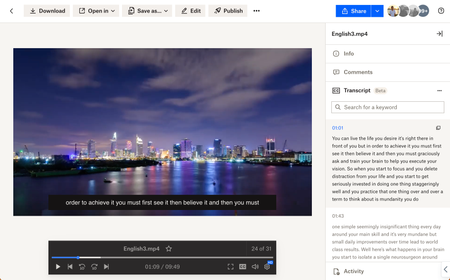
Hey folks! My name is Derrick and I work on a team that improves the file preview and viewing experience at Dropbox. We are excited to announce two features on Dropbox.com to enhance your video viewing experience: video transcriptions and closed captioning. Here’s how to use: Simply upload your video to Dropbox and voila! Your videos will have auto-generated transcripts and closed captioning at your disposal with a click of a button. Even more so - watch videos shared from your colleagues - and copy transcribed segments to instantly quote them in a presentation. Tell me about your experience with our new features! We are all ears. Help Center Article URL: https://help.dropbox.com/view-edit/transcript-closed-captions12KViews9likes9Comments
Did you know... you can search for images using just text?
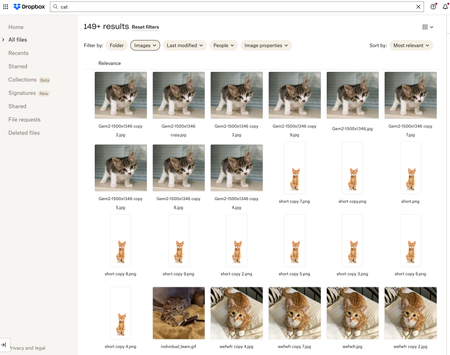
Hello Dropbox Community! My name is Lainie and I'm a Product Manager at Dropbox. Every now and again, I am going to post a "Did you know..." to 1) keep you informed of all of the cool technology that exists at Dropbox and 2) gather your feedback on how the features are performing. In today's, "Did you know..." I'll be talking about Image Search! Image search is allows you to use the Search Bar to search for the contents of the image using words to describe the image. For example, if you search for "cat" your search results will show files that 1) contain the word "cat" in the file name or body, AND 2) files that contain images of cat. No mention of the word "cat" is necessary! Pretty cool! If you haven't yet, I recommend that you check it out. Please respond to this thread and let me know... A) Did you know this feature existed? Do you use it? B) How can we make this even more useful for you? Have a great day! Lainie For more information, check out our Help Center Article on Image Search!9.5KViews9likes3Comments
Message from Dropbox about completing date of birth by 1st September or lose Family Plan Access
I received the same email & have the same issue. I can't find where to update the DOB from! This truly frustrating for how much we pay for this service. Not to mention that we store important personal and business data on it. DropBox team, please sort this out!Solved7.9KViews2likes57Comments
Black Friday deal for Family plan?
I'm on a monthly Family plan with 2TB of storage and was wondering if anyone knew of an upcoming Black Friday/Cyber Monday sale. I'd like to switch to yearly billing, and I know many companies offer larger discounts on yearly plans during BF/CM, so I was thinking this would be a good time to do so if there was going to be a good sale. I see there's a generic discount baked into switching to yearly, but I'd prefer to snag a lower sale price if possible.Solved7.4KViews2likes3CommentsUploading slideshows from Mac
Hi. I have used Dropbox from iPad not very intensively just putting up a series of photos for family and friends now and then over the last few years. Now I have started using it with my Mac Photos. I have it up at the top of this screen and it is half evident what to do, at least enough for me to find a way. I click upload, this leads to all my Mac files, I go to Photos, and I see a layout similar to that when I open Photos in Mac. I see my albums for example. I haven't found yet a way if there is one of uploading an album directly, but I hope and one and uploaded all the photos in it, after which I as this would result in a mess if I leave it like that, collected the lot all up and put them in a folder. Perhaps this procedure can be improved but that's not my main question at the moment which is: I want to upload slideshows that I have prepared in Mac. I said " I see a layout similar to that when I open Photos in Mac" - it's similar but not identical. In Mac Photos beneath my albums in the bar on the left, I see a section called "Projects" which is where my slide shows have gone. But when I access in the way I explained above via from dropbox, this section does not appear! So I have stuff ready, and people ready to receive it, but don't know how to get it to them, I hope somebody can point me to this.Solved6.1KViews0likes4CommentsGet support for your paid Dropbox account
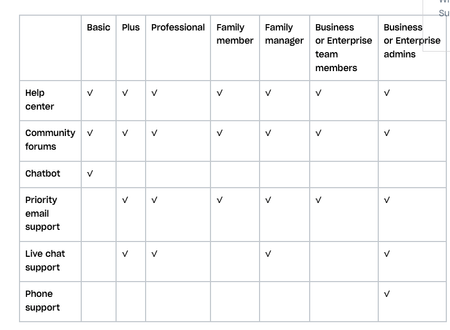
Obviously, you know that we (the Dropbox Community forum) are always here for you. No I mean it, we’re here 24/7, but of course, there are other ways to get support too. Check out your options below, or ask us a question and we will do our best to direct you to the right spot. Getting support on a Dropbox Basic plan: You’ve seen us talk about the many benefits of Dropbox Basic before but when something isn’t working quite right, you can get help: Right here, the Dropbox Community forums The Help Center The Chatbot Getting support for your paid Dropbox account If you need more support than that, and you are on a paid Dropbox plan, you can also access priority email support. With email support, you can expect an email response from support within 1 business day (Monday–Friday). Users on the Enterprise plan can expect a response from email support within 1 hour, any day of the week. Live chat and phone support are also available during your local business hours, 9:00 am – 5:00 pm. How to receive support in your preferred language Help isn’t help if you can’t understand it - so make sure you can access support in your preferred language, so here’s what you need to know. All Dropbox customers have access to support in English. Depending on your account type and location, support may be available in French, German, Japanese, Portuguese, and Spanish. Sign in and visit dropbox.com/support to see your language options. If your language isn’t listed at dropbox.com/support, you can send an email or start a chat in your preferred language, and you’ll be routed to the appropriate team. And if that doesn’t make it clear, you can check out this table to see how you can best get support, check this out. So, we hope that answered your questions about getting support, but if not, tell us about it in the comments below!5.5KViews3likes2Comments