Our Community is in read-only mode until April 8th, learn more here. You can still search existing threads or get help via Dropbox Support, the Dropbox Help Center, or Learn.
Dropbox Paper
19 Topics
I'm getting an error when loading Paper documents on the Dropbox site
Is anyone else having trouble opening documents in Paper? I just wanted to review a couple to determine if I was scrapping the associated projects or saving them, but the site keeps giving me errors when I try to open them. :/ I know the general... everything around Paper has been declining over the last couple years, but this is a new one for me. The error states: "How embarrassing… We experienced an error trying to load the current page." I've already emailed support, but curious how widespread it is and if it's just one more sign to abandon ship.117Views0likes2Comments
Thoughts and feedback on the new release of Dropbox Paper
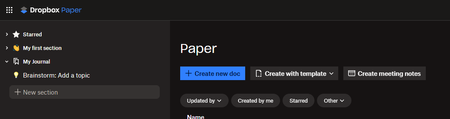
This idea was already suggested many years ago and closed for inactivity. The old Dropbox Paper was easy to use, simple and was "what you see is what you get". The new Dropbox Paper introduces lots of new concepts that don't necessarily align I think with how many people have used Dropbox Paper in the past. It could just be me, but seems unlikely. Paper was a useful tool for me to organize my thoughts, write notes, journal ideas, etc... I don't usually like tools in general that try to push me to organize my life into someone else's perspective of how one should operate. I realize that other users may like that, I don't. I don't want "to-dos", "alerts", "notifications", "channels", etc... I like the "sharing" capability, and perhaps some very basic "collaboration", but to turn Dropbox Paper into a complete "Team" solution for ideating is way way beyond what I want to use it for, and I feel a little like the new version of Paper is intended to force users into a way of journaling and writing that maybe isn't what or how they are comfortable operating. Maybe these features could be useful, but on an as-needed basis, without taking away the simplicity that existed prior. It would be great if we could just have something that gives us the old Paper capabilities, with the advantage of treating a "Paper" document just like a dropbox document (which is what I thought the new implementation was all about and I was excited for). Here's the new Dropbox Paper UI. How is this intuitive? "Sections" on the left. "Create new doc" on the main page. Shouldn't I be navigating documents on the left, and each document have sections? Where am I right now? Where are all my paper documents? How do I get to them? What is a section? When I click on "My first section", nothing happens, it doesn't go anywhere. "Brainstorm: Add a topic". What's a topic? I don't brainstorm in Dropbox paper, why is that important? How would you then browse topics? Or is topics part of brainstorming? Is that a document or a "thing" thing in the new Paper application. Do the icons mean each thing on the left is a type of thing, or is it just a clever emoji you can prefix your titles with. What is "Starred" for? If I have 1000 paper documents, why am I starring them like that? Or should it just be maybe "Recent documents". Is "Starred" going to be a new virtual directory tree or a list of starred documents. I feel like it's a bit of a mess of ideas and concepts and terminology. Besides "Create new doc", nothing else makes sense to me. Maybe I am the wrong user. Maybe it was never intended to be used as a simple repository of notes, journals, etc... What's the grand old vision for Paper? Where is it heading and trying to take us as users? I really don't know how to suggest a better idea without a better understanding of what Dropbox Paper is meant to accomplish for users going forward. Is it for the enterprise going forward? Who is Dropbox Paper trying to compete with, because I thought it was pretty unique before in its simplicity. I noticed there's a slack integration? Is the product management group for the application taking their cues from businesses, or are this going to also still be for regular retail-ish consumers. Maybe that can be explained clearly. And then I can decide if it's for me or not, but as-is, I'm not sure how this is going to work for me.2.4KViews4likes20CommentsDropbox Paper mobile app will be discontinued on October 9th
Today I've received an email that the Dropbox Paper mobile app will be discontinued on October 9th. So it looks like all the documents won't be accessible on smartphones which in this day and age is a major bummer. What's the rational behind this shocking decision? Does this mean Paper as a whole is on the chopping block?505Views0likes6CommentsPaper by Dropbox to be discontinued?
I'm seeing a number of posts across social media speculating that Dropbox Paper is to be discontinued. As there has been no Paper by Dropbox app update for 2+ years (since Version 262.2), and because of general user discontent regarding the infamous 2020 update, this rumour seems to be gathering momentum. Could somebody confirm what we should expect (and when) before I start scouting for alternative platforms? Many thanks!Solved2.5KViews2likes23Comments
How to upgrade from Legacy Paper?
I found other forum discussions about how to update from Legacy Paper to the "2020 release"... so that we can have our files all organized in Dropbox (storage)... versus the Paper file system. Those discussions suggest that there was not a way to manually upgrade... BUT, since those discussions are 3 or 4 years old... I figure there must now be a way to do it... Right? There is a way to upgrade now, right? (Insert "Anakin / Padme meme here)Solved2.7KViews2likes8Comments
Dropbox Paper, where is the link to access it?
Hello everyone, My name is Pablo and I'm a student from Spain. Recently, my team and I have been using Google Docs for our study projects. However, we've encountered some issues despite following the recommendations we found here: https://cincodias.elpais.com/cincodias/2016/10/21/lifestyle/1477059838_404192.html, but unfortunately, we haven't been able to resolve them. I recently learned that Dropbox offers a similar tool called Dropbox Paper https://pmedia.es/dropbox-paper-la-herramienta-ideal-para-la-colaboracion-en-proyectos-de-diseno-web/ which is ideal for collaboration on projects like ours. I've tried accessing it from my Dropbox account at https://www.dropbox.com/home but I can't find the option to access Dropbox Paper. Could someone help me find how to access Dropbox Paper from my https://www.dropbox.com/home? I would greatly appreciate any guidance on this matter. Thank you in advance for your help! Best regards, PabloSolved1.7KViews0likes1Comment
Ditching Evernote for Dropbox Paper - 2023 edition
Hey all, so evernote is jacking their pricing up again, and I'm just not sure why I keep letting them do this to me. I'm considering moving to paper. Mind you, evernote got pretty fancy from a UI/UX end, and I have been using it for YEARS. I'm pissed I have to consider leaving, but I'm also asking myself why I keep spending money when I already pay for dropbox. Have you all found a way to move files from evernote to paper easily? Am I going to have to rebuild the library again? Have you found a better alternative to evernote and/or paper?4.3KViews4likes2CommentsDropbox Paper is not displaying PDF image content when I check online.
We use Dropbox Paper to comment on files and keep all comments in one place. However, when uploading files for our last project, all of a sudden we cannot comment on the file outside of the thumbnail view because the full screen image doesn't appear. It's just a blank screen. This is happening when we link multipage PDFs directly from Dropbox and when we drag and drop single page PDFs from the desktop. Happening on multiple computers and different browsers. We can however open up the files on mobile devices. That's nice, but the images are too small to use for analyzing and commenting. Anyone have a solution for this problem? Thanks!Solved3.5KViews0likes17Comments
Spreadsheet Functionality
Problem: While Dropbox Paper is rich with productivity features, it lacks the ability to perform tabular (cell-based, row/column) calculations, requiring customers to use an external application and often have their data cached outside of Dropbox. Solution: Integrate basic arithmetic into Dropbox Paper's table feature, and explore developing a separate spreadsheet application. Integration idea: add math statements to Paper's tables, based on orientation from current cell or using a coordinate system. Orientation from current cell example, calculate using a value from one cell over from the LEFT(L): Orientation could be: Above (A), Below (B), Left (L), Right (R) Caffeine calculation for OZ value: =(L1*11.8) DATE OZ CAFFEINE 08/14/23 25 295 Coordinate system (traditional spreadsheet ColRow) example: C2 cell calculation: =(B2*11.8) A B C 1 DATE OZ CAFFEINE 2 08/14/23 25 295 The syntax is similar with both, but the underlying approach is different based on Dropbox developer preference. Sum a column of cells: Orientation method: =(A10:A1) Coordinate method: =(C1:C10) Calculate various cells: Orientation method: =(L1*RA3) Coordinate method: =(C3*F15) Comments: Developing, supporting, and growing a separate spreadsheet application is a large task and can be a slippery slope with scope creep, and create competition with existing partnerships. By beginning with adding basic arithmetic into Paper's table feature, Dropbox can benefit from monitoring usage and feedback to determine which spreadsheet functions should be prioritized for their customers. In the end, customers may only need more sophisticated Paper table features, and not a full-blown spreadsheet application. Note: The orientation method seems overly complicated from a development and usage perspective, but I thought it might spark some other ideas or conversation in the comment section.1.1KViews0likes1Comment