Our Community is in read-only mode until April 8th, learn more here. You can still search existing threads or get help via Dropbox Support, the Dropbox Help Center, or Learn.
Dropbox Paper
250 TopicsIntroducing:: Dark mode for Paper
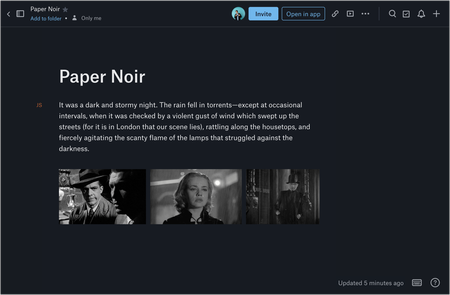
Overview Dark mode has been one of Paper’s most requested features from our users. We are now very happy to say that dark mode for Paper is now available! Audience This feature is available to all Dropbox Paper users, including our Basic, Pro and Plus subscriptions, not just those on a team subscription. How do I get it If you haven’t seen dark mode yet, you can flip it on from the “?” menu on the bottom-right of any Paper doc. You can also turn on dark mode from your computer’s system preferences. This is available on desktop, so get on there and start using it now! More ideas If you have more ideas on how we can improve our product then check out our Paper ideation board here, or our Dropbox Business ideation board here. Request improvements, suggest ideas, we’ll review them all! Thank you for helping to improve our product.56KViews6likes2CommentsHow to share photos from Dropbox
How to Share Pictures using Dropbox Hey Community Friends! 📷 Karina here, and I’m happy to be sharing with you the different ways you can share your pictures using Dropbox (on the web & your mobile devices), on various Social Media platforms (ie. Facebook Messenger & Instagram), as well as how you can display your images on websites as a workaround to how Public Links were once displayed on websites, and through Dropbox Paper. Let’s start off with the basic and most common way to share your photos:Solved52KViews2likes4Comments
Ability to attach Dropbox files to email in Mail app on Ipad has disappeared
I have regularly been able to attached documents from Dropbox when creating an email on OSX Mail app. However, now I am not able to. Steps that fail are below: Create email on iPad with Mail. Tap on the paper clip icon OR tap in the body to get banner of options, including Add Attachment Window opens with file access options; under LOCATIONS, find ICloud Drive, On My IPad, and Recently Deleted. No Dropbox option. No MORE... button anywhere to add Dropbox as a choice for Mail to attach documents. I have looked in Settings for a way to tell either Dropbox to allow access or Mail to get access to Dropbox. No success yet. Please, any solution? I have found discussion of problem with Outlook and referral to Microsoft, but there is no MS Office involvement in this issue. Thanks in advance.Solved29KViews2likes20Comments
Migrate from Evernote to Dropbox Paper
Dropbox Paper is an ideal candidate to replace Evernote. Here's what would need to happen, I believe, for many folks to make the switch. In order of priority: Import Evernote (.enex) data (Dropbox Paper is perfect for this, because each Paper doc can contains notes, attachments, and links like Evernote notes do.) Webclipper Email to Dropbox Paper ---- Why Dropbox Paper would be better than Evernote: Active development Beautiful UI/UX Better collaboration Dropbox is *already* where I keep everything else! Way better device apps, with killer features like scan to document. Dropbox's bulletproof sync and backup. (But if I can't get started by moving my data from Evernote to Dropbox Paper, then this is all moot!)28KViews75likes9Comments
Why can't I rename a file, or delete a folder in Paper?
I am so close to loving 'paper', but I have run into so many non-sensical issues (not bugs, just stuff that makes no sense) that I can't even consider showing this my team. 1) You really need to make it clear that "paper" and "dropbox" might as well be two different brands and companies that have very little in common. One kind of assumes, expects, that the "dropbox" part of the name would mean they get some of the benefits of Dropbox, but they don't. There is no sharing between "dropbox" and "paper', no offline editing, or syncing. I do not like Google Docs that much, but this small detail of having your files offline is why I, and many, I am sure, do use it. 2) I have a paper doc I created called "Untitled", and nowhere, on any page, is there an option to rename that document. How does one rename a paper file? 3) I made a folder under my paper HOME, and now I want to delete it. It is not shared with anyone and it is empty, but the only options I have for the folder is Rename, Move, Archive, from within the folder. From the parent page, there is no option for that folder at all, no "..." on the right side, nothing. So how do I delete that folder? 4) is there a way to get rid of "Recently viewed" as the default, and seemingly only, view of the files and folders. With "Recently viewed" there is no hierarchy between the files and the folder... just a long list of unrelated files and folders. It's chaotic and redundant. It is only good for when you are dealing with very few documents, so it is a good option, but nothing but unproductive when dealing with more than a few file and folders. Is there a way to enable a normal hierarchical file system view, like a typical file browser, especially considering I can't use my local file browser like I can with Dropbox? I really hope there are easy answers to these questions and/or Dropbox is planning on making the user experience more smooth and somewhat intuitive. ThanksSolved23KViews2likes5CommentsIntegrating Dropbox Paper with Dropbox
Paper is a Dropbox product, but what's the relationship between Paper and Dropbox itself? We're here to tell you! Here are the basics... Can I access my Paper docs from Dropbox? You can access Paper by clicking the Paper tab on dropbox.com or by navigating to paper.dropbox.com. If you don't see a link for Paper and you use Dropbox Business, your team admin may have disabled Paper. Contact your admin to discuss access to Paper. Can I access my Dropbox files in Paper? While you can’t directly access your Dropbox files in Paper, you can link or embed a file from your Dropbox directly in a doc (for example, an image or media file): 1. Click an empty line in your doc 2. Click the Dropbox icon 3. In the pop-up window, select the file you'd like to add to the doc. Do I need to be signed in to Dropbox to access Paper? Yes, you must be signed in to Dropbox to access Paper. If you aren’t signed in to Dropbox, you are prompted to sign in when you visit the Paper homepage. Learn more about using Paper and Dropbox together here. How do you integrate Paper and Dropbox? Do you use both? If yes, how do you leverage both for your own work or to collaborate with your team?20KViews3likes29Comments