Our Community is in read-only mode until April 8th, learn more here. You can still search existing threads or get help via Dropbox Support, the Dropbox Help Center, or Learn.
Dropbox Plus
57 Topics
Dropbox Not working after restart: Reconnecting to the internet. This may take a moment.
I have been experiencing a very frustrating issue with Dropbox the past few days. Issue: After restarting my Mac Studio (MacOS 13.6.5), Dropbox always gets stuck with the message: Reconnecting to the internet. This may take a moment. No VPN No Firewall Home Network Fully updated Dropbox The thing that is baffling is that : If you Quit and restart Dropbox it works immediately but if you restart the computer the issue appears again If you wait for a long time Dropbox eventually connects and syncs. But it takes a long time On the same computer, about a week ago, Dropbox was syncing instantly after reboot. I have tried already reinstalling and deleting the cache folder. Is this a known issue that's going on at the moment> Many thanksSolved31KViews13likes120CommentsDropbox update has caused Windows File Explorer to slow so badly I cannot work
Ever since this update was forced upon us, my File Explorer no longer works properly. It takes forever to load with a green bar at the top and white icons. When it does finally load, if I click on a file to either open it or copy it or whatever, I get the blue donut and nothing happens for ages. I have to go away and do something else for 5 or 10 minutes before it will finally allow me to right-click or open it. I am beyond frustrated now. It took me over an hour to complete a simple copy and paste task this morning that would normally take less than 5 minutes. I simply cannot run my business this way. I've tried various things such as the obvious rebooting etc. I also tried to rename the Shell Icon Overlays as there is apparently a limit in Windows and Dropbox was apparently causing an overlay limit conflict. I also cleared my thumbnail/icon cache. Nothing I do is working. It's awful and I hate the change. I just want it to work. File Explorer isn't great at the best of times as it's so unreliable and I've always had to restart it 2 or 3 times a day. But now it's not working for me at all. Please can someone help? I am incredibly busy at work and have now wasted a good 4 hours on this. I really desperately need to get on with my work. I'm using Windows 10 Pro and it's up to date.1.2KViews5likes12Comments
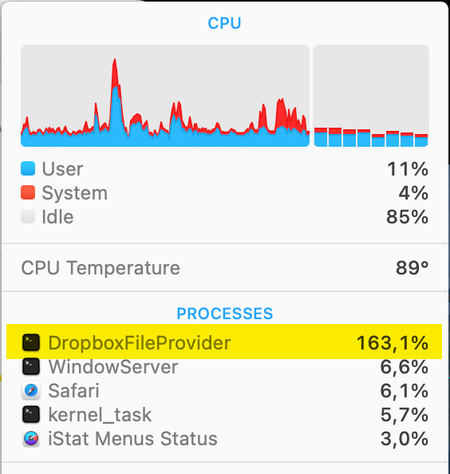
MacOS Sonoma 14.1 constant high CPU by process DropboxFileProvider
I'm using the latest version of Dropbox (v186.4.2607) on my MacBook Pro (2,4 GHz 8-Core Intel Core i9) that is running macOS Sonoma 14.1. Lately I've noticed that Dropbox is having a high cpu (150 - 200%) almost all of the time. Dropbox is always syncing although nothing is synced because all is already synced. The menubar icon always shows the sync icon and never the ready icon anymore. This is very unpleasant and the MacBook Pro is now always very warm/hot with temperatures from 85 to 100 ºC and that is not how it should be. Is there a solution for this issue?14KViews4likes27Comments
Deprecated message using Dropbox from Fedora RPM repos
System information: Operating System: Fedora Linux 35 KDE Plasma Version: 5.24.2 KDE Frameworks Version: 5.91.0 Qt Version: 5.15.2 Kernel Version: 5.16.11-200.fc35.x86_64 (64-bit) Graphics Platform: X11 Processors: 8 × Intel® Core™ i7-1065G7 CPU @ 1.30GHz Memory: 7.5 GiB of RAM Graphics Processor: Mesa Intel® Iris® Plus Graphics ------------------- I use Dropbox application from RPMfusion-nonfree repo on Fedora 35. In the last few months when using Dropbox from the bash I see the error message: /usr/bin/dropbox:614: DeprecationWarning: isSet() is deprecated, use is_set() instead if self.stop_event.isSet(): break every time I give a command line with dropbox (e.g. dropbox status or dropbox stop or dropbox start). This is just to let you know before this issue becomes critical.Solved6.8KViews3likes12CommentsDropbox menu bar icon keeps moving to the left after shutdown
The Dropbox icon on my Mac suddenly started moving from its original position in my menu bar all the way to the left (as I like to customize the order of the icons for efficiency... ) I move it back using the CMD key to re-order the menu bar icons, but every time I shut down or restart, it moves back to the end of the line of icons... Before: Dropbox Icon near the middle After Shutdown/Restart: (moves to the left???) Can someone please help me out? Before you ask, I have fully updated all the apps and the software Device: MacBook Pro (Retina, 13-inch, Early 2015) OS: macOS Monterey 12.71.6KViews2likes5Comments
DropBox Cannot Connect or Sync Despite Advanced Reinstall - Need Manual Sync Solution
64-bit Win11 PC Company-provided laptop with firewalls (presumably) Internet connected My Dropbox desktop app will not connect with the internet, no matter what I do, even though it used to. I have installed the 64-bit version, currently showing as v187.4.5691. The Dropbox updater, on the other hand, runs in the background as a 32-bit task, but that's a question for another day. I have uninstalled and reinstalled and restarted numerous times, including using the Advanced Reinstall instructions. Whenever I start Dropbox, I get the message that I am not connected to the internet. I am, in fact, connected to the internet, because I can post this question. Yet when I click "Sign in" in the app, nothing happens. The taskbar icon stays grayed out, saying "Connecting..." and the app, when opened, says "Starting..." - but again, nothing ever happens. I have added every Dropbox executable to the Windows firewall. And I mean every one - I did a full search of my PC. I'm at a loss as to why this isn't connecting, and now I just need to manually sync my files at this point. I'm not sure the best way to do that. I'm lookng for potential solutions that I haven't already tried for getting the sync to work, or for manually syncing my files. Thanks.1.3KViews1like7Comments
No more overlay icons in Windows Explorer
Since the las update to the Windows app this week, I don't see the overlay icons on any of my 3 computers, 2 Windows 10 and 1 Windows 11. I check the order onthe registry and is ok, with the Dropbox entries above. And now I see in Windows Explorer an status column with an icon con all the Dropbox content, like OneDrive. An in the ap there is no more option to keep all files offline like before. The windows app is ruin, is like OneDrive now... awful. I have a Plus plan.1.7KViews1like6Comments
Unable to Link App to my Account in Linux
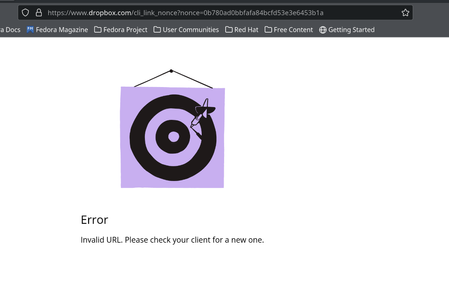
I am trying to install the Dropbox app on my PC which is running Fedora workstation 38. The installation worked fine on my laptop, which is running the same version of Fedora, but on my PC I keep getting the following: I am on the Dropbox Plus plan, and I only have my account linked to two other devices. I have tried the solution suggested in this question but get the same errorSolved1.1KViews1like1Comment