Your workflow is unique 👨💻 - tell us how you use Dropbox here.
Dropbox Plus
338 Topics
Unable to sign in to Dropbox in MacBook Air Taskbar
Application Affected Dropbox App Device MacBook Air Operating System/Browser (if using the web) MacOS Tahoe 26.3 Dropbox App Version (if using the app) 144.4.4491 Question or Issue Problem best stated as OS based App will not open on MacBook Air, and will not let me login. Background: It’s been awhile since I actively used Dropbox; it has probably not been backing up as intended. I realized a while ago that I had two accounts, and am finally going through the process of combining data by sharing from secondary account to the primary, so I can delete one account due to renew 3.30.26. I’ve been working on the Browser-based Dropbox to do this. My problem is that now I am trying to see all the shared folders & files on my MacBook Air, and to verify that these are all “available offline” before I continue the process of moving, backup and deleting redundant account. But I can’t yet see then newly shared folders in Finder on MBAir, although I see them in the primary account in Browser-based view. I opened Dropbox in the Taskbar but any attempt to use it sends it into an endless loop. I chose to make the primary account - the one I will keep - that same user name / email as my Apple account, at least I think that is what I have done. I’m not sure if that is the issue, though. When I open the Dropbox in Taskbar, I can see the general, account, backups, network, notifications, and sync tab. Selecting Account shows me message to Sign in to a Dropbox account, but doesn’t ever finish spiraling. My account is Dropbox Plus. What do I need to do to fix this?19Views0likes3Comments
I paid for an upgrade to 2TB (with 3 months extra), but nothing has happened.
Dropbox Plan Plus with 3 months extra! Payment Method IDEAL How did you upgrade? Through the UPGRADE button Question or Issue 28-02-2026 Dropbox iDEAL | Wero -119,88 Omschrijving: [redacted] 7180125967132235 revenue api transaction id 6fa1a829 IBAN: [removed per Community Guidelines] Kenmerk: 28-02-2026 21:52 7180125967132235 Valutadatum: 28-02-20269Views0likes1CommentTell Us How You Use Dropbox
No two people use Dropbox in exactly the same way. Some of you rely on it every day for work, others for school, creative projects, or keeping life organized - and we love that. We’d love to hear how you’re using Dropbox today - is it something you use once in a while, is it part of your day to day, are there any features you can’t live without? What workflows have you built that save time or reduce friction? And where do you see opportunities for us to do better? Your tips, ideas, and honest feedback really help us to make sure we can share useful tips, and they help other community members discover new ways to get more out of Dropbox too. Share your experience, favorite features, or suggestions in the comments below. Your voice truly helps shape the future of the Dropbox community 😁 The Dropbox Community Team2.6KViews3likes12Comments
Files are zero bytes on Dropbox on File Provider
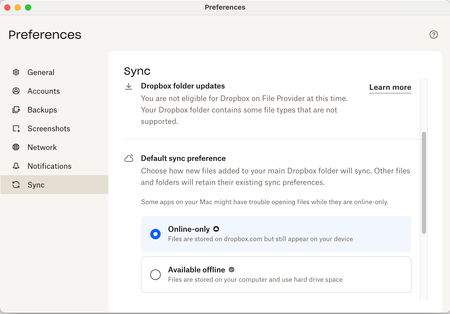
I'm on a Mac with OS Sequoia, running Dropbox Plus, version 242.4.5815. My Dropbox folder location is on my internal hard drive. I've set Default sync preference to online-only since our business had files too numerous to store on my 500 GB internal drive. I have reinstalled the Dropbox app this morning and restarted my computer to try to fix these issues, to no avail. In my Mac Finder, many files are showing as zero bytes. This creates problems with InDesign not seeing linked files. If I double click the zero-byte files and then close them, this activates them somehow, and then InDesign can see them and their true size shows in Finder. How can I make these files available automatically without having to open each one? There are way too many to open each one like this. Additionally, the Dropbox quick action menu is missing when I right click a Finder file. It used to be available. How do I restore this functionality? Why is my system not eligible for Dropbox on File Provider? Is this the source of the problem? Thanks for your help. ReginaSolved85Views0likes11CommentsDropbox Plus Plan but can't access email support
Dropbox Plan Plus Payment Method Card How did you upgrade? Don't remember Question or Issue I want to email a question to support as the chatbot isn't able to resolve my issue. When I go to http://www.dropbox.com/get_help,it says my support options include email, but I only have access to the chatbot. It's the exact same issue as the thread below and I have tried all the suggestions in the thread below. https://www.dropboxforum.com/discussions/101001018/i-cannot-access-email-support-with-my-paid-plus-account/853500/replies/853585117Views1like9Comments
'We couldn’t process your payment' error when trying to update my billing info
Dropbox Plan: Plus Payment Method: Card Today, dropbox sent me the following message: “Romanos, we couldn’t process your payment. Update your billing information now before you lose access”. Indeed, I have found that dropbox has not debited the amount owed from my bank card for February and they claim that they are unable to do so. They asked me to update my payment details, but every time I try to do so, I get the following error message: “Error in call to API function /2/checkout/update_billing_info”. However, the problem does not lie on my side. In other words, my bank card is active and capable of online transactions, while the bank I contacted does not recognize any problem on its side. In other words, there has been no call from dropbox to pay my monthly subscription for February. Does anyone know what might be happening?Solved69Views0likes2CommentsI can't edit my original text in PDF files, even though I'm on the Plus plan.
I finally bit the bullet to upgrade to the Plus Plan primarily for pdf editing capability. When I tried my first pdf edit, I as so disappointed to find that this plan does not allow for editing of original text! As I read the Features web page regarding pdf editing, I saw "With Dropbox plans, you can make in-line text edits that automatically match the original document's font family, size, and styling" and thought that a paid Plus plan would do the trick. Is there any intention to enhance the Plus Plan pdf editing capabilities? Not sure if I need this plan with current limitations.136Views0likes3Comments
I deleted my friend's folder by accident in November. Can it be restored?
My friend gave me Can Edit permissions on her Dropbox Plus account, and on 13th November 2025 I deleted the entire folder (I thought I was making space on my laptop). Dropbox Plus has a 30 day recovery window, it's now January 2026 - is there any hope I can recover these now? It wasn't her fault! Thanks so much38Views0likes1Comment