Our Community is in read-only mode until April 8th, learn more here. You can still search existing threads or get help via Dropbox Support, the Dropbox Help Center, or Learn.
Dropbox Transfer
119 TopicsHow have you used Dropbox lately?
So you might have seen our little exploration into how Dropboxers use Dropbox, from the small stuff like online games and to do lists, right up to the big stuff, like buying a home and sharing baby photos. In fact, I’ll be back soon to share how I recently used Dropbox to take the pain out of planning a wedding (tips and tricks incoming). Great and all as it is to hear how we use Dropbox, we want to know how you use it! Day to day, big projects, sharing files with friends and family - we want to know about it. Share in the comments below, and if your tips are truly inspiring, who knows, you might even earn the Mighty Badge and the extra space that comes with it!9KViews1like4Comments
Dropbox downloads files bigger than 20 GB
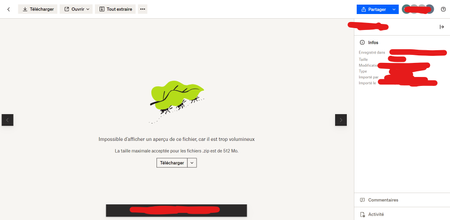
Hi, We are sharing enormous files sometimes with dropbox, files over 20GB/50GB and beyond, we've been doing that for a long time with dropbox but recently I've encontered a server error when downloading any big file via chrome without downloading the application. Our internet connection is stable and very good. We've tryed with differents computers in differents network. We've zipped our files so it get smaller and we go into the file page to make sure we're downloading only one file and dropbox is not doing a zip file of our zip file. And then we get the server message when we're about half through the download. I was wandering if anything changed with dropbox recently about file downloads if there is new limitations. We're not using Dropbox Transfer we use normal file sharing through the application. We've got all the same options in there so I don't really know why there is dropbox transfer since it used to work just fine. Thanks in advance,6.4KViews0likes3Comments
Dropbox transfer right-click option vanished from windows 11
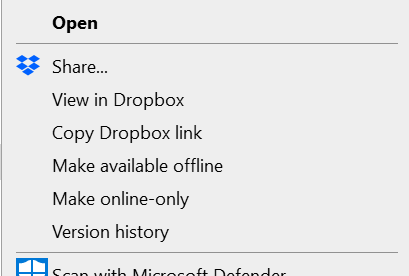
Hello, would like to ask for a hepl with Dropbox transfer. I used Dropbox transfer from my Windows 11 by clicking right button on my mouse and there was "send with dropbox transfer" option. I could select more files and do the same. But now I can not see this option anymore in my windows. There is just Dropbox > View in Dropbox / Version history. Any guess what shall I do? I have account with 5 TB storage including this transfer feature. Thanks in advance, Jana5.5KViews1like26Comments
Dropbox Transfer "Couldn't add some files"
Hello, I am trying to create a Dropbox Transfer of the entire contents of a folder. The folder contains 76.8 GB in total and over 16K of files. I am doing this from my Windows desktop. The folder is already within Dropbox but it appears that Dropbox wants to upload a new copy. I have the Professional plan specifically in order to be able to create large transfers. When I attempt this, adding the 1 folder (and many sub-folders, etc), it successfully seems to prepare the transfer but after I click on Create Transfer, I eventually get the error message "Couldn't add some files. Try adding those files again or removing them." The single folder I added has "Failed to upload" in red text next to it. I attempted again, this time adding by subfolder. It successfully prepared the transfer, with all folder being listed. After clicking on Create Transfer, like the prior attempt, it never left 0% and only showed 0 bytes out of 76.8 GB before failing. Every subfolder had "Failed to upload" next to it in red. I am running Dropbox version 152.4.4880. KathySolved4.7KViews0likes22CommentsI'm getting an error when trying to download files from a Transfer, what can I do?
Hi all. I've been having some problems receiving large transfer files from a fellow Dropboxer. He originally sent one 20 gig file, which was well within his limits for his account, but I couldn't download it. I got half of it down, and it just quit giving me an error message (error 79). He then broke up the file to it's component folders and sent them individually. Most were around 1 gig or under, and I had no problem downloading them. There was one folder, however, that was 11 gigs, and once again I got the same error message after attempting to download around half of the file. My limit for space on Dropbox is 4.2 gigs, but as a recipient of the transfer file my space shouldn't matter, or does it? Anyone else encounter this? Regards, CameronSolved4.5KViews1like3Comments
Migrating from Mac to Mac using Migration Tool
Greetings, MacBook Pro (old machine): OS 12.6.5 MacBook Air (new machine): OS 13.3.1 1. I have been using Dropbox to backup my files on my MacBook Pro, all my files are online and only the ones I use is made available offline 2. I used "Migrant Assistant" to migrate to a new MacBook Air, so the folders & files in Documents, Downloads, Desktop are seen on my new Mac. 3. I am unable to setup Dropbox on my new MacBook Air. I get the error from Dropbox App which says "cannot setup the folders" (Desktop, Downloads, Documents) For eg it is asking me to move "Move Desktop folder to its original location, then try again" 4. When I click on the Dropbox icon on the toolbar, it says "Upgrade to the latest version of dropbox", but I had downloaded the app just then on MacBook air. I don't know what to do. Please advise. regards, Mahesh4.3KViews0likes24Comments
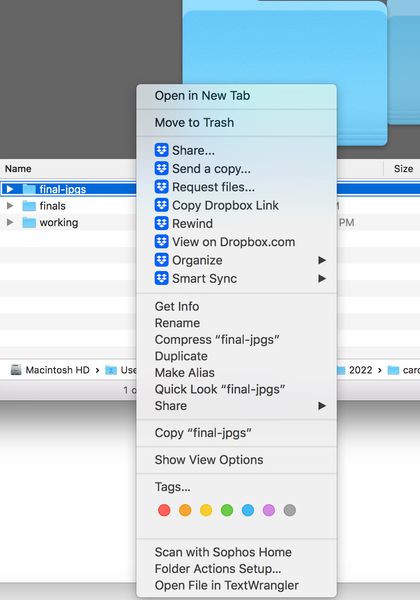
Dropbox transfer is not showing in menu
The option to create a transfer has disappeared both on my desktop and on dropbox online. I confirm that I do not have syncing issues, app is running on my computer and "early release" under setting is "off". The "create transfer" option comes and goes, it is incredibly frustrating. Now it is gone from both desktop (right click) and dropbox.com. Screenshots attached. Please help me solve this problem once and for all. PPlease help.Solved4.3KViews0likes6CommentsDropbox Transfer Limits
Hi, I'm using Dropbox Transfer on a Dropbox for Business account. Are there any limits on public access and number of downloads? We have something we need to send to the press that will be downloaded many dozens of times via a web page. I only see settings for password and expiration and no information on other limitations. Thanks!Solved4.3KViews0likes1Comment