Our Community is in read-only mode until April 8th, learn more here. You can still search existing threads or get help via Dropbox Support, the Dropbox Help Center, or Learn.
Dropbox Transfer
119 Topics
Remove "Login/SignUp" Popup window from dropbox transfer link
Hello, I just now noticed that as a paid user, everytime we send a client of ours a dropbox transfer link with our own branding, it upsells our own clients! With some pop up box about some log in into dropbox. I now that it has a "download only" on the bottom but this is not reseonable. We are users that pay dropbox for a service, dont upsell our own clients. I kindly ask the removal of this feature asap.2.9KViews9likes9Comments🌟🤝Community Spirit Badge 🤝🌟
Hey everyone! 🌟 It’s Theresa here. You’ve probably seen me hanging out in the Community, jumping into conversations and joining discussions (if you haven’t seen me before, well, hello 👋). And while doing that, I’ve noticed something pretty great (well, we all have here on the Dropbox Community Team) – so many of you are out here making this Community an amazing place. Whether you're helping others, sharing useful tips, or just bringing good vibes ✨, your contributions really stand out. To recognise and celebrate this, we’ve created a brand-new badge… This badge is all about celebrating the people who make this space feel like home. It’s for those who do more than just answer questions – the ones who offer a helping hand 🤝, share great tips 💡, and keep the good vibes flowing. Whether you're solving tricky problems 🧩, sharing useful resources 📚, or just making the Community a fun place to hang out 😃, we see you and we appreciate you. The Community Spirit Badge is a one-time award 🏆, so if you earn it, you know you're doing something special. It's a little extra recognition for those who truly bring the Community to life. We’re so excited 🎊 to launch this new badge and can’t wait to start recognizing the amazing individuals who truly bring the spirit of this Community to life. And if you spot someone who you think deserves the Community Spirit Badge, don’t hesitate to tag me Theresa within the thread. T 💙 (Dropbox Community Manager)858Views5likes0CommentsDiscover Dropbox Transfer in video!
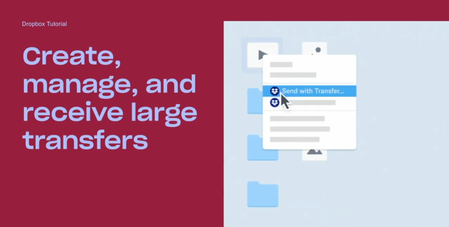
Hi beloved Community! Has any of you used Dropbox Transfer, our feature allowing you to share large files to anyone, Dropbox user or not? We put together a video featuring Madison, one of our Product Marketing Manager who built this amazing feature, and some of our users who will explain themselves, in their own words, how Transfer works! Check Dropbox Transfer video here! Did you like this video? And would you like to see more lightweight, educational videos on Dropbox features in the future?1.6KViews3likes0Comments
Can't "Send via Transfer"
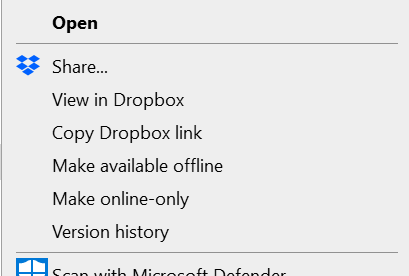
Help! I previously sent files by selecting the "Send via transfer" tool when I right click a file. Then followed the steps and copied the link into an email. Now the "Send via transfer" option is missing altogether! How do I re-enable this ASAP? The files are to large to send any other way.Solved2.6KViews2likes5Comments
Recipients confused by the login prompt when downloading files from Transfer or shared link
When sharing files via Dropbox Transfer or a "view-only" link, the "Continue with download only" button is hidden at the bottom. This often confuses recipients because they think they must log in to download. I wish recipients weren't prompted to log in at all when they just want to download the files. Thank you for considering this improvement!Solved232Views1like3CommentsSetting Dropbox Transfer preference
Hi, I’m on a Mac using the v.206.4.6506 of Dropbox desktop app. Recently when I’m uploading files using Dropbox Transfer, I set the expiration date, let’s say one year later, and turn off the download notification slider. The file upload and it’s done. Everything is fine BUT when I do another transfer I have to set the date and notification again. It’s pretty annoying since I do a many transfers every day. In the past weeks, the app remembered these settings but since a recent update it no more remember the settings. Is there a way to set a preference so I don’t have to set it each time? Otherwise is there a way to escalate this to Dropbox engineer team so they can find a solution for this? ALSO, before this recent update, we were able to have multiple Transfer window opened and uploading at the same time on the desktop. Now it’s only one. Why this change? Is it possible to bring back the multiple transfer? Thanks!Solved1.4KViews1like3Comments
I can't send files. "Error creating transfer. Please try again."
Every single time I try to send files from my dropbox to someone else, the message "Error creating transfer. Please try again." appears. So I thought it was the file size, Nope. Same message even with a 1gb transfer attempt. I tried turn on and off my computer, nothing. Tried clearing my data and cookies, Nothing. EVEN TRIED SENDING IT USING MY PHONE, NOTHING. WHAT IS GOING ON? WHY CAN I NOT SEND ANYTHING? THIS IS FOR MY COMPANY!1.2KViews1like6Comments
Automatische Info nach erfolgtem Download bereitgestellter Daten möglich?
Hallo Community, ich stelle in meiner Dropbox gerne Dateien oder ganze Ordner für externe Parteien per Link zum Download zur Verfügung, da bin ich sicher nicht der einzige. Wenn mein Gegenüber die Daten dann runtergeladen hat will ich die aber wieder entfernen, da die Bereitstellung anschl. ja nicht mehr nötig ist, und meine Dropbox sonst irgendwann überlaufen würde. Ich weiß aktuell nur nicht wann der Download tatsächlich erfolgt, sofern ich nicht vom Empfänger aktiv Rückinformiert werde. Daher meine Frage(n): Ist es möglich eine automatische Benachrichtigung zu erhalten, wenn bereitgestellte Daten vom Gegenüber runtergeladen wurden? So oder so ähnlich wie z. B. bei WeTransfer? Oder kann man zumindest eine Kennzeichnung der Dateien / Ordner aktivieren, dass die eingesehen oder runtergeladen wurden? Vielen Dank!Solved1.9KViews1like4CommentsFix incorrect internet speed warning when downloading large Dropbox Transfers
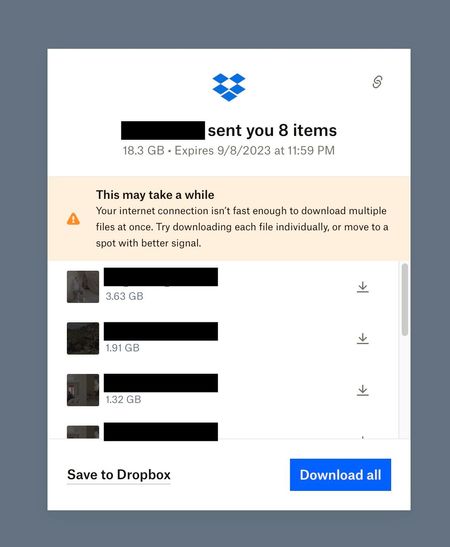
I'm not sure if it's a lot of files, or a large size that triggers this warning. The warning claims the internet connection is not fast enough, and also suggests moving to spot with better signal, erroneously assuming it's a wifi or cell connection even if it is hardwired. The warning is incorrect. For large transfers, it come up on any internet connection I've tested, including very fast home internet (300mb/s down) and very fast commercial dual 10gigabit fiber connections at a film post production facility in NYC. It looks sloppy to be sending my clients big files, and have them see this warning, when they connect from a state of the art, top 0.01% internet connection designed specifically for downloading large files quickly.3.2KViews1like6Comments