Our Community is in read-only mode until April 8th, learn more here. You can still search existing threads or get help via Dropbox Support, the Dropbox Help Center, or Learn.
Error Messages
16 Topics
Receiving errors from Dropbox API
Hello we've had intermittent issues with the Dropbox API, where some users within our org are unable to upload pictures or docs. In our Kibana logging we are seeing this error occur: :Error= com.dropbox.core.NetworkIOException: PKIX path building failed: sun.security.provider.certpath.SunCertPathBuilderException: unable to find valid certification path to requested target We are trying to narrow down why is error is occurring and if you need any additional info about our config please let me know.Solved483Views0likes5CommentsError 500 finishing huge file upload (300GiB+)
Hello, When a huge file (300GiB+) is uploaded using the upload_session API an "Error 500 Internal Server Error" is received when the last part is uploaded (/upload_session/append with close set). I retry the request but an Error 500 raises again and again. Sometimes, after more than 1 hour retrying the file uploads successfully. I am using session_type sequential. The same code for smaller files (10GiB) works perfectly. Are you aware of the problem? Is there any workaround?1.2KViews0likes8Comments
Can't get Oauth to work... please help
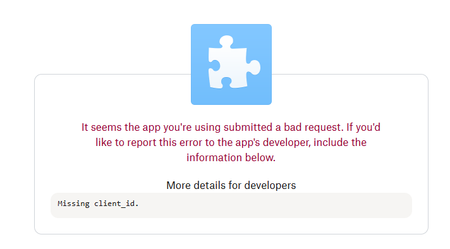
Question or Issue I'm a little frustrated with the poor examples of dropbox... :-( I'm trying to start with Oauth, I'm trying to build a c# console app that will run for hours, since the tokens expire fast, I tried to get oauth integrated, but at step 1 it dies.. my code starts as follows: const string AppKey = "XXXXXXX"; // Replace with your App Key const string AppSecret = "XXXXXXX"; // Replace with your App Secret const string RedirectUri = "http://localhost:8080/"; // Replace with your Redirect URI // Generate a unique state for security string oauth2State = Guid.NewGuid().ToString("N"); // Get the authorization URI Uri authorizeUri = DropboxOAuth2Helper.GetAuthorizeUri( OAuthResponseType.Code, clientId: AppKey, new Uri(RedirectUri), state: oauth2State, tokenAccessType: TokenAccessType.Offline ); BUT as soon as my browser opens, I get an ugly error as follows: I did check the url and the client_id is there... (of course is not XXXXXXX) https://www.dropbox.com/oauth2/authorize?response_type=code&client_id=XXXXXXXXXX&redirect_uri=http%3A%2F%2Flocalhost%3A8080%2F&state=65b4556d0f1f4639ac42b6cdfce08fb7&token_access_type=offline I understand my App Key is my client Id, thank you for any help you may bring.249Views0likes4Comments
Dropbox Access Tokens - How do they work?
I'm currently using Dropbox Access Tokens which expire pretty quickly. I'm wanting to know when I publish my app, which downloads files from Dropbox, how I get a fully working Access Token that won't expire within a few hours. Do I need a membership of some sort for this to happen? I can't be updating access tokens at all as I need to be running a business. Cheers441Views0likes4Comments
SSL Certificate error or SSH md5 fingerprint not Ok error.
In our application we our using third party login to dropbox using OAuth. When the app is trying to load the login page it is showing error SSL Certificate error or SSH md5 fingerprint not Ok error while communicating with https://marketing.dropbox.com/oauth2/authorize and after that error shows with dropboxcaptcha.com. The login page is not able to load because of this error. Do anyone know why ? We have checked from our side regarding all the certificates in our application. The certificates are valid and have not expired. It looks like it is from the dropbox side.340Views0likes4CommentsCloudRail - Dropbox - Missing client_id
Over the Easter weekend (Apr-10, 2025), Dropbox apparently made a change that makes it impossible for PimlicalAdvancedCalendar to log in through its CloudRail library. This has worked flawlessly for many years, and no change was made to PimlicalAdvancedCalendar or the CloudRail library (which is no longer supported by the developer). Is there a reason why Dropbox has suddenly made this change? Anyone else out there with an application that was using CloudRail to access Dropbox have any idea of what Dropbox did over the Easter Weekend?SolvedRequest Id: eb653fb08d0e425eb445cc599c6e9e7d
Dear Dropbox Support, We are encountering an issue when attempting to interact with Dropbox using SqlBak, our database backup software that uploads files to Dropbox as a destination. We would appreciate your assistance in diagnosing and resolving the problem. Recently, we encountered the following error: 2025-03-10 11:25:50.7245|DEBUG|4|SqlBak.Destination.Dropbox.Impl.DropboxFileHandler|ExecFunc. Begin. 2025-03-10 11:26:06.1106|WARN|4|SqlBak.Destination.Dropbox.Impl.DropboxFileHandler|ExecuteWithRetry. AttenmpNo: "1"; RetryAfter: "".|Dropbox.Api.ApiException`1[Dropbox.Api.Files.SearchError] at Dropbox.Api.DropboxRequestHandler.<Dropbox-Api-Stone-ITransport-SendRpcRequestAsync>d__12`3.MoveNext() --- End of stack trace from previous location where exception was thrown --- at System.Runtime.ExceptionServices.ExceptionDispatchInfo.Throw() at SqlBak.Destination.Dropbox.Impl.DropboxFileHandler.ExecuteWithRetry[T](CancellationToken cancellationToken, Func`2 getTask, Int32 ё1retryCount, Func`2 canRetry); Request Id: eb653fb08d0e425eb445cc599c6e9e7d Could you please help us understand what might be causing this error and suggest any possible resolutions? If you need any additional details, we will provide as much information as possible. Looking forward to your response. Best regards, Oleg455Views0likes7CommentsReceiving Too Many Mounts error even though I do not have more than 1500 folders.
My app uses the Dropbox API to create folders, upload files and share the folders and recently I started getting an error message about exceeding the tree size. After getting this I re-organized a bunch of folders so I no longer have more than 1500 folders within 1 parent folder. I am able to create and share more folders if done through the web interface, but it doesn't seem to work through the API even after moving folders around. I get the following response when calling the /sharing/share_folder endpoint. Is there something weird going on where Dropbox 'remembers' where a folder was when it was originally shared, and even though I've moved it, it still counts as a shared folder within it's prior parent folder? {"error_summary": "too_many_mounts/tree_size_exceeded/.", "error": {".tag": "too_many_mounts", "too_many_mounts": {".tag": "tree_size_exceeded", "limit": 1500, "current_count": 1500, "new_count": 1501}}, "user_message": {"locale": "en", "text": "Your Dropbox account has reached the limit for shared folders."}} <br />Solved193Views0likes1Comment
Can't test dropbox choser api via localhost
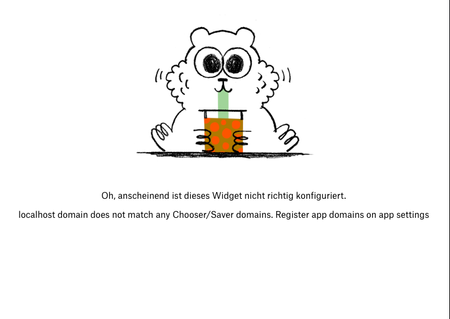
Currently trying to integrate dropbox into my weapp for an university project. But for some reason when clicking the implemented button to chose a file from dropbox i get this error window. And I can't add localhost as a choser domain for testing. Any ideas? Thanks in advance!Solved