Our Community is in read-only mode until April 8th, learn more here. You can still search existing threads or get help via Dropbox Support, the Dropbox Help Center, or Learn.
File requests
80 Topics
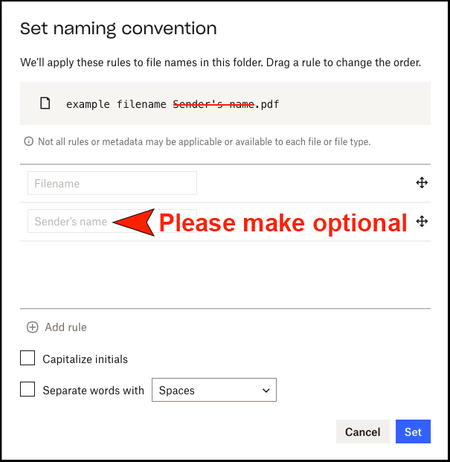
File Request - Please provide an option to NOT rename our uploaded files
We receive tons of file submissions from our business partners daily. However, a large part of the time I spend managing these submissions is spent renaming the files because they're automatically prefixed or suffixed with the Dropbox username of the user that uploaded the file. This causes a lot of unnecessary work and wasted time. I am requesting that you allow us - the paying Dropbox users - the option to determine for ourselves if the Dropbox username is desired . . . or, if the original unaltered filenames are what we'd like to have to work with. Thank you. PS - If I've linked you to this message, it was because you had created or responded to a thread that included the terms File & Request. I know this may not apply to everyone, but if you think that this is a reasonable feature to add (at least, the option to not have the Dropbox user prefixed or suffixed onto the original file name), then please vote for and link other Dropbox members that you think might benefit from this feature, and promote this idea! Staab, Drew G, Teamchil, benebelt1, dwcapture, buildonrock, Artisticfuries, mccarthian, SuperStock, Macn101, MeritDeveloper, VJG21, Birsay, tc16, Rich, ramiromalcala, Mark, Ed, PPT320, Greg-DB, Filip H, Jay Tom Tom, hallofgame2k22, w_l, Hannah, Nancy, marplatense, jcm48, dappelgrenSolved13KViews21likes46CommentsTell Us How You Use Dropbox
No two people use Dropbox in exactly the same way. Some of you rely on it every day for work, others for school, creative projects, or keeping life organized - and we love that. We’d love to hear how you’re using Dropbox today - is it something you use once in a while, is it part of your day to day, are there any features you can’t live without? What workflows have you built that save time or reduce friction? And where do you see opportunities for us to do better? Your tips, ideas, and honest feedback really help us to make sure we can share useful tips, and they help other community members discover new ways to get more out of Dropbox too. Share your experience, favorite features, or suggestions in the comments below. Your voice truly helps shape the future of the Dropbox community 😁 The Dropbox Community Team3.9KViews4likes14Comments
File Request option missing on macOs after File Provider update
Hello Since I've updated to File Provider on my MacOs Desktop App, I'm not seeing the 'Request Files' option after right-clicking a folder. I can still request files for each specific folder via the website file request form, but the ability to right-click and request files directly from the folder that you wanted just made the process A LOT faster. Why is it gone and how can I bring it back?1.1KViews3likes6Comments
Create File Request Directly From Destination Folder
It would be great if we could create file requests directly from the destination folder, rather than going through the file request section and manually scrolling through our firms hundreds of folders to find the right one. The procedure should be: Navigate to the desired folder as usual -> click button that says "Create File Request to This Folder". If it could also be integrated into the windows file explorer, that'd be even better.Solved1.1KViews3likes2CommentsFile Request File Name Issue
Hi everyone! Just checking in here to see if anyone has any ideas for how to work around this! I work for a company where we collect thousands of files a week to submit to clients. We use file requests as a convenient way to get these files, but we have a persistent problem. Our clients each have different labels they prefer for a file. Some might be: Character_Name_Company While others request: Character - Name - Company Previously, file requests FORCED sender name to the end of a filename, resulting in a file submitted as: Mickey Mouse - Calvin Nickelson - Disney to become... Mickey Mouse - Disney Calvin Nickelson This meant these files would all have to be relabeled before submitting to clients. Now Dropbox has a feature for file requests whereby you can remove the "Sender Name" as a name modification. Eureka, I thought! But now, when files are submitted as: Mickey Mouse - Calvin Nickelson - Disney It removes the name completely and makes it: Mickey Mouse - Disney Is there any way we can set up file requests so it leaves the file names completely untouched? We send super specific labeling information with our collections, so when people submit they usually do it exactly right! We'd like Dropbox to just collect files without altering the name in any way. Any ideas?2.7KViews3likes11Comments
File Requests Require Name & Email
Why is the receiver of a File Request required to enter their first and last name, and their email address before they can upload the file? It's cool that they don't have to have a dropbox account to give me their file, but i don't understand what the reason would be behind requiring their name and email.Solved6.1KViews2likes7Comments
Cannot create File Request
Hi...I'm a new DropBox user with a Basic plan. When I create a File Request, I enter the Title and Description and then click Create. DropBox just hangs at that point with the Create button spinning. I never get to the point of being able to enter email addresses. Searching through the forum, I've tried using a different browser and clearing cookies, but I get the same issue. Any suggestions? Thanks.Solved2.7KViews1like10Comments