Our Community is in read-only mode until April 8th, learn more here. You can still search existing threads or get help via Dropbox Support, the Dropbox Help Center, or Learn.
GUI
18 Topics
Syncing icons on the files in the Dropbox folder have changed
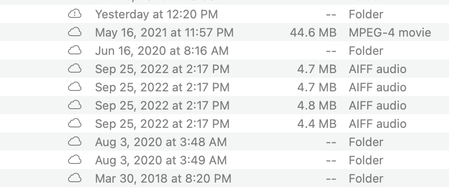
Hello The Finder Extension Icons indicating whether a file or folder is Online Only or Available Offline are showing up in my Finder, however, the statuses are incorrect. For instance a folder that contains files that are both Online Only files and Available Offline files is showing a cloud icon, when it should be showing a white circle with a green checkmark and green outline. I think the Finder Extension is confused. Is there a way to reset the Finder Extension so the icons show correctly without changing the Online Only or Available Offline settings that I have for my files/folders? I do not want to change the statuses of my files/folders, I just want the icons to indicate the statuses correctly. Thank you. Mac 10.14.6 Dropbox 152.4.488030KViews10likes163Comments
Dropbox Mac Beta: Green Circles are gone - everything has the cloud symbol
I am assuming work is being done in the background, but as of a few days ago, I no longer have green circles for downloaded (available offline) files. Everything has a cloud symbol (that symbol doesn't even exist in the online documentation) but seems to be available offline. I am also getting lots of sync errors - but my files appear to be still on my computer (where I need them). And yesterday the DROPBOX icon disappeared from my sidebar (Locations). Only to show up again hours later. Strange. What is going on? These sync irregularities seem to be quite substantial. Syncing files is what Dropbox is all about. I am a little surprised this beta version was even released to the public. When I joined the beta, the email I got from dropbox made it sound like the final release was imminent.Solved25KViews4likes15CommentsThere are no green check-marks on any files in my Dropbox folder on Windows 10.
This is a Windows 10 machine. I have tried quitting and restarting the dropbox app. I have tried uninstalling and reinstalling the app. I am viewing the correct folder -- I clicked the folder icon on the dropbox app. My other machine, a laptop with Win 11 on it shows the green checkmarks properly. It would be nice to have these checkmarks so I can see at a glance if a file is synced or not, rather than opening the app and hunting through the sync history.Solved18KViews3likes11Comments
"Green tick with white background" but I see this icon on almost all of my files.
I've been a user and paid subscriber to Dropbox for about a decade. I use Drobox for sharing my files across multiple devices and occasionally for sharing files with other people who don't always have Dropbox accounts. I don't work as part of an organisation so I don't use any of the team or business related features. I often recommend people use Dropbox over other cloud storage as I've always been impressed with Dropbox. I've just started seeing the normal green background tick replaced with a white background tick on multiple files and folders. According to the help pages these white background ticks can only appear on folders yet I have them on multiple files. The help page says this green tick with a white background and green circle 'Contains files that are both available offline and online-only. A white circle with a green outline and a green checkmark can only appear on a folder. It means the folder contains a mix of files and folders that are ”available offline” and “online-only”.' Looking at the files it looks like some of these are files I've previously shared with other people but that doesn’t match the description here. My recolection is the shared folders had a different icon but that seems to have changed. What would be nice would be for a company to be consistent with their icons rather that occasionally going for a total redesign just because someone has said it's fashionable to have a new look. If you have to have a new look please, at least, keep the basic symbolism consistent with the past for the sake of your long term loyal customers. When you do release an update please also release an update of the help files as the statement that 'A white circle with a green outline and a green checkmark can only appear on a folder' is not true as I have it all over my files.11KViews2likes6Comments
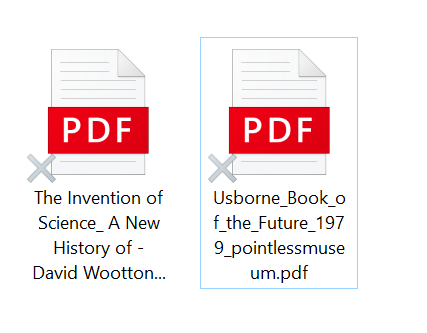
White cross in some files in Windows 10
Take a look to the next capture: What that white cross means? Files are in local, and I have that cross in most of my local files. They work, they sync, but they have the cross, and I haven't found it in the list of iconography in documentation.Solved6.6KViews0likes3CommentsRight click 'copy dropbox link' not working
I have recently gone through the difficult jounrey of transferring to a new latop... however, the process was remarkably smooth as all files are on dropbox! I am having a problem though. I like to share files and folders with other colleagues by sharing link to them and have always right clicked the "copy Dropbox" link - however this now does not show up when right clicking a file or folder. I have closed everything and restarted the computer. Not fixed. I am running Windows 10 on a surface pro. Any ideas on how to fix this? Help please! Mike5.9KViews0likes9Comments
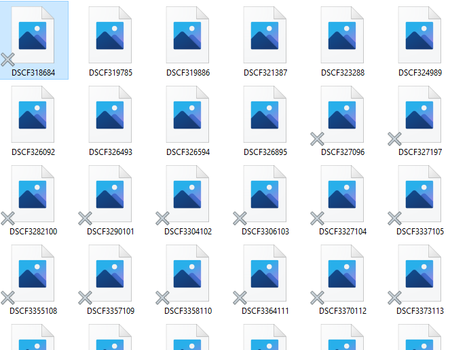
Grey X on all dropbox files
Hello Earlier this week, I reinstalled dropbox as to include my professionnal account aswell. I decided to go for smart sync as to save storage on my computer. As such, I uninstalled dropbox, and reinstalled its latest version and logged my professionnal account and linked personnal account. There seem to be an issue however, as I cannot access a single file on either of those 2 accounts, and when opening a folder, all the files of that folder finish with a grey X on the bottom left corner. When opening a file with Word/Excel/Photos/... it just freezes and I am never able to open the file. All files stored on my computer directly (not on my dropbox), can be opened without issue; but I can't move a file from my dropbox to my desktop, as this freezes aswell. Seems there is some kind of sync issue, but I was not able to fix it, despite spending hours on all similar topics. My dropbox app is running, but seems not to be able to sync those 2 files (stuck for hours) Any help would be greatly appreciated4KViews0likes9CommentsNeed to see creation date of backups loaded to Dropbox
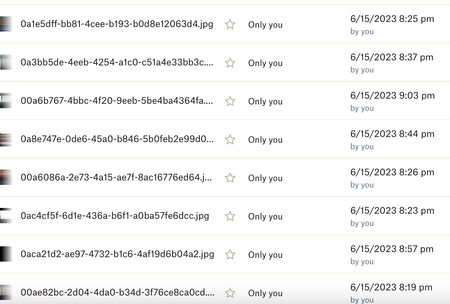
I am using Dropbox as a secondary backup for customer files from my server. If a customer needs me to restore their data from a particular date I have to locate the files they want by the backup date of file . I just noticed Dropbox is changing all my file dates to the date I uploaded them from my server to Dropbox. I cannot figure out how to see the creation date of the files anymore. This makes them unusable to me as backups since I have no idea what date the backups are for All the files have a 6/15/23 date now so if I need to restore files from 5/1/23 I can't figure out a way to do that. Please advise.3.1KViews3likes9CommentsSmart Sync option is missing from File Explorer
Hello, I upgraded to window 11 yesterday hoping that this would resolve this issue, but no luck. Now I cannot see if my files are synced locally or on cloud. But strange enough, when I tried to open a file via Word App, the smart sync icons magically appeared. There is now a brown storage box icons next to the dropbox files, but no options to smart sync neither. I called Microsoft Team and tried to contact Dropbox, they got no idea what is happening... Can someone help me, please? Thank you ever so much....3KViews0likes15Comments