Your workflow is unique 👨💻 - tell us how you use Dropbox here.
Linux
229 Topics
Nothing gets copied to the clipboard after clicking "Copy link" on Linux.
Application Affected Dropbox Device Dell Inspiron 5482 Operating System/Browser (if using the web) Fedora Workstation 43 running Gnome on Wayland. Dropbox App Version (if using the app) (241.4.4853 - found in app settings or About section) Question or IssueThe question is about the context menu in Files. When I click on the Dropbox item in the context menu and choose "Copy link" nothing ends up in the clipboard. The only workaround I found is to go the dropbox web interface and copy the link from there.165Views0likes11Comments
Dropbox apt infrastructure relying on unsecure SHA1
When one update its software list with apt on Debian Trixie at least, he gets this error: Err:13 http://linux.dropbox.com/debian sid InRelease Sub-process /usr/bin/sqv returned an error code (1), error message is: Signing key on 1C61A2656FB57B7E4DE0F4C1FC918B335044912E is not bound: No binding signature at time 2026-01-16T19:39:14Z because: Policy rejected non-revocation signature (PositiveCertification) requiring second pre-image resistance because: SHA1 is not considered secure since 2026-02-01T00:00:00Z (...) Warning: OpenPGP signature verification failed: http://linux.dropbox.com/debian sid InRelease: Sub-process /usr/bin/sqv returned an error code (1), error message is: Signing key on 1C61A2656FB57B7E4DE0F4C1FC918B335044912E is not bound: No binding signature at time 2026-01-16T19:39:14Z because: Policy rejected non-revocation signature (PositiveCertification) requiring second pre-image resistance because: SHA1 is not considered secure since 2026-02-01T00:00:00Z Error: The repository 'http://linux.dropbox.com/debian sid InRelease' is not signed. Notice: Updating from such a repository can't be done securely, and is therefore disabled by default. Notice: See apt-secure(8) manpage for repository creation and user configuration details. Notice: Some sources can be modernized. Run 'apt modernize-sources' to do so. This issue was already reported in an unrelated apt issue thread (now closed for replies) in https://www.dropboxforum.com/discussions/101001016/openpgp-signature-verification-failed-with-debian-trixie-/835761/replies/842767 by steinarb Looks like you're signing with SHA1 and that will be forbidden by debian APT policy in a year from now. at which it was replied that Debian Trixie is not officially supported... But the support tells Ubuntu 64 bits : 18.04 ou version ultérieure please see the process to switch to SHA256 in (there might be better options since because this process is from 2016): https://github.com/mxe/mxe-apt/issues/2 and this page tells that the support for SHA1 was removed in Ubuntu in release 16.04 and https://wiki.debian.org/Teams/Apt/Sha1Removal tells that dropbox switched to SHA256 long ago. I believe that recently one of your admin switched back your apt repository signing to SHA1 which is broken on Debian Trixie but also on all Ubuntu above 16.04 so this bug lies in your "offical support". CheersSolved457Views1like7Comments
Linux install - do not add "dropbox.list" to apt... (deb)
Linux install - do not add "dropbox.list" to apt... (deb install) latest Linux versions use DEB822 Source Format now (.sources) or replace "dropbox.list" with "dropbox.surces" example: Types: deb URIs: http://linux.dropbox.com/ubuntu/ Suites: questing Components: main Signed-By: /etc/apt/trusted.gpg.d/dropbox.ascSolved398Views1like10Comments
Can you support the operation of the Dropbox app on Linux in System tray on x11?
It's been a while since I've used Dropbox since it disabled normal operation in Systemtray on x11 in Linux (I use icewm). I'll be happy to reuse it but until it doesn't come back it's hard for me to reuse it again.85Views1like2Comments
Gnome unresponsive icon tray was only "fixed" for Ubuntu
Operating System Verified on Debian 13, Fedora 43, Ubuntu 24.04/25.10 Dropbox App Version (if using the app) v241.4.4795 Question or Issue We all know this issue which affects Gnome and the Appindicator of Dropbox, there are multiple discussions about it. Dropbox Client for Linux on Ubuntu 24.04 LTS- icon not clickable. | The Dropbox Community Ubuntu 23.10 - No menu | The Dropbox Community I see no menu after clicking on the Dropbox tray icon on Fedora 43. | The Dropbox Community https://github.com/ubuntu/gnome-shell-extension-appindicator/issues/529 https://youtu.be/6a4cvtZsRWo This issue has also been generally solved by reloading the shell/appindicator extension, so with either locking and unlocking session or with /usr/bin/gnome-extensions disable ubuntu-appindicators@ubuntu.com /usr/bin/gnome-extensions enable ubuntu-appindicators@ubuntu.com Now this works so well that this is actually how the issue was solved on Ubuntu (LTS/interim), YES dropbox on Ubuntu (the repository differs from Debian) is actually reloading the appindicator extension automatically, this is what happens if you remove the extension and start dropbox. Although I think it's pretty obvious that it's an inelegant workaround rather than a solution, it is an effective one, but I don't understand why it is only applied to Ubuntu, despite being extremely easy to manage. In fact, there are only two extensions on Gnome appindicatorsupport@rgcjonas.gmail.com ubuntu-appindicators@ubuntu.com Also Debian actually uses the same identical extension https://packages.debian.org/trixie/gnome-shell-extension-appindicator234Views0likes2Comments
Files on third computer are not syncing with the files on my other two computers
I have a windows and a linux computer that are successfully syncing the files in their dropbox folder to the files I see when I log into dropbox online. The problem occurred when I created an account (using the same email address) on a third (windows) computer - it does not sync at all. The files when logged in to dropbox online on this computer are the same as the other two, but the files in its dropbox folder are completely different and do not sync. The weird thing is that the files in this computer's dropbox computer have the little dropbox icons on them (the ones that show whether they are synced, or just in the cloud, and so forth) - it's as if they are syncing to a completely different mystery repository from what I see when logged in online! I have checked that I do have the desktop dropbox program installed (it's also clearly true, as the little dropbox icons show in the file browser), so this is not the problem.123Views0likes5Comments
New installation of the desktop app on Fedora remains on Starting...
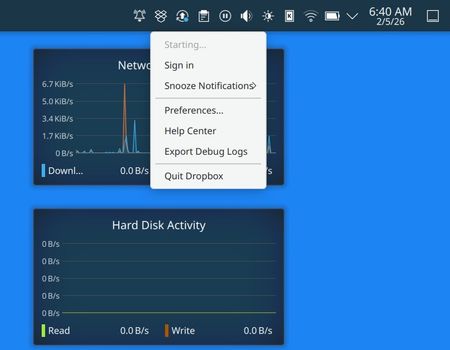
Application Affected Dropbox deamon for Linux System Operating System: Fedora Linux 43 KDE Plasma Version: 6.5.5 KDE Frameworks Version: 6.22.0 Qt Version: 6.10.1 Kernel Version: 6.18.7-200.fc43.x86_64 (64-bit) Graphics Platform: Wayland Processors: 24 × AMD Ryzen AI 9 HX 370 w/ Radeon 890M Memory: 32 GiB of RAM (30.6 GiB usable) Graphics Processor: AMD Radeon 890M Graphics Manufacturer: Framework Product Name: Laptop 16 (AMD Ryzen AI 300 Series) System Version: A9 Dropbox App Version dropbox-lnx.x86_64-241.4.4795 Issue Fresh install of dropbox on a new laptop running fedora 43 linux. It is "stuck" on "Starting..." I can't figure it out. Need help. If it matters I've been running dropbox on Linux for about a decade and have never experienced this issue. It is currently running just fine on my desktop PC, which is running fedora 42 Linux. I installed drop using the instructions on the dropbox site, using the Fedora 64 bit RPM. That was fine, and the usual files are installed in the places I usually see them. The deamon even properly set itself up to auto start - so when I reboot it starts up and puts itself in the tray (see screenshot). When I reboot it does ask me to sign in - bringing up the web browser, which asks me to 'Connect' my existing account. Which I do in the web browser. I get no complaints or errors. But it doesn't seem to have any effect on the deamon. When I look at the linked devices in my dropbox account the new laptop is listed there. So dropbox has made the association somewhere in it's databases. I have looked around in the linux firewall settings, but don't see anything relevant there. But then again I'm no expert in that regard. Permissions on the disks/files are under my user/group. I am the only user account on this system. I am not seeing any network issues on the system - all other network-using apps are running as expected. If anyone has ideas -- I'm all ears!Solved191Views0likes6CommentsUbuntu Plucky - Policy will reject signature within a year
warning: https://linux.dropbox.com/ubuntu/dists/plucky/Release.gpg: Policy will reject signature within a year, see --audit for details Control: https://linux.dropbox.com/ubuntu/dists/plucky/Release.gpg: Sub-process /usr/bin/sqv returned an error code (1), error message is: Signing key on 1C61A2656FB57B7E4DE0F4C1FC918B335044912E is not bound: No binding signature at time 2025-05-30T19:08:44Z because: Policy rejected non-revocation signature (PositiveCertification) requiring second pre-image resistance because: SHA1 is not considered secure since 2026-02-01T00:00:00Z -- Ubuntu Plucky is stable enough to support Dropbox, update signature PLEASE!!!!!! André318Views0likes4Comments(Fedora 42) dnf update fails with 404 error
Application Affected linux client Device Fedora 42 qubes vm Operating System/Browser (if using the web) Fedora 42 Dropbox App Version (if using the app) nautilus-dropbox.x86_64 2025.05.20-1.fc42 @commandline Question or Issue dnf update is not working. It's giving me a 404 error from a dropbox url. As you can see in the error message, it is trying to download a fc43 rpm even though it is in a fedora 42 location, and even though I have fc42 installed. It confuses me why it would try to get a rpm for a different OS, and if that's what my problem is, I still have no idea how to fix it. Please help, my system software is 2 weeks out of date. ... >>> Status code: 404 for http://linux.dropbox.com/fedora/42/x86_64/nautilus-dropbox-2025.05.20-1.fc43.x86_64.rpm (IP: 127.0.0.1) - http://linux.dropbox.com/fedora/42/x86_64/nautilus-dropbox-2025.05.20-1.fc43.x86_64.rpm > >>> Status code: 404 for http://linux.dropbox.com/fedora/42/x86_64/nautilus-dropbox-2025.05.20-1.fc43.x86_64.rpm (IP: 127.0.0.1) - http://linux.dropbox.com/fedora/42/x86_64/nautilus-dropbox-2025.05.20-1.fc43.x86_64.rpm > >>> Status code: 404 for http://linux.dropbox.com/fedora/42/x86_64/nautilus-dropbox-2025.05.20-1.fc43.x86_64.rpm (IP: 127.0.0.1) - http://linux.dropbox.com/fedora/42/x86_64/nautilus-dropbox-2025.05.20-1.fc43.x86_64.rpm > >>> Status code: 404 for http://linux.dropbox.com/fedora/42/x86_64/nautilus-dropbox-2025.05.20-1.fc43.x86_64.rpm (IP: 127.0.0.1) - http://linux.dropbox.com/fedora/42/x86_64/nautilus-dropbox-2025.05.20-1.fc43.x86_64.rpm > >>> No more mirrors to try - All mirrors were already tried without success > ... >>> Interrupted > ------------------------------------------------------------------------------------------------------------------------------------------------------------------------------------------------------------------------------------------------> [40/40] Total > Failed to download packages Librepo error: Cannot download x86_64/nautilus-dropbox-2025.05.20-1.fc43.x86_64.rpm: All mirrors were tried439Views0likes5Comments
Dropbox installation causing persistent issues on Debian
Regarding an issues raised across several other posts: Like this one And this one Dropbox installations can result in persistent system issues on Debian 13. In an attempt to save others some headache, here's a few details I found helpful while attempting to fix the issue. Note that Debian isn't supported by Dropbox. Here is their list of supported distros (Ubuntu & Fedora). Regrettably, I believe that means no official support for this issue. Dropbox installation on Debian 13 can cause issues when uninstalling and/or updating. Common remedies for this kind of issue, especially those targeted at Debian amateurs (like myself) are generally inapplicable. Trixie changed some apt features. "add-apt-repository -r" no longer works. Don't go down a rabbit hole trying to get it onto your Trixie install, it isn't meant to be there. Typical methods to remove or purge Dropbox won't work. They result in errors, or are ineffective. The final entry in this guide got me the best results. Applied to the dropbox issue, that meant (ls -l /var/lib/dpkg/info | grep -i dropbox) followed by (sudo mv /var/lib/dpkg/info/dropbox.* /tmp). After this, I could get purge to correctly resolve. I hope that this saves somebody some time.93Views0likes1Comment