Your workflow is unique 👨💻 - tell us how you use Dropbox here.
Linux
229 Topics
Debian Linux - Key is stored in legacy trusted.gpg keyring
When I run "sudo apt update" on my system I get an error about the Dropbox key being stored in legacy trusted.gpg keyring (/etc/apt/trusted.gpg) and apt-key being deprecated. I searched google for an hour or so and tried multiple different solutions but can't find anything that works. It seems that the public key needed to verify the "http://linux.dropbox.com/debian/dists/sid/Release.gpg" key is not available. Any ideas?Solved32KViews1like8Comments
Need help installing Dropbox on a Raspberry Pi
Hello guys, I'm trying to install dropbox on my RPI 3 ModelB with Raspbian OS. I'm running the following commands. pip install dropbox sudo pip install dropbox The dropbox gets successfully installed, but then I can't find it anywhere. I want to use dropbox to synch a file using Python. Any thoughts?Solved28KViews0likes9Comments
Unable to install Dropbox on Ubuntu 20.04
Hi, With this morning updates on beta version of Ubuntu Focal (20.04), system uninstalled Dropbbox because it updated package libpango. So I downloaded the new deb package on Dropbox site, and saw that it was a new version from 4th March 2020, good ! But installation failed : sudo dpkg -i dropbox_2020.03.04_amd64.deb dropbox depends from libpango1.0-0 (>= 1.36.3) ; but: Package libpango1.0-0 is not installed But it's well present : libpango-1.0.0-1.44.7-2 Please could you update your installation package ? Thanks !Solved26KViews0likes12CommentsBest practices for using symlinks (symbolic links)
Hi there, I use dropbox on linux with symlinks, but am not sure which is the best/preferred way to use them. Is there a best practice for using this type of configuration? Currently I use symlinks in my home directory that point to the actual folders in my Dropbox folder, but I have heard of doing the inverse: placing symlinks in the dropbox folder pointing out into the home directory. Are there pros and cons to symlinking from the Dropbox folder to the home directory vs. placing a symlink in the home folder linking to inside the Dropbox folder? What happens during a catastrophic failure triggering a need for data restoration, which method is preferred? Is there a way to dynamically create links for new entries (like .* folders)? Is there an advantage/disadvantage to using soft vs. hard linking? Any links/posts with regards to the above would be most appreciated. I acknowledge that Dropbox does not fully support symbolic links, but find them so useful I am committed to using them. Thanks in advance!Solved26KViews1like32Comments
Changing folder in Linux
Hello. I've had installed Arch Linux and put my Dropbox folder to the other partition had been mounted as USB device (e.g. to the /media folder). Recently I changed the way of mounting my partition with Dropbox folder: I add my partition to fstab file and immedeatly changed mount point. So at the moment Dropbox doesn't find this folder (I know why). I want just to change Dropbox folder but don't know how to do it. When Dropbox daemon is starting, it gives me an error about wrong folder. If I agreed I would mark all folders to sync again (but I didn't remember all folders, meh). I have tried to find out location of the settings' file and to use dropbox-cli. Nothing helps me until I post this message. If there're ways to correct this errors without full changing of folder, I will be happy.Solved24KViews0likes3CommentsProprietary daemon and python-gpgme
Hi, I try to install Dropbox on Linux. When I clicked on the Dropbox icon or visited www.dropbox.com/download, I got a message: In order to use Dropbox, you must download the proprietary daemon. Note: python-gpgme is not installed, we will not be able to verify binary signatures. What shall I do? How to download the properitary daemon and install python-gpgme?20KViews4likes15Comments
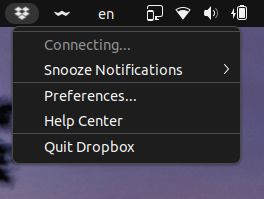
[Solved, Ubuntu 22.04] Dropbox is always "Connecting..."
Hi, Dropbox tray icon says it is "Connecting..." forever. I cannot see the list of the latest modified files as it used to show or use the tray, actually. I am using Linux Ubuntu 22.04 (but it like that since the 19.10, I suppose) The currently installed version of Dropbox is 149.4.4568 I also don't have the "Early releases" enabled as you can see in the following screenshot. I also tried to remove `.dropbox` and `.dropbox-dist` manually to reinstall them cleanly. You can check the date and time it was reinstalled here.Solved20KViews3likes74CommentsLinux Dropbox: fatal python exception
Hi everybody, I am new to linux, taking over responsibilty due to a colleague leaving and im very lost. Yesterday, I checked the drobox status on the terminal and it was stuck on dropbox upgrading. I restarted it and now I'm getting the following error with a load of other text: ImportError: libatomic.so.1: cannot open shared object file: No such file or directory !! dropbox: fatal python exception: Can anybody advise how I am able to fix this? And please bear in mind I am new to all of this :) Thank you so much for your time. RossSolved19KViews3likes36CommentsI cannot install the desktop app on Linux Fedora 37
Gnome 43 has removed libnautilus-extension.so.1 making it impossible to install Dropbox on Fedora 37. Please update the rpm installer to make use of the changes in gnome 43. For reference: https://ask.fedoraproject.org/t/official-dropbox-package-doesnt-install-in-fedora-37/27296 Here is a link to an open pull request to make the necessary changes: https://github.com/dropbox/nautilus-dropbox/pull/105Solved19KViews15likes70Comments