Our Community is in read-only mode until April 8th, learn more here. You can still search existing threads or get help via Dropbox Support, the Dropbox Help Center, or Learn.
Mac
53 Topics
Mysterious mass deletions after moving to a new computer
Device Mac Air 13" M5 Operating System/Browser (if using the web) Tahoe 26.3 Dropbox App Version (if using the app) 244.4.6580 Question or Issue Heavily use Dropbox for my business and love the application, however I just transitioned to new computer and when moved over Dropbox has been auto generating an enormous (tens of thousands...enough for Dropbox to send me emails wondering if something is wrong) number of files in the delete folder. These files have unusual names, none of which I have generated or used. They include names such as: Album-prepare-marker.plj, journalAttr.101616, .dat.nosync2FO.JZcDX8, and a lot similar to eat_jounalAttr_BCE8333B1-A91E-4B9D-97B6-65618...E9_6289556_95721.processed, an entire folder with: file cache.DAE6E2DC-BE92-42E1-A959-1A562426A8D9 There are a lot of others, these are just a few. Can someone recommend how this can be addressed? It is clogging up my Dropbox, showing up in recent activity, and driving notifications to my email for things I haven't done. Appreciate the support. Mike166Views0likes12Comments
I deleted my the Dropbox app and lost my Desktop, Documents and Downloads folders
Device Macbook Air M1 2020 Operating System/Browser (if using the web) Sequoia 15.6.1 Dropbox App Version (if using the app) unknown (deleted app a long time ago. Question or Issue Yesterday I received a message saying my memory was full on my Macbook Air. It's likley this was actually Dropbox. Went into storage to make space. Saw Dropbox and hadn't used it for years. Didn't have much in it so I deleted it and also wiped from bin. It must have been integrated into IOS as I've now lost my Desktop, Documents and Downloads. Only on a basic plan for Dropbox so don't have rewind option. What can I do short of factory resetting macbook and losing everything?74Views0likes4Comments
Recovering files after a Mac-ScanSnap-Dropbox fumble
Device MacBook Pro i9 Operating System/Browser (if using the web) macOS Tahoe 26.3 Chrome v145.0.7632.77 Dropbox App Version v243.3.6895 Scanner Snap ix500 ScanSnap Home v2.23.1(2) Question or Issue Deep plumbing alert! I use a Fujitsu ScanSnap ix500 scanner with my MacBook Pro. It appears I may have made the mistake of changing a folder name via Finder when that folder happened to be the ScanSnap Home (SSH) folder, which is the destination folder for scanned documents. That folder is also within Dropbox. For example, the original SSH folder was [Users/me/Dropbox/My Inbox] and the [My Inbox] folder name was changed in Finder to [My Scans]. The name change was done recently, and with plenty of my recovery period remaining. There is no longer any record of files in the now-renamed [My Scans] folder in Dropbox (online or on my device) before the date of the folder name change. There is nothing in the deleted files folder (online or on my device), including a reference to the folder name change, so I am not able to view/restore as I normally would with deleted files. However, the files (or at least thumbnails of) can still be seen in the ScanSnap app but they cannot be accessed, as an error message comes up showing the doc with the old [My Inbox] path is not accessible. Maybe the question is, how can files (20k+ files) get removed from Dropbox without any trace or record of those files ever being there? Any help or insight would be appreciated.71Views0likes2Comments
How do I resolve a selective sync conflict after reinstalling the Dropbox app on macOS?
Device MacBook Air Operating System/Browser (if using the web) macOS Tahoe 26.3 Dropbox App Version (if using the app) 241.4.4853 Question or Issue Due to a failed macOS update I had to reinstall macOS and recover my data from a Time Machine backup. However, the system reported that my Dropbox app was corrupted, so I deleted it and installed a new copy from the Dropbox website. I set it to online only. All seemed to be well. Today, I find that all my Dropbox folders are showing as having selective sync conflicts. This is both on my MacBook and in the web version of Dropbox. I don't know how this happened when none of them should have been on the MacBook to create a sync error in the first place. Having looked at other posts, I know that Dropbox can't do anything about this and expects me to go through thousnds of files manually to check them. What I don't understand is what I am then supposed to do, because the instructions from DropBox staff/moderators are not clear to me. My question is which folders I am supposed to keep and which to delete. Do I just keep the online folders? If I delete the ones on my MacBook, won't it just create a new sync conflict? Will the sync conflict warning go away if I consolidate everything online? As I pay good money for this service and it is vital for my work, I hope you can give me a clear set of instructions in plan English, because this 'feature' is now going to cost me hours of labour whrn I haven't done anything wrong.141Views0likes2Comments
Mac OS – files duplicated in Dropbox folder cannot be renamed or moved, just deleted.
To those Mac and Dropbox users still suffering this annoyance, there is a slightly easier way to resolve it than having to repeatedly quit the Dropbox app. In a Mac desktop window, click on the folder containing the duplicated file. Right click or ctrl click it. In the pop-up menu select 'Make available offline'. That resolves the issue for me for all files in that folder. It's as if Dropbox is unable to set the default for duplicated files on Mac to 'Available offline', even though that option is selected in 'Sync and storage'.83Views1like1Comment
I deleted the Dropbox folder off my laptop, and now loads of files are gone
I was unaware that my laptop was set up to file sync with Dropbox, which had automatically set itself up to house my Desktop, Documents and Downloads folders. I didn't actively use Dropbox, and didn't have the app download on my laptop, so when I deleted a folder on my laptop that was called Dropbox and said "No data", I thought that would be fine. Since, I've lost access to my Desktop, Documents and Downloads folders, and none of the data that was within these folders can be found in the Dropbox trash when I log in online. Completely baffled, and pretty heartbroken to have lost years worth of music that I'd made. I back up my laptop, but since it was all stored in a file sync, even if I go back using the Time Machine, there is no data to restore. It seems it all relied on this Dropbox sync, which seems to be empty. Any ideas on what I can do? Absolutely gutted.124Views0likes2Comments
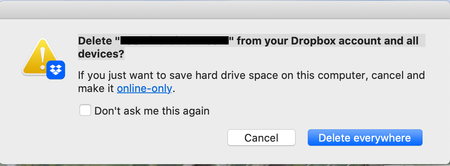
What does the "Delete from your Dropbox account and all devices" message mean?
Using the macOS desktop app. I'm deleting files from Dropbox via Finder like I do in non-Dropbox folders. Please explain what it's asking simply, I do not understand and do not want to do something that I don't want it to do like finding the file on my hard drive and deleting it in a different non-Dropbox folder (which is what it sounds like to me but doesn't really make sense). Thank you.346Views0likes11CommentsI reinstalled the Dropbox desktop app on my macOS Tahoe and have two questions.
Device iMac (M1, 2021) Operating System/Browser (if using the web) MacOS Tahoe Dropbox App Version (if using the app) 238.4.6305 Question or Issue My Dropbox folder is on an external 4 TB SSD. Yesterday I deleted the Desktop app and erased and reformatted the external drive. I reinstalled the Desktop app and reinitiated the sync via the web portal. Everything seemed to progress well. All of my folders appeared on the drive. and after indexing my files populated the folders. I have access to all of my files from the external drive. I have 2 questions. Prior to yesterday's reinstallation my files occupied 2.76 TB on the external drive. As of this morning they occupy .33 TB. What could account for the size discrepancy? Are my file really on the external drive? I completed the reinstallation, and all files were present on the external drive, at noon yesterday. Since that time the Desktop app has been updating. My sense is that something is wrong. It shouldn't take this long to update the files. I have purposely stayed away from making any changes to the files. Should it take this long to update? ThanksSolved245Views0likes11Comments
Apps create conflicted recursive copies of their contents filling my drive
Application Affected Dropbox Device Various Macs Operating System/Browser (if using the web) macOS Tahoe 26.2 and various Macs on lower versions Dropbox App Version (if using the app) 238.4.6075 Question or Issue For the second time now, I've found a file in a Dropbox folder that recursively keeps adding conflicted copies of itself in the app package. See a sample below of a partial transcript of my deletion attempt in macOS terminal: Amazon Kindle.app/Contents/PlugIns/SendToKindle (David Kaplan's conflicted copy 2025-12-09) (David Kaplan's conflicted copy 2025-12-10) (David Kaplan's conflicted copy 2025-12-15) (David Kaplan's conflicted copy 2025-12-16) (David Kaplan' ( (David Kaplan's conflicted copy 2025-12-19).appex Amazon Kindle.app/Contents/PlugIns/SendToKindle (David Kaplan's conflicted copy 2025-12-07) (David Kaplan's conflicted copy 2025-12-11) (David Kaplan's conflicted copy 2025-12-12 1) (David Kaplan's conflicted copy 2025-12-16 1) (David Ka (David Kaplan's conflicted copy 2025-12-19 15).appex Amazon Kindle.app/Contents/PlugIns/SendToKindle (David Kaplan's conflicted copy 2025-12-07 2) (David Kaplan's conflicted copy 2025-12-08) (David Kaplan's conflicted copy 2025-12-09 1) (David Kaplan's conflicted copy 2025-12-11) (David Kaplan (David Kaplan's conflicted copy 2025-12-13).appex There were hundreds or thousands of these (I have no idea, but I'm getting disk warnings that my drive is getting full). These were consecutive in the terminal session I use to recursively delete the sub programs... Even more interesting the two times this has happened, the files were in a data folder, not in a folder I would use for executing them. Being that this is on Dropbox, I've had to stop syncing on my 6 Macs, delete the files before I can turn syncing on again. At the moment a deletion attempt is still running after deleting over 165,000 items in that file. When this file creation happens it really slows down my computer. Also stranger, is that I don't have a "Amazon Kindle.app" in my Applications folder. I use a "Kindle.app" The first time this happened it was with a completely different program, not Kindle. What more info can I provide?112Views0likes2Comments"This is an unlinked Dropbox" on my app's preferences on Mac Sonoma 14.5.
I cannot access files stored in the dropbox location untill I copy an individual file and paste it elsewhere, how do I fix this whenever I also try to connect it says Your device couldn't connect to server. There might be a problem with the server or network4.3KViews1like36Comments