Our Community is in read-only mode until April 8th, learn more here. You can still search existing threads or get help via Dropbox Support, the Dropbox Help Center, or Learn.
Microsoft
85 Topics
"Upload failed. We're sorry this didn't work.Try saving again later" error when working with Word.
Operating System/Browser (if using the web) macOS15.7 dear we are using Dropbox for Teams functionality to work simultaneously with colleagues on the same document. However, we frequently get a warning the autosave function has been switched off, and we end up with different copies after all. The exact message we are receiving is: "Upload failed. We're sorry this didn't work. Try saving again later and if that still doesn't work, click Save a Copy." Saving a copy is a totally unacceptable solution for us, since there are many changes in different places in a document (word file with hundreds of pages). If anyone has an idea for coworking, I am highly interested :)106Views0likes2Comments
I see a "Sorry, xxxxxx.docx is stored in an unsupported server location" error for Word files.
Device iPad Operating System/Browser (if using the web) (Windows 10 Dropbox App Version/Browser Version Chrome 124, Safari 17 etc. Question or Issue When trying to open a document stored in Dropbox in Word the following message appears: Can’t open file. Sorry, xxxxxx.docx is stored in an unsupported server location. How can I fix this.3.1KViews0likes3Comments
Word document's format created on the web, doesn't seem the same when viewing using the desktop app.
I am having issues with formatting NOT remaining the same from when I create a Word document locally (and saved on Dropbox app) to once it is being edited in Word for the Web. I have noticed that specific "Style" formatting in Word for Web doesn't match the formatting when viewing the document in Word itself. Is there a way to update the styles formatting in the Word for Web to match the styles formatting in Word desktop? E.g. When in my local Word app, I use Styles set to Palatino Linotype for HEADING 1, 2, 3. All of my body text is also Palatino Linotype (Normal). My Table of Content also is showing correctly in Palatino Linotype. When I open the same document in Word for Web all of my headings (1,2, and 3) get converted to Calibri. My TOC also changes to Calibri as does my body text for bulleted lists. This is massively problematic when I or anyone else goes to edit the document in Word for Web as it looks like the formatting is wrong. However, if anyone was to open it on their desktop it would look as it should. How do I get the Word for Web formatting to match what I see and do on desktop? Note: I use Chrome on a Mac. When I open Word for Web I see the option to use Palatino Linotype but even if I revise the formatting in Word for Web with Palatino L. it will convert back to Calibri at some point due to other edits made. Basically, the option to use Palatino L. is there but it doesn't want to stay that way.Solved3.2KViews0likes1CommentThe dreaded error 'Can't save here choose another location' for MS office files.
Hello--I have a chronic problem with my file folders: frequently get 'Can't save here choose another location'. I use my employer's MS Office 365 account, and sync Dropbox to Windows Explorer, and use Explorer for my file management. The 'Can't save' message seems to appear when I am using many subfolders...if I go back one folder I can save the file. The problem is, this doesn't work with my folder organizing system. Is there a limit to how many subfoldes can be used? If so, can I release that limit? Or is the problem something else? Thanks you!5.5KViews0likes1Comment
Data Migration from Sharepoint/OneDrive to Dropbox.
Hello I am new to Dropbox and I am currently setting up Dropbox (former Sharepoint/OneDrive user). I can't find a lot of information on how to migrate from Sharepoint/OneDrive to Dropbox almost all the information are the other way around. Are there some best practices or guidlines I can follow and use. Do tools for data migration from Dropbox exists? The only information I could find was movebot and Storage Guardian. Are there any reviews and helpful tips? Good to know: I have a lot of data 1.5 TB + which I want to migrate without loss. I would be really thankful I someone can provide me with detailled information about this topic or even a guidline. Thanks a lot.Solved3.4KViews1like2Comments
Dropbox y Tablet Lenovo
Hola, Acabo de adquirir una tablet Lenovo, instale la aplicacion de Dropbox, instale mi aplicacion de Excel Pero cuando intento abriri un archivo de excel desde mi Dropbox no me deja, me pide autenticarme pero no deja es como si no se lograra enlazar dropbox y excel desde mi table Que puedo hacer? Ayuda100Views0likes1Comment
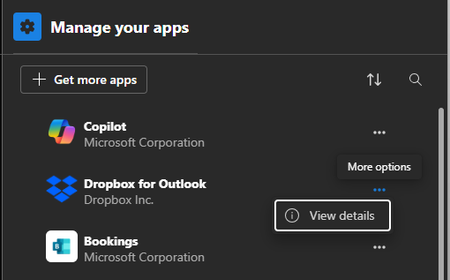
There's no option to remove the Dropbox for Outlook add-in on Windows 11.
Hello, I'm trying to remove "Dropbox for Outlook" Addin from Microsoft Outlook (new, lite version) running on Windows 11. It should be as easy as clicking "Remove" from the "Manage your apps" setting, but it's missing for the Dropbox add-in. Desktop version of Dropbox used to be installed, but was uninstalled. Looking forward on any advice on how to remove it. ThanksSolved282Views0likes6Comments
Macros have been blocked for my Excel files.
Hi We got problem activating Macros in Excel when opening files from dropbox. Excel has a messages in the top saying that Macros has being blocked. And there is no option to activate Macros, as there used to be. Any ideas Brgds Bent674Views0likes14Comments