Your workflow is unique 👨💻 - tell us how you use Dropbox here.
Microsoft Office
87 Topics
Microsoft files on Windows 11 are prompting for a Dropbox sign up every time I try to open them.
Hello, I have the Dropbox desktop app installed and every time I open Excel or Word this Login screen appears asking to "Log in or sign up to Dropbox to link with Microsoft Office 365" Is there a way to disable this? Microsoft 365 Device PC Operating System/Browser (if using the web) Windows 11Solved5.1KViews6likes93Comments
Unable to open Excel files on Android Dropbox mobile app - Office login loop
Hi, I have a free dropbox account and have used it for years to store a few basic excel spreadsheets that I use daily. I have a paid Microsoft 365 account that I use on my android phone and lenovo laptop. For some reason the last few days, I am unable to open my dropbox excel spreadsheets on my phone. When I try to open the spreadsheet I get a log in page saying "Log in or sign up to Dropbox to link with Microsoft Office Integration". I log in using my dropbox user and pw and it just sends me to my onedrive. I have tried deleting the dropbox and 365 apps on my phone and re installing and logging in. I have tried to open the dropbox files by going into excel first and then trying to open the dropbox spreadsheet. Just always sends me to the log in page. It all works fine on my laptop, and after saving, my dropbox android app shows the newly updated spreadsheet. Dont know what has happened. Please help.11KViews4likes75Comments
Sync comments onto Word docs (or download them)
The document commenting function of the platform is useful for those who comment, but cumbersome to use effectively for those on the receiving end and, worse, confusing when sharing links. For instance, when one shares a link to a Word document with the intention for others to download its latest version, they sometimes think they should be using the online commenting function. As the receiver of these documents, I can't really use those comments effectively, and the best (or least-worst) approach is to have two windows open: one with the online comments, and another with the "actual" document in Word. I have to scroll down to each comment, find each and then respond to them in the Word document itself. Google drive is seamless at all this. I use Dropbox instead of Drive because it doesn't damage original Word formatting (which is crucial for things like academic references via Endnote or Mendeley). My suggestion is that you do one (or more) of the following: - have a visible function to disable commenting on a file to avoid confusions; - In Word documents, figure out a way to integrate your dropbox comments onto the Word file itself (as a regular Word comment that can later become - In Word documents, figure out a way to signal comments IN the document itself made via the online platform. - Have DB comments sync in the Word online version of the doc. This idea is similar to another one that was closed recently but I hope this is better explained: https://www.dropboxforum.com/t5/Dropbox-ideas/Download-Comments-as-DOCs-or-PDFs/idi-p/4224364.5KViews4likes4Comments
Why do I need a license to edit Word and Excel files now?
So this just happened today. I can't create new Word or Excel files, nor can I edit existing ones. There is now a paywall that says I need a commercial Office 365 version. Um what? Working for an org that has a number of remote colleagues, we rely on being able to share and collaborate on our in-progress work. Having to pay for an essential embedded program on top of a subscription, without any warning, is not cool.20KViews3likes93Comments
can't save files from Office365-app to Dropbox - supposedly write protected
Hello there! Starting yesterday all of a sudden I can't save files to my Dropbox via the Office 365-app anymore. I get a message telling me that the file is write protected, which it isn't. It tells me to save a copy, when trying to do that I get the same error message. Up until the day before yesterday everything worked like a charm. I haven't knowingly changed anything about my smartphone's configuration, no new apps etc. Had anyone ever experienced this issue? Any ideas on how to solve it? Thank you! Andy16KViews2likes139Comments
Can’t print Word or Excel files from Dropbox.com
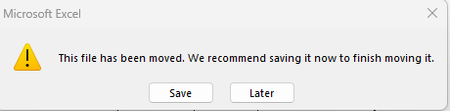
I have Dropbox.com set to open office files on the web with office integration. I open my Word document from dropbox.com The file opens in Word (online at the Dropbox.com site) When I choose File, Print...it says file is ready to print but never does anything. Never opens another window to select printer. Says if nothing opens, to download the file from the file menu. There is no download option anywhere in the file menu. Never get anything else. Doesn't print or download. No message in Edge showing me that it's trying to open a download. Word documents = I click on print. It says file is ready to print. Nothing ever happens though. Using Edge or Chrome. Excel = I click on print. New window opens but says blocked by Edge and Chrome. I have no extensions and set browser to defaults. I also have an Office 365 account under a different email address. When I login to my Onedrive account, I can use everything without issue. I was trying to transition over to Dropbox, but without this properly working I can’t use it and will be requesting a refund. Wesley from tech support keeps pushing the blame on office. Obviously not an office issue since that works perfectly fine by. It has something to do with Dropbox and/or the office integration. I really wish they would step up to the plate and assist me.6.3KViews2likes13Comments"This file has been moved" error when trying to open Excel files in the Dropbox folder
Integration Affected Microsoft 365 (specifically Excel) Operating System/Browser (if using the web) Windows 11 Question or Issue One of our users started getting errors yesterday when trying to open Excel documents that are stored within the Dropbox folder. The file opens, but brings up the following error: The file has not been moved, nobody else has this problem currently. It only happens when the file is within the dropbox folder on her computer. If we copy the file to a location outside of dropbox, it's fine. Searching the internet, it seems people who use Box (which I'm assuming is similar to Dropbox), are starting to have the same problem. It was reported in their community beginning on Nov 25, 2025 and more and more people are replying to it complaining of the same issue. A few different "fixes" were suggested by their IT which did not fix the problem and yesterday they say they have determined that it's a bug related to the latest Seamless Login release from Microsoft. Just throwing this out there in case it helps the issue to be resolved with Dropbox quicker. So far, only one of our team members is having this issue. Please help.Solved592Views1like17Comments
Remove Dropbox login popup when opening an Excel file from my desktop app.
Application Affected Excel Device Lenovo Legion Operating System Windows 10 Dropbox App Version v231.4.5770 Issue: Recently, when opening Excel files on my Dropbox path (these files are also saved offline), Dropbox has been requesting that I log in to Dropbox from within Excel (a pop up appears). Doing so created a variety of issues (macros no longer being permitted to run, changes to files not syncing), so it is seemingly superior for me to NOT log in to Dropbox from within Excel. However, by not logging in, the popup appears every single time I open an Excel file. Apart from being annoying, this is also causing me issues when attempting to read and write Excel files from Matlab code. How can I permanently prevent this Dropbox login popup from appearing in Excel? Some things that I have tried and/or implemented that have NOT solved the problem: - Turned off "Show Dropbox badge" in preferences - Turned off "Show Dropbox in Microsoft Office as a save location" - Uninstalled and reinstalled Dropbox on my computer - Removed Dropbox as a "Connected service" in Excel - Removed Dropbox COM add in in Excel settings Thanks in advance.Solved977Views1like7Comments
Excel crashes when opening a file from Dropbox but not from Desktop.
Hello. This just started occurring yesterday for one of my machines. I have files stored on Dropbox sync'd through filer explorer. When I open the file from dropbox (file explorer), excel quits responding. When I open the same file from my Desktop, Excel works as normal. Dropbox is listed as a connected service in Excel and there have been no issues before yesterday. I have updated office and performed a repair without luck. Any thoughts?1.7KViews1like17CommentsLooking up a value in an Excel file in Dropbox.
Our company has one excel file in dropbox and another file on my computer looks up a value from a column in the dropbox file. Others need to use the file on my computer, so is there a way to change the link so it will work for everyone? current formula is VLOOKUP(A17,'C:\Users\myusername\Dropbox\foldernameindropbox\[filename.xlsx]worksheetname'!$G:$H,2,FALSE).1.3KViews1like3Comments