Your workflow is unique 👨💻 - tell us how you use Dropbox here.
Microsoft Office
32 Topics
Cannot open Word documents in Dropbox
I am synced to open Dropbox documents in the online-only mode on my Surface Pro since it doesnt have a ton of hard drive memory. That has worked well for several years. Recently, my Surface Pro has been unable to open Word documents stored stored in Dropbox. Instead, I get the "Unspecified Error" message. I can open pdf files stored in Dropbox without a problem. What changed? How do I resolve this? I have updated my Windows and Dropbox apps. Thanks.Solved12KViews2likes7Comments
Excel Files not opening to edit in Excel from Dropbox.
Started this week. On my phone I can open an Excel file in Dropbox as a preview but when I click on the edit button I get the Office Excel opening (Downloading from Dropbox) screen, then it flips to the "Microsoft Office Integration would like access to the files and folders in your Dropbox. Learn more. > Allow screen" I click on Allow then it just flips back to the Dropbox preview of my Excel file. I have logged out of Dropbox on the (Android) phone, then back in, no change. I have rebooted the phone, no change. I have uninstalled Excel on my phone and let Dropbox install it again, no change. Sometimes I get the "Sign in to Dropbox to link with Microsoft Office Integration" prompt so I do, no change. I have clear Cache, no change. Removed the Default apps, no change. I can open and edit the Excel file with Excel on the Web from a computer. I am will to use Google Sheets but I do not get that as an option on the phone. Note: I can open the Excel file in Excel on my phone if I open Excel directly on the phone then select the file, just not from within Dropbox.11KViews0likes55Comments
Only one tab displaying in spreadsheets stored on Dropbox
This morning when we open our spreadsheets on dropbox only one tab is being displayed and we can't access the other tabs on the sheet , if we download the file and open it all tabs are displayed. They spreadsheets are saved as xlsx files on Dropbox. Any idea's why this has suddenly happened ? All were fine yesterdaySolved11KViews4likes61Comments
Excel File Displaying Chinese Characters.
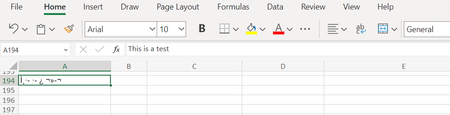
Hi All. I have a file that I edited yesterday that is now appearing online as chinese characters. If I select the cell, the correct/English version of the word appears, but not when displayed. All other excel files in my dropbox appear in English as they should. On the app, it appears in English, this is only happening online. To troubleshoot I saved the file from my app, downloaded it to my computer, viewed it in Excel where it showed up in English, deleted the dropbox file, then uploaded the English version from my computer, but it is still showing up with the chinese characters. How do I rectify this and view the file on my computer the way it should be??Solved9KViews0likes8Comments
Can't open xlsx files on my mobile device
Recently (maybe the last month to month and a half) I have been unable to open Excel files on my Mobile device. Android S21 Plus Prior to that I could open and edit them just fine. When I try to open an xlxs file, I get the message: File type not supported Couldn't download file. Please try open in another app. Any ideas what has changed?8.1KViews0likes15Comments
can't open excel files on iphone recently
I used to be able to open my excel files in dropbox, on my iphone. I still can open them on my ipad. I've tried reinstalling dropbox on my iphone but that hasn't worked. When I try to open an excel file I get a white screen with the name of the file in grey and the data bytes number in grey and that's it.Solved5.7KViews0likes6Comments
Having problems with Word/Excel files Save As PDF uploading into Dropbox
Hi, I have regularly created word and excel files on my iPad, saved them in Dropbox. I’ve then used the Export facility in Word and Excel to save them as PDF on the same Dropbox folder. Last time I successful did this was 5 days ago. Today I tried and I am receiving an Upload Pending error in Word and Excel. In Dropbox, it creates an unreadable file. I’ve tried Exporting to another directory in iCloud with no issue, so Dropbox is the problem. Any thoughts on how I solve this?Solved5.4KViews0likes22Comments