Our Community is in read-only mode until April 8th, learn more here. You can still search existing threads or get help via Dropbox Support, the Dropbox Help Center, or Learn.
Multiple Accounts
59 Topics
Dropbox unlinked my accounts suddenly
Hi there! I've have a free dropbox personal account for 15 years, and at some point added a free Teams account. Several years ago I upgraded the Teams account to a Professional account. ----- Today I got this message, and all my Professional files were taken off my machines (they're still on dropbox of course) Business Dropbox Removed: Your business Dropbox account was removed from this computer because your accounts were unlinked. Your files have not been deleted. ------ I would love to be able to link my two accounts, and continue having two separate dropbox home folders on my machine. Basically, I am leaving the country tomorrow morning and will have extremely limited internet access. I just need it to work how it used to, but I accept that I may need an alternate setup based on whatever Dropbox has changed. When I am signed into my Personal (free) account, it says I have 3TB of space, and the same for the Professional account. Within the settings menu the Pro account is called Personal Account, but when I check the billing plan for the Pro account, it calls it Dropbox Professional. Any solutions? Many Thanks! (too bad this is my only option for customer support 🙂Solved12KViews5likes27Comments
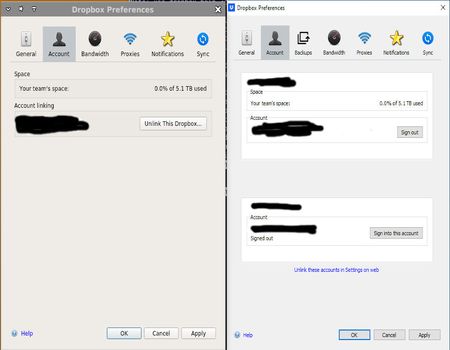
Switching between two linked accounts on linux seems to be missing ???
I am trying to set up on linux access to my linked business and personal account. But the instructions for doing so in the app do not match what the app provides. Here is a screen shot of the dropbox app when running on linux (left) and when running on windows (right): The linux version does not seems to know about my linked app. Is this a bug in the linux app or am I missing something? If a bug, how does one report a bug to dropbox?Solved2.2KViews2likes6Comments
How to Sync Two Business Accounts on the Same Computer
Requires two local users to be configured on the computer While logged in to the first local user, log in to business account #1 on the Dropbox app. Choose a shared location for the files to sync to. Log in to the second local user, then log in to business account #2 on the Dropbox app. Choose the same root folder for the files to sync to as you did in the first step. Ensure that both of the folders are shared to all local users and all local users have read/write permissions.1.3KViews1like1CommentChanging email address linked to Dropbox (complicated scenario)
My wife and I shared a personal email address (verizon.net). She got to Dropbox first 🙂 and set up a Dropbox account under her name, with her files, linked to that address. I got to Dropbox later 😞 and set up a Dropbox account with my files under my name, using a work email address. My wife passed away recently. I would like to a) cancel her account, which I believe she was paying for (not sure of this) and b) rework my own account (which I am not presently paying for) so the files are associated with this personal verizon email rather than a work email that isn't guaranteed to last forever. Sales said I had to talk to support; the support chatbot was not helpful. I guess the ideal would be, cancel the old account, then associate my files with the verizon account, but is that doable? Thanks in advance for any suggestions you can give.Solved1.3KViews1like2Comments
Link personal account with another personal account.
I am trying to link 2 personal accounts - my own, and the one my boss uses (the business I work for is very small, basically just myself and my boss). I only see an option to link a team account: I'm not sure if not sure if there is meant to be a separate link for a personal account? If I click Link accounts, and enter my boss' personal credentials, I get an error saying "Sign in to a team account": So this leads me to think that there is in fact a difference between signing in to a teams vs personal account. Help me please Dropbox community 🙂Solved2.6KViews1like6CommentsAccidentally accepted invite using a slightly different gmail address, disabled original account
I accepted an invite to access an organisation’s Dropbox. They sent it to my personal email myname@gmail.com but when I signed in I used myname+bb@gmail.com (don’t ask why). Now my original dropbox account is disabled. I can still log in using the +bb email address, and it is effectively my old dropbox account (with all my old files) however, I can’t log in using the original email. Nor can I change the email on the +bb login to match the old one (says email already in use). Finally I can’t log in to the old account because it is disabled. It seems I have effectively changed the email address on my Dropbox whilst locking me out from being able to change it back. I’d really like to get it back to how it was. UPDATE: Just tried logging in Chrome on my iPad and it said: “This account has been deleted Please re-register with a new account or wait 6 days to re-register with your current email.” Should I just wait six days and then try to change the email address back on my myname+bb@gmail.com account?1.9KViews1like4CommentsMerge Two Personal Accounts
I have two personal accounts. Account A has much more storage than Account B, however, Account B is linked to my preferred email address. Account A is linked to an email address that is provided by my ISP which I am soon going to deactivate. How can I move my files from Account B to Acount A AND switch email addreses from Account A to Account B and B to A?3.3KViews1like12CommentsHow to manage multiple Dropbox accounts on the same computer?
I am having no end of trouble trying to figure out the best way to coordinate between different email addresses. I have clients who add me to their dropbox using my current work email, that is not connecting to my personal login. I know of the "link" option, but when I go to it in my settings I get a 404 error. Then, I have a third dropbox connected with my former work--the employer removed all sensitive files but I still need to have access to items that other people shared with me via that email address, and I am authorized to access the account. I use dropbox for everything and had migrated my desktop to the cloud, but now when I changed jobs everything is broken. Is there any way to not have to be constantly logging in and out of multiple accounts--especially when I have it set to auto-sync my desktop with all current-working files, it gets very confused when I have to switch accounts. Help!Solved40KViews1like20Comments