Our Community is in read-only mode until April 8th, learn more here. You can still search existing threads or get help via Dropbox Support, the Dropbox Help Center, or Learn.
Notifications
168 Topics
How to disable Dropbox almost full notification?
I would like to have the CHOICE to disable the "Dropbox Almost Full" notification. As a temporary solution, I have chose to not start Dropbox on system boot and close it, but I would like to know how can I disable this message with Dropbox open.Solved42KViews10likes32Comments
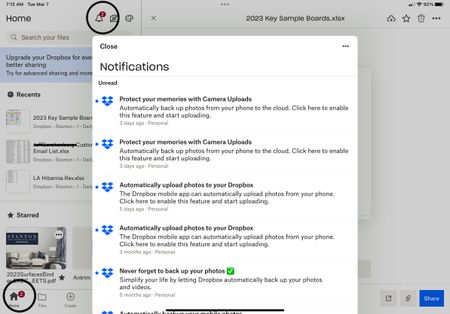
New message notifications will not go away
I have several “unread” messages from Dropbox which when opened or marked as read the “2” displayed above the icon will not go away. The marked as read button does nothing and there appears to be no way to delete the messages ? Using app on new iPad Pro.Solved15KViews9likes64Comments
I'd like to receive real-time email notifications
Dear Forum Users, I am currently using a free Dropbox account for the purpose of testing. The objective of the overall exercise is to identify web-based solutions for the storage of and collaboration on documents of various standard file types (MS Office files, pdf files etc). I understand that in the notifications menu in Settings I can check the box for "Activity in shared folders (weekly digest)". This presumably means that once a week I get an email message describing what "happened" in shared folders (i.e., additions, revisions, deletions; additional users with access to the folder etc). My company is currently using Egnyte for sharing and jointly working on documents with clients. Egnyte offers the option of receiving updates of the type referred to above on a daily or even on a real-time basis. The real-time notifications have become an essential element of our workflows, so we would only consider switching to Dropbox if a paid Dropbox plan offered the same feature. I have noted that upon installing the desktop app it may be possible to receive notifications of the kind I am referring to although they would presumably not be sent / received via email. Unfortunately, relying on the use of the desktop app is not an option for us. The notifications about changes need to be sent by email and they need to work even if only the web-based version of Dropbox is used. If anyone knows whether any (and, if yes, which) paid Dropbox plan provides the exact functionality that I am looking for I would be grateful for a reply. From some brief research in the "help" section of the website, I note that the notification settings for Dropbox Paper are different / separate from the ones for the regular Dropbox. Ideally the answer would also describe which notifications (if any) are available for Dropbox Paper. From my research, I also note that the use of an additional third-party programme such as Growl or Zapier might make it possible to receive the kind of notifications that we are interested in. We would be happy to consider this option. The cost of additional app subscriptions is not a concern, but whatever we end up setting up has to absolutely, reliably work. Whatever the responses may be, many thanks in advance for your time and trouble. EdSolved13KViews6likes15Comments
Constant notifications to update desktop app on Windows.
I am getting frequent notifications to update my Windows desktop Dropbox app, requesting permission to make changes to my system. It doesn't matter whether I respond yes or no, nothing happens after that. It just keeps happening over and over again.Solved18KViews5likes10CommentsDropbox wants to learn more about your experience with notifications
Hi Dropbox community! My name is Justin, a PM on the Desktop experience team. I'm hoping to learn more about your experience with notifications: what's working, what isn't working, what notifications you'd like, which ones you don't. There has been a wealth of comments over the years on this topic and we want to begin addressing the biggest issues Please (1) share your comments below in a few sentence, and (2) if you'd be open to a quick conversation with Dropbox! We'll follow-up via email (you won't need to post your email below).6.8KViews4likes3Comments
How to get rid of the red circle on the dropbox icon in my menu bar? Mac desktop app.
Whenever someone comments on a shared file in dropbox, I get a red circle on the dropbox icon in the menu bar. This interrupts my workflow and I have to get rid of this feature if I want to get any work done on my computer. I have turned off all notifications on Dropbox app and on my system preferences, but the red circle still appears. I think this is bad software development practice to circumvent system preferences (which allow you to choose which applications can show the badge app icon) by putting the red number in the menu bar (which the user has no control over). I have now spent significant amount of time trying to find a solution to this, but I'm starting to fear it is impossible. I wish I had not updated dropbox, I have lost so much working time because of the update that introduced this red circle. Has anyone found a way to permanently disable the red circle or to hide the dropbox icon from the menu bar completely? Is there a way to request this feature (or rather file a bug report, I can't believe the circle is there on purpose when notifications are turned off) from the dropbox dev team?4.7KViews4likes16Comments
How Do I Stop the "Online-Only Files" Deletion Warning?
Nearly every time I delete a folder (which is often), I get a popup asking for confirmation. "This folder will be deleted from your DropBox account. Because it has online-only files, it won't be moved to your Recycle Bin, but recently deleted files can be restored on dropbox.com." I never want to see this dialog again. How can I make that happen?2.4KViews4likes5CommentsHow to disable annoying "Upload Complete" pop-up
I have multiple Dropbox accounts for several different clients, and as such, I must use the Dropbox website for uploading and downloading files I share for one of my clients. When I want to add my files to a Dropbox folder via the website, I always get a pop-up box with a confirmation that my upload has completed. This pop-up box is very annoying. It takes up a lot of space in the lower left corner of my screen, and the only way to get rid of it is to close it by clicking the "X." I upload files all day long and this confirmation pops up every single time. This requires a lot of extra clicking so that I can uncover and see pertinent information on my screen. Question - is there any way to disable this notification, or at the very least change it so that it pops up but disappears on its own after a second or two?1.1KViews3likes4Comments