Our Community is in read-only mode until April 8th, learn more here. You can still search existing threads or get help via Dropbox Support, the Dropbox Help Center, or Learn.
Notifications
168 Topics
I'm constantly getting out of space messages
As described at English | The Dropbox Community except now these notifications are coming up every couple of minutes after I dismiss them. This is insane and unworkable. I have 500MB free; that’s more than plenty. I’m nowhere near running out of space. Something’s got to change.129Views0likes9Comments
Can link-only users be notified of changes to files?
Suppose I create a Dropbox folder containing several files related to a family project. Is there a way that I can share the link to the folder with 8-10 family members and allow them the option of being notified if anything in the folder is edited, added, or deleted?49Views0likes2Comments
How can we get instant notifications for new or updated files instead of weekly notifications?
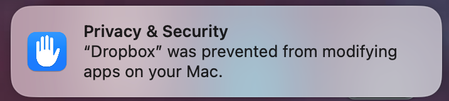
I use Dropbox as a central depository for construction drawings and through "Editable access" permission settings allow external consultants to upload their drawings into nominated folders. The collection of folders for a construction project are shared with subcontractors, staff and other consultants on a "View only" permission setting. The problem that I seek your assistance with is a feature which Dropbox is lacking in. I need a method of automatic instant emailed notifications of new or updated files to all that have been set up for shared access to the project set of folders. Currently, the only avenue for notifications is electing to receive a weekly report. Please help ! TYIA54Views0likes1CommentWhy am I getting a notification on my Mac about Dropbox modifying apps?
Hi everyone! We're starting to notice this Drobox notification below pop up on our Mac community. When we click it, it takes us to Privacy & Security in System Settings but then does nothing. Anyone know what exactly this modifying apps means and what its asking for? Should we be concerned? This particular MBP is running macOS 15.7.4 (Intel) and version 243.4.6956 of the Dropbox app. Thank you!54Views0likes1Comment
My shared link throws a "Couldn’t complete share" error.
I checked the help center and could not find answers. The only information provided was "Couldn’t complete share". The help center just says to look for the reason in the notification, but the notification literally says to look at the help center. I've been using the same shared link for 15 years for employers to see my certifications and it has NEVER given me this error message. Can someone please assist?? I have to be able to share my certificates with employers via this method.86Views0likes3Comments
I can't share any links - Dropbox says my files contain phishing content.
Dear Dropbox Support Team, I’ve received a notification stating: “We have suspended your activity. Your files may contain phishing elements.” I’m unsure why I received this message, and it’s severely impacting my Dropbox experience. It's not specific to any one file. I cannot get the link to share ANY of my files. I always get the same error message when I try to share via the web portal. When I use my PC based Dropbox, I don't get any messages, but I cannot copy and paste any links. I've already spoken with the chatbot and emailed support (over a week ago - ticket id: #26002781) and have not received a reply. Please provide further details so I can resolve this issue promptly. Thank you for your support. Best regards, Tal Device (Razor Blade 15) Operating System/Browser (if using the web) (Windows 11/Chrome) Dropbox App Version (if using the app) (242.4.5815) Syncing Status ("Up to date")91Views0likes2Comments
Dropbox Community rank notifications
I have my dropbox community notifications set up the way I want them - except that there does not seem to be an option to turn on/off emails telling me "You have earned a new rank in The Dropbox Community!". There is an unsubscribe button at the bottom of the email but it just takes me to My Settings: | The Dropbox Community where there is nothing about ranks. I have "earn a new badge" set to Never.161Views0likes7CommentsAllow global settings for Transfer notifications
For people who use Dropbox Transfer a lot it would be helpful to have default settings that mean we are not notified when someone downloads a transfer, when a transfer is about to expire, etc etc. I do not understand why this is not an easy choice to make.82Views0likes1Comment
The default notification settings on this forum should be set to "Never".
This should be set to never by default. It is not URGENT to get notifications about badges. It's just not. I do not care and I would assume most people just tryingto get answers to their quetions do not care either. For those that do care, they should opt in. Otherwise this is just spammy in my inbox. Thanks.80Views0likes1Comment
Suppress or disable notifications at the team or group level
I am requesting a feature to disable notifications for all users or even better a group of users during a change management window (CMW). As example of a change management of migrating folders from personal shares to team folder shares. My current SOP is to block email notifications from no-reply@dropbox.com during my migration window, however notifications still go through to the desktop and web app. The e-mail hold captures messages unrelated to my migration as well which I am able to release for delivery. Ideally I could scope the suppression to a group and have it automatically expire based on a preset time. This secondary feature would prevent an admin from forgetting to enable notifications again after a CMW closes. Here is a forum link that points to others with a similar request https://www.dropboxforum.com/discussions/101001019/disable-all-notifications-as-team-admin-for-all-members-/656045130Views0likes1Comment