Your workflow is unique 👨💻 - tell us how you use Dropbox here.
Photos
28 TopicsWhat you need to know about storing and backing up your photos with Dropbox
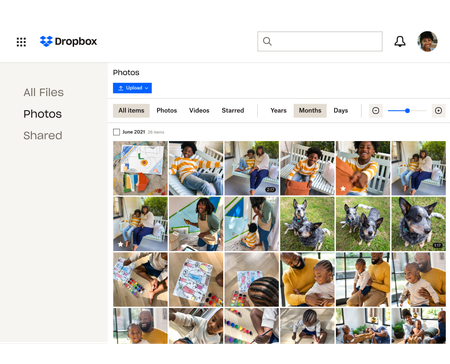
We see a lot of questions about storing, sharing and backing up your photos on Dropbox so here are some tips to make that as easy as possible! Back up photos automatically to your Dropbox account You know we love an automatic process, so whether it’s your camera roll photos, your screenshots or your document scans, your cloud photos are some of the most important files you have. In fact our own Emmet told us about a time when he almost lost his photos due to a tech malfunction - “One of my old hard drives of photos got corrupted several years ago. This was almost a year of photos. Thankfully, lot of these had been saved to my Dropbox account automatically, and this was important as a couple who I was friends with wanted a high definition photo of them from the first night they went out together, and I was only able to share it on their wedding day because it was saved on Dropbox.“ Keeping full-resolution copies backed up with online photo storage means you can access them anytime, and you know there is a safe and secure copy in the cloud. Here are just a few ways Dropbox can keep your photos safe: Camera uploads: Once you turn this on, photos from your phone or tablet will be automatically backed up to Dropbox. Or in our desktop app, photos will be copied from cameras, memory cards, or mobile devices whenever you connect one to your computer. Screenshot backups: You can set up our desktop app to automatically move screenshot images to your Dropbox, or have mobile device screenshots backed up using camera uploads. Document scanning: The native/built-in scan functionality in the Dropbox mobile app lets you use your phone’s camera to scan and make digital backups of receipts, whiteboards, and paper documents. Share your photos with links, shared folders and control access Storing your photos is great, but chances are you will want to share some - whether it’s with family members, teammates or the expense team at work. There are a few ways you can do that, and you can manage the access with a few clicks as well. Shared links: You can easily create a link to share any file or folder in your Dropbox. Copy and paste your link into an email, text message, or chat, to share with anyone—even if they don’t have a Dropbox account. Access control: Keep your photos in the right hands by adding password protection, expiration dates, and sign-in requirements to your shared links. Shared folders: Want to collect your photos and someone else’s in the same place? Share files back and forth by inviting other people to sync a folder between your account and theirs. Organize your photos: Saving and sharing your photos can be great but it’s no use if you can’t find the one your looking for, so organizing and viewing your photos is essential too! Here are some tips on how to do that, and if that’s not enough you can see how our own Eliene organizes her photos. Photo browsing: View and browse all of your photos and videos from the Photos tab in our mobile app or on the web. Image previews: View over 35 image file types from dropbox.com or our mobile app. You can preview common files like JPEG, PNG, TIFF, and GIF; app-specific types like Photoshop and Illustrator; raw formats like CR2, DCR, and DNG; and even iOS HEIC photos. Best of all, there’s no need for special photo software. Image tagging: Find your photos fast by adding searchable hashtags to individual photos or an entire folder. How do you manage your photos with Dropbox? Share your tips in the comments below, or if you have any questions you, we can answer those too!4.8KViews1like2CommentsTell Us How You Use Dropbox
No two people use Dropbox in exactly the same way. Some of you rely on it every day for work, others for school, creative projects, or keeping life organized - and we love that. We’d love to hear how you’re using Dropbox today - is it something you use once in a while, is it part of your day to day, are there any features you can’t live without? What workflows have you built that save time or reduce friction? And where do you see opportunities for us to do better? Your tips, ideas, and honest feedback really help us to make sure we can share useful tips, and they help other community members discover new ways to get more out of Dropbox too. Share your experience, favorite features, or suggestions in the comments below. Your voice truly helps shape the future of the Dropbox community 😁 The Dropbox Community Team2.3KViews3likes11Comments
I can't paste the screenshots I capture on Windows
For some reason I cannot pate the screenshots after I press "Print Screen". I have dropbox on my pc set to copy link when image is ready and then there is a pop up on the bottom right when I take a picture and it says "press ctrl+v to copy" BUT IT DOESN'T work at all!2.1KViews0likes47Comments
iPhone photo import - how do I import the favourites and album information?
Hello, I have set up my iphone photos to sync to my Dropbox. All good, but I can see now that they are all unsorted - my favourites and albums have not come through with the import. Is there a way to do this? I've spent ages sorting on my phone and now all I can see is date order sort or "star". ThanksSolved1.9KViews0likes2Comments
Embedder and tags
I have a HTML page that offers a textbox in which the viewer can write certain keywords. After clicking ENTER, the images are loaded in iframes according to the keywords. My problem is: how do I write this is JS so that it can be integrated on a Dropbox Embedder app? Also, I did not find a way to know if I should tag all images in Dropbox or modify their metadata in advance? I expect that all images with same keyword are shown in page, inside their respective iframes.Solved1.4KViews0likes9Comments
Why was the way screenshots were handled changed?
Me and my friends question what drove the people behind this software to break something intentionally like that? I work as a Quality Assurance expert, and can only see this change as sabotage. When I press "PrtSc" I want the image to be copied into my clipboard. The fact that it was saved into the screenshots folder wasn't always desired, but I could deal with it (always cleaned up that folder once a month). But now that doesn't happen. I get so many extra steps, and if I opt out of it, I'm left with nothing. Sure, I could just install a different software for making screenshots, but that seems so stupid to do, given what worked before!Solved999Views5likes19Comments
API Upload .HEIC and convert to JPG
I am using the API to upload images and make them public. I get the public link back and embed in my application. ALL GOOD. Now I am looking to allow .HEIC uploads. I don't see anything in the API to cause the conversion. So, I put automation on my parent folder and that seems to create another duplicate photo converted to JPG. At that point I assume I have lost the public link and I have duplicate files. I am looking for any pointers here..... thanks in advance.779Views0likes7Comments
My Dropbox app stops after several minutes while uploading my photos from my iOS device.
Goodmorning, I recently started working with Dropbox again and want to upload all my pictures from my iPhone (iCloud) to my Dropbox. It’s about 125,000 photos and it’s not easy, as my app stops after several minutes. At first it started counting and now counting down as it uploads each photo/movie. But I have to open the app again; sometimes it is completely black and it has to start again and sometimes it resumes. Also the night mode stops after several minutes. I have tried if keeping my iPhone open forever works, but no. Also un-installed the app, closed my iPhone and furthermore rebooted it, re-installed the app. It started counting up again and fortunately (of course) all uploaded photos were available, but it still stops after several minutes. I am now at 72.000 and it is too time consuming. Any suggestions on what else I can do to keep the app working? Thanks!614Views0likes28Comments
Hide folders from Photos tab
I have a lot of photos in my Dropbox, both edited and raw/unedited files. It would be great with the possibility to hide certain folders from the Photos tab so that e.g. all of the unedited raw files doesn't show up in between the final versions. Also, this would allow hiding folders with other image files that you don't want in your photo collection. This could either be some right-click folder property, or it could be done by adding e.g. a .dropboxhidephotos file to the folder.347Views16likes8Comments
How do I stop Dropbox from uploading every single picture on my PC?
I use Dropbox on my computer to backup my work files which include my 3D renders that consist in a png sequence (one image per frame at 30 or 60fps), so I have thousands of png images related to renders but dropbox automatically adds them to the camera uploads in my phone app which is extremely annoying because I need to scroll down thousands of images to see my actual photos... if I delete them it deletes my render backup as well, it does the same thing for textures, which makes my photo roll unusable.322Views0likes8Comments