Our Community is in read-only mode until April 8th, learn more here. You can still search existing threads or get help via Dropbox Support, the Dropbox Help Center, or Learn.
Referrals
142 Topics
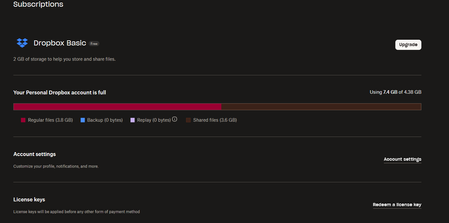
I used to have 8GB total, but after logging in I believe my storage is removed.
Hello, I recently logged into my account to check some files and suddenly I'm out of storage... I used to have 8GB total space because I created my account long time ago and probably some people did use my referral link back then but suddenly I get storage removed and this is worrying since they will delete my files.... How did that happen? How can I solve it without removing files? Can the storage be restored back?40Views0likes1Comment
Referral sent to a friend marks as inelegible
Hi I sent a request to a friend for them to install Dropbox. They followed all the process steps and were awarded 259mb. On my account against their referral email, it is marked as ineligible. This does not make any sense, they set up the account on a different computer. So why is this marked as ineligible? Can someone please look into this for. My email is <<removed to avoid spam>> Regards, TahirSolved10KViews0likes312Comments
Will I lose earned space if I upgrade temporarily and then downgrade?
Hi there, I currently have the basic, free plan wth 18GB of free space earned by referrals over the years. If I were to temporarily upgrade to a paid subscription and then downgrade back to the free plan again, would I lose the extra 16GB?132Views0likes3Comments
Dropbox error: "ERROR: The save failed due to out of memory or disk space."
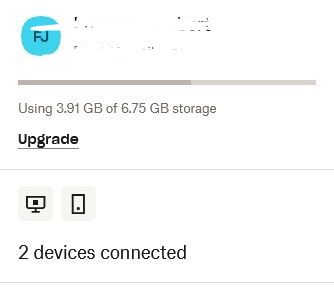
Dropbox Plan - Basic Device - Windows 11 Lenovo Laptop Operating System/Browser (if using the web) - Windows 11 / Firefox Browser Dropbox App Version (if using the app) - 238.4.6305 Question or Issue Good day, Please can you urgently assist in this matter... I have a basic plan but due to Dropbox option to invite others to the platform I have accumulated 6,75Gb in total. My current usage is 3,91Gb but now Dropbox is giving me an error when saving additional / updating existing files. ERROR: The save failed due to out of memory or disk space. I have enough local diskspace and memory available, dropbox storage utilized is more that what the basic plan allowed but have more space available due to above reason... enough freespace is available. Your urgent assistance will be appreciated. Thank you FrannaSolved533Views0likes4Comments
Why is free storage space removed by Dropbox?
I've been reading through some community posts, and a few people have said similar to the following: They have a free account, have storage of over 20GB, but Dropbox has messaged them to say the space will be reduced back to 2GB. Why is this? I don't want to go to the trouble of referring people to get more space, then have Dropbox message me and tell me the space will be removed. Does space get reduced if you don't use it after a certain amount of time or something?Solved17KViews1like31CommentsMy (free) Dropbox account appears to have lost its extra referral space.
Dropbox Plan Standard Device Desktop/iphone Operating System/Browser (if using the web) Windows 11 Question or Issue I was a very early adopter and recommended Dropbox to many others, earning the maximum (I believe) storage space through my efforts. I have a number of not-for-profit files on the system, which are now under threat because Dropbox is now saying I only have a 2GB allowance. This came about after I uploaded some files on a temporary basis and hit my maximum storage space. This was quickly addressed, but I seem to have lost the space that I previously enjoyed, having earned it via referrals. I need to know whether or not it is recoverable, as I will have to make other arrangements for my not-for-profit activities if it isn't recoverable.445Views0likes13Comments