Our Community is in read-only mode until April 8th, learn more here. You can still search existing threads or get help via Dropbox Support, the Dropbox Help Center, or Learn.
Shared Folders
462 Topics
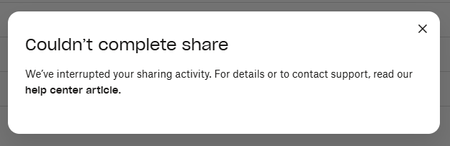
I can't share any folders or files because my sharing activity was interrupted
Device Dell Slim ECS1250 Operating System/Browser (if using the web) Windows 11 Pro Dropbox App Version (if using the app) 244.4.6580 Syncing Status Up to date Question or Issue I am not able to share any files or folders. Get the "Couldn't complete share" error message but without any further explanation. I have checked all possible reasons referred to in the help center to no avail...69Views0likes2Comments
I deleted some files, but they still appear on my Dropbox account online.
Operating System/Browser (if using the web) (Windows 11) Dropbox App Version (if using the app) 244.4.6580 Question or Issue Using basic plan and got he prompt to remove files. I deleted the folder that was share to public and the files are still there. There is no back up. Under shared those files are not listed there. Under shared links , visited links, the link to main online page is there.81Views0likes5Comments
Can link-only users be notified of changes to files?
Suppose I create a Dropbox folder containing several files related to a family project. Is there a way that I can share the link to the folder with 8-10 family members and allow them the option of being notified if anything in the folder is edited, added, or deleted?57Views0likes2Comments
Questions about shared folders, storage space and permissions
Hi all, After cleaning up all the mess in my Dropbox account I would like you to comment on two questions I have: As an example. .I have a folder A, and a lot of subfolders within that folder, called 1, 2, 3 etc. In the subfolder A1 there are a few subfolders, called, A1a, A1b etc. I want to share the subfolders A1a, A1b etc. The person I want to share folders with has a free Dropbox account (2 GB). I give them permission for A1a. So the person opens Dropbox goes into my account until the level of A1, finds the subfolder A1a, opens that and does what this person wants to do. As long as the folder A1a is smaller than 2GB that's okay for this person to do. After editing files within A1a, the folder may be closed and removed from the free Dropbox account. In this way this person has always 2GB available. One or more shared folders may not exceed 2GB. Is this a way to use Dropbox and shared folders? A shared folder can be opened by another person as long as necessary until I remove the permission, right? Thanks in advance and with kindest regards, Leo.Solved121Views0likes2Comments
Is viewing with download disabled for free accounts?
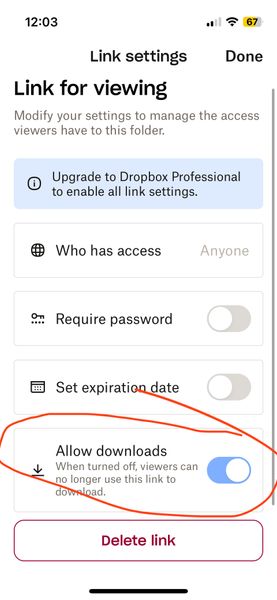
Is viewing with download disabled for free accounts? (I am on a free account) When I go to share (and subsequently generate a link) I now see a mandatory choice of either 1) editable or 2) viewable only. The software defaults to editable (which I think I was inadvertently using for a while and NOT what I want). When I noticed this today, I went to the viewable option instead and then looked at the settings. There are options (see screenshot below) but it seems like the option to have downloads enabled on viewable links is greyed out? But also kind of difficult to tell – it looks lighter blue than normal GUI switches I've seen in the past... It looks like it is on by default but I don't know if it being greyed out means that it is stuck on or that it is not functional (meaning even though its showing as on, the greyed-out-ness means it is actually off AKA no downloads for recipient). Can you please clarify this confusing interface before I send the link? I do not want to send things then recipients say they can't access it. The interface really shouldn't be this confusing. Thanks!Solved67Views0likes2CommentsI replaced some subfolders in a folder, but the subfolders are now empty.
Hi all, I uploaded some folders into Dropbox and wanted to share them. The folder to share, consisting of subfolders, appeared too big for some one with a free account. So I replaced the subfolders and share them. Unfortunately the subfolders appeared to be empty after replacement. Any suggestions? Thanks in advance and with KR, Leo.Solved220Views0likes13CommentsFiles not being shared across group members
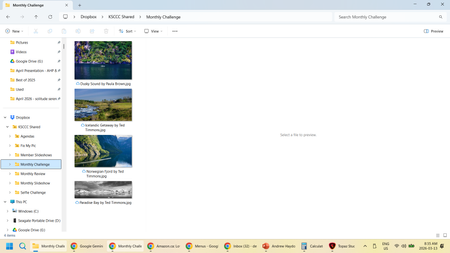
Device PC, Mac Operating System/Browser (if using the web) Windows 11 We use the free version. Question or Issue We use dropbox to share pictures for our camera club. Lately we have been having issues with members seeing a different set of pictures in their PC folders then what is on the web. As well, what members see on the web is also different. Personally I have seen my dropbox folder empty, but when I go to the web, there are pictures in the folder. I have also used my folder to create a video of our pictures only to find out that some were missed because they were not in my folder, but they were on the web. Another member sees a different set of pictures in their folder than I do. Here is a screen shot of what I see: Here is a screen shot of what they see: On the web, it looks like what I see. We have three people that add pictures to the folder at different times. Some through uploading on the web and others by copying into their folder. We have only started having issues with this in the last few months.116Views0likes7Comments