We’re Still Here to Help (Even Over the Holidays!) - find out more here.
Space and storage
178 Topics
Changing a file to online only does not work. Nothing happens.
Hey! I've had a problem few weeks now. Even I've tried to put almost everything online only -mode, nothing happens in the hard drive storage. Any ideas what could be wrong? Last month everything worked like a charm. Thanks!Solved20KViews2likes17Comments
Allow a personal account to have more than 3 TB, or more than 4 TB with the add on
Hello, I'm a graphic designer with over 15 years of workload. This obviously equates to extreme files sizes. I was disappointed to learn Dropbox don't offer a package for single users over 3TB. I work solely and require more cloud space and don't want to have to upgrade to a 'per user' plan as this isn't cost effective. This option has to become available soon.62KViews188likes221Comments
How can I cancel my computer backup?
I apparently selected pc backup when I installed Dropbox and naturally I'm out of storage on my Dropbox account now. I don't want and have no need to have my pc backed up to it. I have the desktop app but am not able to find the preferences section to stop it from backing up. I did try just deleting My PC from Dropbox but a message comes up and says if I delete "My PC" it says it will be removed from my Dropbox and from the computer. If I delete it in Dropbox, does that mean I'll lose everything on my laptop too? Sorry if it sounds like a newbie question but I am. 🙂 Any help stopping the PC backup would be greatly appreciated.Solved25KViews2likes58Comments
Access to my files when my Dropbox account is full?
Hi, I have no more acess my files because my Dropbox is full. I'm encouraged to upgrade it. But I don' want tu upload any files more, I just would like to have access to those which are already there in order to donwnoad them on my PC. What should I do? Thanks a lot4.3KViews0likes16CommentsDropbox taking up "other files" Disk Space on MacOS
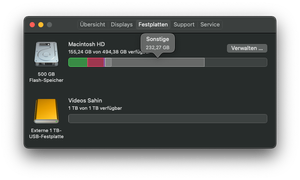
Hey, I have an issue with the Dropbox Smart Synch function on my MacBook Pro M1 2020. Until recently everything worked just fine, I also have the "Smart-Synch-Update for Mac" Box checked in the settings. But now, when I synch a file or folder to "online only" it will do that and show, that the file has 0 Byte. But simultaneously my "other files" space in the MacOs Disk Space Tool increases so that I have about 250GB of "other files" on my system, that are no where to be found. Even if I search everything on my Mac there is no folder that is so big. Can anyone help me?3.2KViews1like13Comments