Our Community is in read-only mode until April 8th, learn more here. You can still search existing threads or get help via Dropbox Support, the Dropbox Help Center, or Learn.
Third Party Integrations
32 Topics
Problem playing phone call recording from Call Recorder ACR
I have Call Recorder ACR app on my mobile phone. I've linked to Dropbox to store my phone recordings. They appear in Dropbox after each call but I can't get them to play on Windows Media Play although it supposedly supports 3GP and MP4, both of which I've tried. Any suggestions?Solved47KViews2likes11Comments
Can I download folders from Dropbox to my Android without a third party app?
This is SO frustrating. I have a real need to download entire folders to my android device. For some years I have used the FILE DOWNLOADER FOR DROPBOX from Play Store. I had to reset my android device and now I find the app is no longer available. No other third party apps seem to do this. So anyone know whether I can do this from Dropbox these days (without accessing dropbox .com) or of a third party app?32KViews3likes13Comments
My files are available offline, but I can't open them from OneDrive.
Hello I really hope someone can help me with this! I had all of my files I Dropbox in the desktop app on my Microsoft (Windows 10) computer. I had chosen to save files online and not local due to the fact the my computer doesn’t have enough GB. I then choose to move to OneDrive (also in the desktop app) and just cut and pasted my entire folder with all of the folders and files in it. It then took a long time of course to move it all and now the desktop Dropbox folder is empty and everything should then be in the OneDrive desktop folder. OneDrive said that it was done syncing but when restarting the computer it continued. I have restarted the computer several times since yesterday and it happens every time. I had just about 200 GB worth of files in the Dropbox and everything is moved but only about 60 GB of the files can open in OneDrive and the rest of them is not able to open. I have googled and found out that this method can be used but I should probably have saved it to the local desk and not only as online files according to google. When I open Dropbox.com now I see my files and I tried to download one folder to the local desk as a zip file but it wasn’t able to open. Now I am really not sure what to do or how to get all of my files to OneDrive so I can open them all. As mentioned my local hard drive doesn’t have space for it all and on top of that I’m not sure if Dropbox has still saved all of my files online and if they are even saved there since I deleted them in the Dropbox desktop app. Dias anyone have a good advice and a solution for me so I will not loose any files? I am in the middle of an exam so it is very urgent. Thanks in advance!Solved26KViews1like5Comments
Pdf not opening in Adobe when using Dropbox online
I have installed adobe acrobat reader DC, linked my dropbox account to it, and change the default program to open pdf files to adobe, but when I try to open a pdf from Dropbox online, it still opens in my edge browser (windows 10.)Solved22KViews1like10Comments
I linked my account to my Oculus Quest headset but none of my files are showing
Ive linked my account to the headset but none of my files are showing even though they are supported file types. i asked oculus and was told to ask here because they said it wasnt an issue with the headset but with the service.Solved21KViews0likes26CommentsBroken links in InDesign files on macOS Monterey 12.3.1
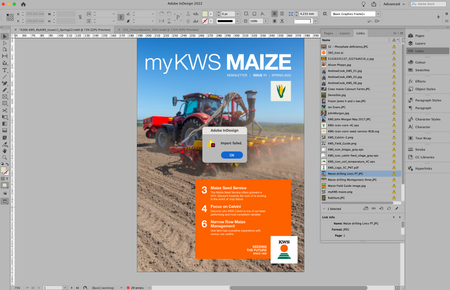
Hi there, I've been happily working with Indesign files in Dropbox for a year now where my files are all stored Online Only. It used to be the case that Dropbox would automatically relink all the supporting files that are stored on Dropbox.com and I would be able to edit the InDesign file. Recently, upon opening an InDesign file all the links to picture files etc are broken. Added to that, when I try to relink the files through InDesign I get a message that reads: Import Failed! (see attachment). My Dropbox App says that the files I am trying to relink are all Zero Bytes. When I access my account at Dropbox.com the files are all good. The only way I seems that I can relink my files is if I download them to my iMac. I'm currently using Mac OS Monterey 12.3.1. Any ideas?Solved20KViews6likes71CommentsAndroid: Kdbx files can only opened with Google Drive-PDF-Viewer which is wrong!
Why can I open Keepass *.kdbx files only with Google Drive-PDF-Viewer?? It is no PDF. Why does the dropbox app does not let me choose a different App to open the file with? Why not use the android default app open selection??14KViews3likes55Comments
Can't open files in 3ds MAX that are on Dropbox
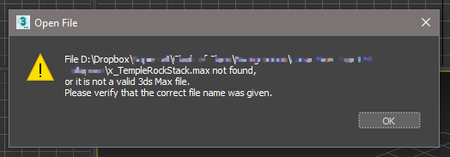
**Just thought I'd edit this top post** I think this has been resolved quietly by either Dropbox or Autodesk, as I no longer have any problems with syncing or anything. Hello all, Similar to this issue :- https://www.dropboxforum.com/t5/Dropbox-files-folders/3D-Studio-Max-Files-won-t-open-from-Dropbox-folder-on-my-new/td-p/431339 ( if not identical.. ) I recently moved over to a new PC, and since then I have been having loads of issues opening older ( older than my new PC ) files that are stored on Dropbox. I never had any issues before, and for some reason, some files do work... My setup is identical, as far as MAX and Dropbox are concerned at least. There is no issue with missing or corrupt files, or versions of 3ds MAX. I get this error ( file names redacted...):- I also get similar issues with some materials, where MAX can't find the texture files... If anyone has any idea I would be very grateful. It's driving me mad. I am convinced there's some kind of simple solution that will have me slapping my forehead ( there may not be.. ). Thanks !5.7KViews0likes31CommentsDropbox Smart Sync doesn't work for image sequences in After Effects
Hi, whenever I open an After Effects project from coworkers which uses linked image sequences that I haven't yet synchronized locally, the Dropbox smart sync feature fails to sync the whole image sequence automatically. It detects the first image in the sequence but doesn't download the rest, resulting in an After Effects error "Can't import as sequence. Found no matches for the selected file name. (39::44)". For projects with multiple sequences, this is a very annoying bug. Especially because relinking the files isn't easy since you first have to find the file locations and sync the files manually. We have been using OneDrive before and there it wasn't an issue. Any plans to fix this issue? Best, Lennart5.4KViews0likes28Comments