Need to see if your shared folder is taking up space on your dropbox 👨💻? Find out how to check here.
Tips and Tricks
7 TopicsIntroducing: Managed sharing for Dropbox teams
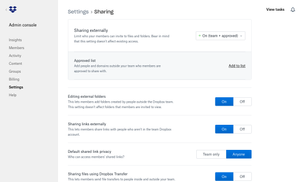
Overview: As an admin, you need to know who has access to files, and sometimes to share them beyond your own team, especially as we continue to work from home. Now, if you're the team admin of a Dropbox team, you can control how team members can share with people outside the team. Find out more about this here. Audience: This is available to admins only More ideas: We would love to hear your input on how to improve the Admin console, so why not submit an idea? Check back in for updates and news, and you can join the conversation with other Admins and Dropbox staff here.2.2KViews0likes0CommentsWhat’s new: Dropbox Shop, editing PDFs, and Dropbox Backup
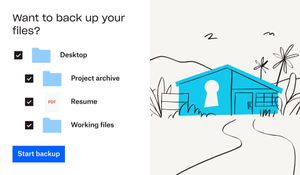
This is a big month for product updates, so keep reading to get all the details about Dropbox Shop, Dropbox Backup and PDF editing. Trust us when we say there are some seriously useful updates here, whether it’s to do with day-to-day file management, security or an online shopfront - exciting times! Secure your digital life with Dropbox Backup—here’s what’s new: Backing up your files, as you know, is super important and if you need a simple and secure backup solution to protect the most important parts of your digital life - Dropbox Backup is for you. Whether you have family photos, graduation videos, or tax forms on your computer—you can keep it all safe and quickly recover with Dropbox Backup. If you’re a member of the Dropbox Community, chances are you’ve heard of Computer Backup before, so what’s the new news? Based on feedback from customers and our Community members, the team have made improvements to Computer Backup - building on our popular backup functionality, we’re now introducing Dropbox Backup. Backup has been upgraded with new features our users have been asking for, including a new restoration flow, settings to manage your backups on your computer, and more. Simplify your backup experience- Manage everything from your desktop—one place to check progress, view history, and prioritize specific files. Be prepared with an automated safety net- Keep backed up files separate from your shared files, so you won’t have to worry about overwriting your emergency backups. Rely on fast recovery if things go wrong- Start recovery with just a few clicks, and your files will be automatically restored from cloud backup. Dropbox Shop is here, and ready for you to try: You might have heard us mention Dropbox Shop before, but now you can join the Public Beta and check it out for yourself! (If you are outside of the U.S. or are part of a team and want to sign up, click here). Dropbox Shop is a new platform that allows creators (like you, maybe) to easily sell content—from e-books and recipes to prints and workout videos—directly to customers, so you can spend more doing what you love: creating. With Dropbox Shop you can: Easily create product listings in three clicks: Add content directly from Dropbox or your computer, set a custom image, audio, or video preview, and determine your price, and now, tipping is also enabled. Customize your storefront: Set your seller profile up with a name, picture, and description that lets customers know exactly who you are and what you’re doing! And if you want to update it later, you can simply edit the items and your storefront too. Make the connection: Establish your brand and maintain your relationship with customers through a custom storefront, not a cluttered marketplace of sellers. Add content directly from Dropbox: No need to upload your files all over again. Sell any type of content: With the ability to upload multiple files, of any type, up to 50GB per file for Plus/Pro users and 2GB for Basic users See what works (and what doesn’t): View key analytics to help learn what’s working and what can be better for your business. Share directly with customers: There’s no middleman here. You control how you interact with customers - you can share a listing directly with them wherever you interact with them already, whether it’s on email, social media and even newsletters. Enable secure payment processing: Don’t worry about managing payments, it’s covered through our partnership with Stripe and Paypal and multiple payment options for customers. Automatically deliver content upon payment: That allows you to save time facilitating sales, and keep on creating. Simplify transactions for you and your customers: Buyers don’t need a Dropbox account to make a purchase, they can access their files via email verification and download it within 28 days. Those with a Dropbox account can access everything they’ve purchased when logged in. Work conveniently from your desktop, tablet, or mobile Why not take the first brave step and put your work out there for sale? As we said, you can set up your first content listing in 3 easy clicks, so get started here. Save time and edit PDFs in Dropbox PDFs are incredibly handy files, but sometimes they need to be updated, and now, you can edit them without leaving Dropbox. Well, just exactly how much editing can you do? Within Dropbox you can: Rearrange PDF pages Insert, rotate, and delete PDF pages Fill interactive forms Manage multiple versions: save PDFs as a copy or replace original These features are available to a select few in Beta now, and will roll out to more people in coming weeks. Sounds like a time saver to us! Will you use this feature? Now you can keep your files safe with just a few clicks, sell your digital content, and edit PDFs in no time, which sounds good to us! But wait, there are even more updates you can check out here. Will you be using these new products and features?16KViews3likes5CommentsIdeas you might have missed: November
Here are some new ideas from our Community members you might not have seen this month. We love to see which new ideas get a lot of votes, and what sparks inspiration for other Community members too. Check them out, get voting on the ones you like or even add your own ideas! Dropbox Folder Shortcuts - Submitted by jj1234 Mind maps for Paper - Submitted by Virginia Gi Admin option for hiding the facepile and commenting to anonymize Paper Docs - Submitted by elizag1010 Moving files Warning Message is "Limited” - Submitted by Joe F So keep an eye out for even more ideas, get voting, and share your own - and keep your eyes peeled for updates that become a reality in the future.1.2KViews0likes0CommentsIdeas you might have missed: December
We can’t believe it’s the last idea update of 2020! You know we love to see your ideas for Dropbox, and sharing some that you might have missed this month. Check them out and vote for the ones that you like the sound of! Dropbucks - Suggested Digital Wallet & Money Transfer App - Submitted by tberishaj Playback speed - submitted by Rahstyle Export Dropbox history - Submitted by blue Photo tags and face tags - submitted by fernandodandrea Dates and Times for File Requests and Expired Links - submitted by bsneen We’ve really loved rounding up the ideas this year, and we’ve loved seeing some of those ideas become a reality. If you have an idea, you can share it here and who knows, you might see it become a part of Dropbox next year.2KViews1like0CommentsWhat’s new: December
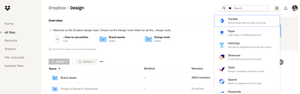
We love to keep you up to date with the latest feature releases to Dropbox and this month we have a few small but mighty changes coming your way. New invitation settings: Previously, only admins could add members to a team but with these new settings, the admin can delegate their work and empower other members to invite the people they work with. So if your admin isn’t available, you can keep your team rolling! Learn more here. Vault is now available to users on the Dropbox Plus, Professional, and Family plans. You might have heard about Vault already, and now it’s available on more Dropbox plans. Keep your most important files safe and well organized, with a PIN for secure access. Enjoy peace of mind knowing that you can designate trusted people to access your files in an emergency. Learn even more about it here. New grid icon: The app launcher is a launching point for Dropbox products and third party integrations. You can find it in the right hand corner of Dropbox.com, it looks like a little grid. Now you can move between your apps a lot easier and access products and features from any screen. Configure your team’s desktop app preferences with GPO: This one is for admins of Dropbox Business teams. You can now configure your team members’ Dropbox desktop app preferences remotely using GPO (Group Policy Object). You can configure preferences for individual team members, groups of team members, or whole teams - read more about it here. Import and Invite contacts from Google Directory As an admin, you will now be able to import and invite contacts from Google Directory into your team. This will make it much easier to invite company contacts, and cut out any messing around with email addresses or typos. We’d love to hear what you think of these updates, so join the conversation below and if you want to add your own ideas for Dropbox, you can do that right here. It’s been a busy year and we’re looking forward to sharing all our new features in 2021!2.7KViews0likes0CommentsIntroducing: Selective sync now enabled by default
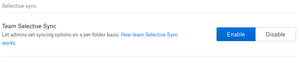
Overview: Selective sync will now default to be Enabled (in settings). When a Dropbox Business team member is added to a team folder or team space, all folders shared with them automatically sync to their computer’s hard drive. Find out more about this here. Audience: Business Admins only More ideas: We would love to hear your input on how to improve the Business Admin console, so why not submit an idea? Check back in for updates and news, and you can join the conversation with other Business Admins and Dropboxers here.2.5KViews0likes0CommentsIntroducing:: Business Admin update - Insights page
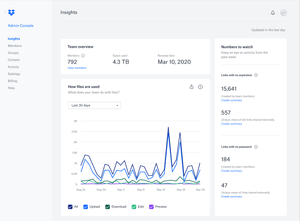
As an admin, you need to know how your team are doing. Not just in terms of mood, but in terms of accessing files, space available, renewal and more. To make that all a little easier, the Admin Console will now open directly on the Insights page, instead of the Members page. Don’t worry, you can still find your way to members page through the menu on the left hand side of your screen. Audience: This is available for all Business Admins. More ideas: We would love to hear your input on how to improve the Business Admin console, so why not submit an idea? Which insights do you check most often?1.8KViews1like0Comments