We're making some changes to the Dropbox Community 👩💻 - Find out more here.
View
566 Topics
I download my PDFs for offline use on my iPad, but it corrupts them and I can't edit them.
Hi everyone. I use dropbox primarily through the files folder on my iPad and computer, where I annotate PDFs of textbooks for law school. I have been doing this for a year and it's worked pretty well. Recently, however, I have two problems: (1) Even if I download offline the pdf to my files folder, at some point if I am editing offline, it will try to sync and fail and undownload, leaving me unable to edit the file. (2) In the last week, I have annotated PDFs and saved them. Then they become corrupted and won't open. I then have to restore an earlier version of the PDF, which doesn't have the latest annotation, which is super annoying to lose all of my work. Any ideas or advice on either issue?69Views0likes5Comments
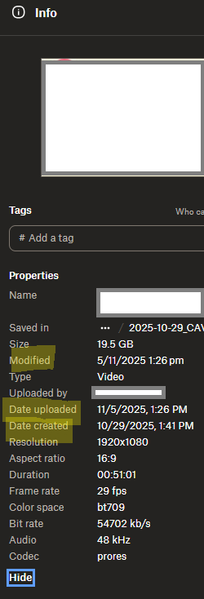
I'm seeing 2 different date formats after opening file info on my Dropbox account online.
Device PC Operating System/Browser (if using the web) Windows 11 Dropbox App Version (if using the app) Browser Edge Version 143.0.3650.96 (Official build) (64-bit) Question or Issue Hi, in the web browser version of dropbox, when choosing file info, the date are shown in 2 differents formats, that is very confusing to understand when looking at dates like 11/5/2025 and 5/11/2025 for example, which one is month? Modified : day/month/year date upload: month/day/year date created: month/day/year here is a screenshot when you can seeSolved154Views0likes6Comments
iPad keyboard covers search bar/results when searching inside a document
Title: iPad keyboard covers search bar/results when searching inside a document App: Dropbox Device: iPad (9th generation) OS: iPadOS 26.3 Issue: When I search within a document in the Dropbox iPad app, the on-screen keyboard appears and blocks the search bar and search results. I can’t see the results while typing because they are hidden behind the keyboard. Steps to reproduce: 1. Open Dropbox on iPad. 2. Open a document (PDF, etc.). 3. Tap the search/find feature inside the document. 4. Start typing a search term. 5. The keyboard pops up and overlaps the search results. Expected behavior: The search bar and results should remain visible above the keyboard. Actual behavior: The keyboard overlaps the search interface, making it difficult to view results. Device: iPad 9th generation iPadOS version: 26.393Views0likes2Comments
Can recipients of a shared folder link view other recipients of the same link?
I have some large files (several GB each) that I would like to make available to customers to test my company's software. Due to the file sizes, upload/download times can be quite long, and I don't want to chew up my organization's storage space by uploading each file multiple times. So, I'd like to place the files in a single Dropbox folder and share the link with each relevant customer. However, I want to make sure that anyone who I share the link with can't see who else I've sent it to. Recipients of the link may be early in the adoption process and can't be officially "exposed" as customers yet, and our customers may be competitors with each other, so I want to be sure that no one outside my organization can see anyone else who isn't part of either their or my organization. For example: In this folder, I am RK, BC is my colleague, and XH and ZW are employees at one of our customers. However, if XH and ZW weren't colleagues, I would want each of them to only see themselves, RK, and BC as members of the folder. Does this feature exist, and if so, how can I enable it in shared folders? I would want this obscurity to propagate downwards to any sub-folders (and sub-sub-folders) as well.Solved184Views0likes4Comments
Add an option to exclude directories from the Photos tab.
In the Dropbox app, there's a Photos tab which shows every picture in my Dropbox. However, I have photos from my personal life, work items, screenshots and even memes in my Dropbox, which makes the content pretty chaotic. Ideally, I would like the 'Photos' tab to display photos from my personal life only, which would make it easier for me to explore my timeline and relive my memories. Therefore, I would like to request a feature that would allow us to select which directories should be included or excluded from the Photos tab. Thank you.116Views0likes2Comments“Can't open the file because the file format/extension is not valid.” error on website/desktop app.
Hi, I’m having a serious issue with Dropbox where many of my files appear in the correct folders on both my computer and on Dropbox.com, but none of those specific files will open. I receive errors like: “Cannot open the file because the file format or file extension is not valid.” Here’s what’s happening: I can see the file names and folder structure in Explorer. I can also see the same file names on Dropbox.com. But when I try to open any of these files (locally or on the web), they fail with format/extension errors. The files appear to be zero‑byte placeholders rather than real files. Most of my other files still exist on my second laptop, but the ones I urgently need do not. These missing files appear in Dropbox, but none of them open anywhere. This all started after repeated issues with the Dropbox sync engine failing to start. Dropbox would install, but the app never launched, no tray icon appeared, and the sync engine seemed to be stuck in a crash loop. I believe this may have caused Dropbox to replace some of my original files with empty placeholder versions. I need help determining: Whether Dropbox has older historical versions of these files stored internally. Whether a data recovery review is possible for these zero‑byte or corrupted placeholder files. Whether Dropbox can confirm if these files ever successfully uploaded before the sync engine failed. These files are extremely important to me, and I’m hoping Dropbox Support can check server‑side logs or historical versions to see if recovery is possible. Thank you for any help or escalation you can provide.518Views0likes26Comments
"Video not available or not supported for this browser" error on Safari
Hi, I have uploaded several videos to a Dropbox folder, but when I try to view on a computer (Mac, Safari (v.26) Mac OS - Tahoe 26 -- recently updated), I get the image below with a "spinning" box. Never had this problem before, and I can download the video back to the computer and it plays fine. I can also view the videos on an iPhone no problem. Btw, seems to work ok on Chrome. Seems that the Safari browser is not compatible? Thanks!145Views0likes3Comments
View HTML in Safari rather than the Dropbox mobile app on iOS?
Is there some easy way I am missing of viewing an HTML file from the iOS Dropbox app in Safari rather than in the in-app viewer? I have only been able to make this happen by a convoluted process involving sending files to My Files first.113Views0likes2Comments