Our Community is in read-only mode until April 8th, learn more here. You can still search existing threads or get help via Dropbox Support, the Dropbox Help Center, or Learn.
Web
234 Topics
Improving Uploads
Hi everyone! My name is Kevin and I lead a team that's looking to make it easier to upload files to Dropbox. We are looking at the Dropbox website and mobile apps (both iOS and Android) to try and make uploading better in the following ways: Reliability: less likely to fail Performance: speed things up so you wait less Usability: give more information during upload so you know how it's going And much more. I'd love to hear from all of you about your experiences with uploading content. What is working well and what is not working well? What are some of the features you wish were available to make uploading easier? What frustrates you? Don't hold back. Here to listen and engage.10KViews10likes25Comments
Open Dropbox links directly in explorer (windows) or in finder (mac)
This is the most important request ever! And it should be already implemented. Is to open dropbox links directly in explorer (windows) or in finder (mac), independent where the link is, whatsapp, slack, messenger, skype, any of then. Is a link, when i click today,. it always open the browser (Edge on Win and Safari on Mac), but should have an option, or in my point of view, the defult should be open in explorer/win and finder/mac. That is the way it should be. You can ask any computer user, and i know a lot ask for this and post helps about it. So, why still isn't like that? And most important, can you please do it fast? All community will give you a lot of love and more subscriptions back. Thank you!4.6KViews7likes2Comments
couldn't save content Please check your internet connection and refresh the page
Online ANYWHERE and I get the following error when trying to share from Safari is iOS10 "couldn't save content Please check your internet connection and refresh the page" This hapens on any network. iPad V5 32gb with AT@TSolved18KViews5likes20Comments
Grid View when accessing shared folders through shared links?
I find it incredibly frustrating that I cannot view images in a folder by grid. The idea of creating an album for each folder seems crazy -- especially as those folders seem to be on a per account basis rather than across our cloud storage. I find it frustrating that I would have to then search for an album in a non list way to view its contents, which with the 60+ albums I'd have to make, could become impossible quite quickly, when all I want is to be able to view the contents of a folder in grid view. If this is something that an archaic system lik Microsoft can offer, dropbox should be able to offer it as well.Solved6.5KViews5likes6CommentsSlow upload speed (but only to Dropbox). Dropbox is now unusable
I've begun to experience this recently: 1: Uploads to dropbox are (as of about one week ago) consistently around 0.14 Mbps. This happens through desktop or web interface. For perspective, that's a 300 baud modem from 1984 kind of speed. It renders me unable to work using dropbox. 2: Speed tests of the line show consistent ~75 Mbps downstream rate / ~20 Mbps upstream rate. 3: If I try uploading the same file(s) to google Drive (or anywhere but dropbox), speeds are as-expected. 4: I have re-installed the dropbox app. Prefs for everything, including Bandwidth, are at default, so please don't suggest it as a solution. Dropbox is the only destination exhibiting the problem. Any help appreciated! What kind of tests can I do to narrow things down? Thanks in advance. (UPDATE EDIT: 9 Nov) It's not a fix, but a good clue: I have seen immediate return to expected upload speeds after connecting through a VPN. Another user below has also found respite by altering the MTU size in their router configuration. Will update with new findings. POSSIBLY suspecting a bad hop somewhere along the route between me and dropbox. If it is, then How to remedy?3.5KViews3likes10Comments
How to disable annoying "Upload Complete" pop-up
I have multiple Dropbox accounts for several different clients, and as such, I must use the Dropbox website for uploading and downloading files I share for one of my clients. When I want to add my files to a Dropbox folder via the website, I always get a pop-up box with a confirmation that my upload has completed. This pop-up box is very annoying. It takes up a lot of space in the lower left corner of my screen, and the only way to get rid of it is to close it by clicking the "X." I upload files all day long and this confirmation pops up every single time. This requires a lot of extra clicking so that I can uncover and see pertinent information on my screen. Question - is there any way to disable this notification, or at the very least change it so that it pops up but disappears on its own after a second or two?1.1KViews3likes4CommentsNeed to see creation date of backups loaded to Dropbox
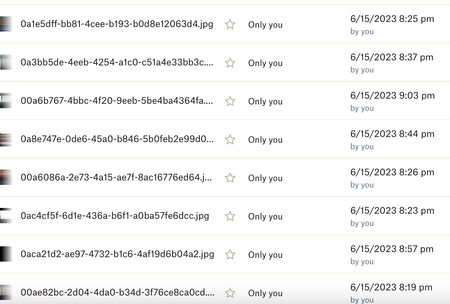
I am using Dropbox as a secondary backup for customer files from my server. If a customer needs me to restore their data from a particular date I have to locate the files they want by the backup date of file . I just noticed Dropbox is changing all my file dates to the date I uploaded them from my server to Dropbox. I cannot figure out how to see the creation date of the files anymore. This makes them unusable to me as backups since I have no idea what date the backups are for All the files have a 6/15/23 date now so if I need to restore files from 5/1/23 I can't figure out a way to do that. Please advise.3.1KViews3likes9Comments
"You seem to be having internet issues" error preventing upload even w/o Internet issues present
Trying to use Dropbox for the first time, a relative set up an account w/ 2TB of storage so we could share old home movies. I'm trying to upload one that's like 7GB and almost two hours, understandably the upload time it gives me is sizable which is fine, but four times now the upload has stalled with a message of "You seem to be having internet issues. Hang tight and we’ll resume your upload once you reconnect." despite not actually having any Internet issues as every other site is cooperating fine, and even if I leave the tab open for a while there's no further progress on the upload. Have never had this issue with large uploads to Google Drive or YouTube, etc. Tried signing out and in as well. Any particular fix for this beyond just using a different service besides Dropbox instead? Thanks!Solved12KViews3likes49Comments
I'm trying to upload a small file, but finalizing is taking forever when using the desktop app.
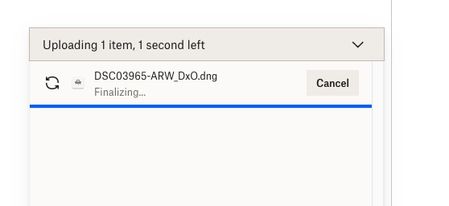
Trying to upload a dng file that is about 90MB in size to my gallery - fter taking the 3 minutes indicated it has been 15 minutes with the screen saying 1 second left and "finalizing"...what is going on?Solved25KViews3likes38Comments