We're making some changes to the Dropbox Community 👩💻 - Find out more here.
Web
1096 Topics
Audio is being transcribed in wrong language.
Device Lenovo ThinkPad X1 Carbon Gen 9 Operating System/Browser Windows 11 / Firefox Dropbox App Version/Browser Version Browser Version Issue: I have been using the transcription feature for audio files for a while now for work to make first transcriptions of interviews. Usually no issue. Now Dropbox is transcribing an audio file in English (there might be one or two words in Afrikaans here and there but over 90% of the content is English) into a seemingly slavic language, probably polish, for some reason and there seems to be no feature to tell Dropbox to change the transcription language. I saw some older, closed threads where people had the same issue with video transcripts but there it seemed to have been triggered by where they were based. My case is doubly strange, as the file is in English and I am based and currently using the feature from Switzerland. I checked and my VPN is not active and was not active at the time of transcribing. Any fixes known? Thanks91Views0likes4CommentsWhy does the Dropbox website keep logging me out?
I've had a Dropbox account for many years, and suddenly in the past few months it logs me out daily and tries to sign me into another unused gmail account. I don't close the tab or the browser, it just goes to sleep. Do I need to cancel the gmail account? What can I do so I don't need to keep signing in? Every time I do, my settings change. And speaking of, is there any way to change the default settings of specific features? Like I dislike quick view and would like the default to be full-screen instead of having to check the box again every time I log-in (again, daily at the moment...) Thank you for your help!159Views0likes12Comments
The audio transcription on Dropbox can't find explicit language in songs.
Hi I wonder if someone could help. Has the AI modelling changed for this feature? I use this feature most days to transcribe vocals in music featured in radio shows. Was really useful for finding expletive language and so on. Now it seems like the only vocals you are able to transcribe from a one hour radio show is the presenters vocal links. Not the music in between. Hope you can help.124Views0likes6CommentsIssue with communication between Dropbox web and Dropbox desktop application
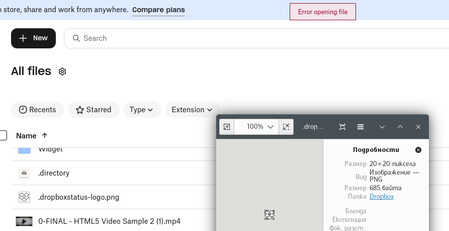
Hello, I want to report issue (I believe it is bug) related to trouble with communication between your web site (https://www.dropbox.com/home) and the official Dropbox application (v240.4.8493) that normally happens on loopback port 17600: This used to work well, but for whatever reason it shows errors on try to open some file using ellipses > Open in > Desktop. Pretty often the web site cannot even detect that there is working desktop application. At the same time Dropbox desktop application seems well working - no delay in sync, etc. I made a little research what might be the reason and found out that despite desktop application does most of its work well there is significant delay (softly said) in responses to requests that website sends: Such responses have to be in borders of milliseconds (1 second is a huge delay). Above delay leads to processing timeout and error seen on first screenshot. One more additional detail: it seems that even when particular file is opened successfully at the end, Dropbox application delays it response related to the file till file gets closed. Is this normal?! It's rather BUG! Please, forward above to team responsible for Dropbox application development.171Views0likes7Comments
I'm seeing 2 different date formats after opening file info on my Dropbox account online.
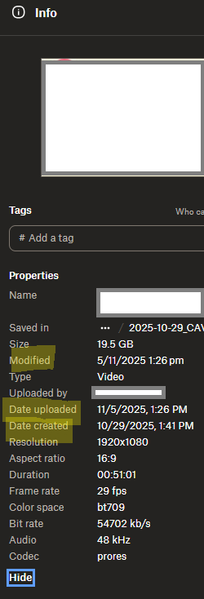
Device PC Operating System/Browser (if using the web) Windows 11 Dropbox App Version (if using the app) Browser Edge Version 143.0.3650.96 (Official build) (64-bit) Question or Issue Hi, in the web browser version of dropbox, when choosing file info, the date are shown in 2 differents formats, that is very confusing to understand when looking at dates like 11/5/2025 and 5/11/2025 for example, which one is month? Modified : day/month/year date upload: month/day/year date created: month/day/year here is a screenshot when you can seeSolved150Views0likes6Comments
Dropbox website is stuck loading when I try to login.
I have exactly the same problem as described in this thread. https://www.dropboxforum.com/discussions/101001020/dropbox-website-is-stuck-loading-when-i-try-to-login/786004 However, I didn’t find a solution there. Could you please tell me how to log into my account on a new device? Why does the authorization work without any issues on one device but get stuck on another?Solved134Views0likes10CommentsTell Us How You Use Dropbox
No two people use Dropbox in exactly the same way. Some of you rely on it every day for work, others for school, creative projects, or keeping life organized - and we love that. We’d love to hear how you’re using Dropbox today - is it something you use once in a while, is it part of your day to day, are there any features you can’t live without? What workflows have you built that save time or reduce friction? And where do you see opportunities for us to do better? Your tips, ideas, and honest feedback really help us to make sure we can share useful tips, and they help other community members discover new ways to get more out of Dropbox too. Share your experience, favorite features, or suggestions in the comments below. Your voice truly helps shape the future of the Dropbox community 😁 The Dropbox Community Team3.9KViews4likes14Comments