Our Community is in read-only mode until April 8th, learn more here. You can still search existing threads or get help via Dropbox Support, the Dropbox Help Center, or Learn.
Web
406 Topics
Audio is being transcribed in wrong language.
Device Lenovo ThinkPad X1 Carbon Gen 9 Operating System/Browser Windows 11 / Firefox Dropbox App Version/Browser Version Browser Version Issue: I have been using the transcription feature for audio files for a while now for work to make first transcriptions of interviews. Usually no issue. Now Dropbox is transcribing an audio file in English (there might be one or two words in Afrikaans here and there but over 90% of the content is English) into a seemingly slavic language, probably polish, for some reason and there seems to be no feature to tell Dropbox to change the transcription language. I saw some older, closed threads where people had the same issue with video transcripts but there it seemed to have been triggered by where they were based. My case is doubly strange, as the file is in English and I am based and currently using the feature from Switzerland. I checked and my VPN is not active and was not active at the time of transcribing. Any fixes known? Thanks110Views0likes4Comments
The audio transcription on Dropbox can't find explicit language in songs.
Hi I wonder if someone could help. Has the AI modelling changed for this feature? I use this feature most days to transcribe vocals in music featured in radio shows. Was really useful for finding expletive language and so on. Now it seems like the only vocals you are able to transcribe from a one hour radio show is the presenters vocal links. Not the music in between. Hope you can help.147Views0likes6Comments
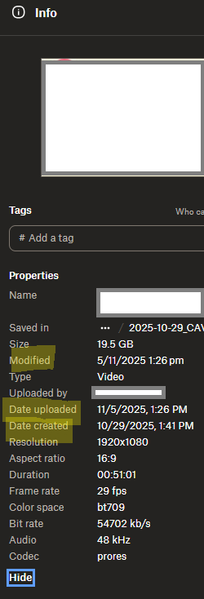
I'm seeing 2 different date formats after opening file info on my Dropbox account online.
Device PC Operating System/Browser (if using the web) Windows 11 Dropbox App Version (if using the app) Browser Edge Version 143.0.3650.96 (Official build) (64-bit) Question or Issue Hi, in the web browser version of dropbox, when choosing file info, the date are shown in 2 differents formats, that is very confusing to understand when looking at dates like 11/5/2025 and 5/11/2025 for example, which one is month? Modified : day/month/year date upload: month/day/year date created: month/day/year here is a screenshot when you can seeSolved156Views0likes6Comments
How can I download a large folder to my external usb stick?
Device Macbook Air M2, 2022 Operating System/Browser (if using the web) (macOS Tahoe Version 26.3) Dropbox App Version (243.3.6860) Question or Issue If anyone can hop on a video call and help me download large 'camera uploads' folder (96GB), 26K mostly images/some videos to external usb stick I'll happily transfer $20! First formatted external hard drive to exFAT but tediously slow having to download files as zip in download folder only and then copy to external hard drive. Tried to set up as APFS with no luck. Getting all sorts of error messages every different workaround I try. If anyone could walk me through it via video call I would really appreciate it. Other folders are no issue to copy/transfer.Solved233Views0likes10Comments
Add an option to exclude directories from the Photos tab.
In the Dropbox app, there's a Photos tab which shows every picture in my Dropbox. However, I have photos from my personal life, work items, screenshots and even memes in my Dropbox, which makes the content pretty chaotic. Ideally, I would like the 'Photos' tab to display photos from my personal life only, which would make it easier for me to explore my timeline and relive my memories. Therefore, I would like to request a feature that would allow us to select which directories should be included or excluded from the Photos tab. Thank you.116Views0likes2CommentsWe want to open shared links directly on the desktop app and not the website.
Hi there. Love Dropbox. I moved our whole team to it from Google Drive much to all of our delight. The one hiccup that keeps coming up (was also an issue with Drive, but would be a game changing new feature from DB) is sharing links. Our team uses the desktop app to work with files directly in finder, but we share links to files and folders on slack and in email, etc... Right now we click a link, it opens the browser as expected, we find the file path in browser and then follow that path in finder. That seems like an awful lot of work when we have a direct connection between our finder and dropbox in the app. Perhaps the website could provide a link that connects to the desktop app, opening the folder/file in finder or windows explorer. Seems like a reasonable option to me, but what do others think?590Views1like10Comments“Can't open the file because the file format/extension is not valid.” error on website/desktop app.
Hi, I’m having a serious issue with Dropbox where many of my files appear in the correct folders on both my computer and on Dropbox.com, but none of those specific files will open. I receive errors like: “Cannot open the file because the file format or file extension is not valid.” Here’s what’s happening: I can see the file names and folder structure in Explorer. I can also see the same file names on Dropbox.com. But when I try to open any of these files (locally or on the web), they fail with format/extension errors. The files appear to be zero‑byte placeholders rather than real files. Most of my other files still exist on my second laptop, but the ones I urgently need do not. These missing files appear in Dropbox, but none of them open anywhere. This all started after repeated issues with the Dropbox sync engine failing to start. Dropbox would install, but the app never launched, no tray icon appeared, and the sync engine seemed to be stuck in a crash loop. I believe this may have caused Dropbox to replace some of my original files with empty placeholder versions. I need help determining: Whether Dropbox has older historical versions of these files stored internally. Whether a data recovery review is possible for these zero‑byte or corrupted placeholder files. Whether Dropbox can confirm if these files ever successfully uploaded before the sync engine failed. These files are extremely important to me, and I’m hoping Dropbox Support can check server‑side logs or historical versions to see if recovery is possible. Thank you for any help or escalation you can provide.525Views0likes26Comments