Our Community is in read-only mode until April 8th, learn more here. You can still search existing threads or get help via Dropbox Support, the Dropbox Help Center, or Learn.
Web
172 Topics
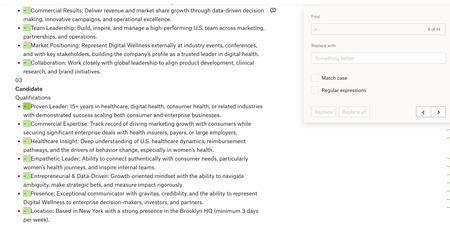
Paper: Find + Replace (with blanks) doesn't work
Device: Macbook Operating System/Browser (if using the web): macOS Tahoe 26.3.1, Chrome Dropbox App Version: Paper Question or Issue Whenever I try using Find & Replace in Dropbox Paper, I can’t seem to replace text with nothing (leave the replacement field blank) the way I can in MS Word/Google Docs. e.g. if I want to quickly remove a recurring character, extra spaces, or formatting marker across a document, Paper doesn’t let me do a blank replace, which makes cleanup much harder than it needs to be.40Views0likes1CommentI deleted my Dropbox Backup but files still are still accessible through the 'Recents' filter
Hi, In my main account, I've deleted a Backup (proper Backup; a computer that was registered there). Today, when exploring the "Recents" filtering on the Home page, I see the name of that computer, folders and files within are still there! I can even open and visualize them. Even though they were supposed to be wiped; when I delete the whole Backup and confirm, they are not supposed to be stored under the retention period. Also, I don't see them anywhere else; not in Deleted Files; not in dropbox.com/backups, so there is no way to restore them or properly delete them. When selecting those files in questions from the Recents filter, the only options I get are "File Info" and "File Activity", so Dropbox "knows" that those files are supposed to not exist anymore and, hence, it won't let me do anything. When you right click other; existing files there, you get all the options like Open, Share, Delete, etc. In summary, this is clearly a (serious) bug: Those files should have been completely removed when I deleted the Backup They shouldn't show up in Recents list as a leftover Serious privacy issue, as not only they show there as some useless remnants, I get a thumbnail preview of them and I can double click to open! You are clearly storing my data I chose to delete! As a side note, why can't we clear or selectively remove items from the Recents list; nor on the Web or the App? I've seen some posts from years ago. Is this ever going to be addressed? All the other main players (Google Drive, OneDrive, etc.) allow that, so why do I have to see stuff I don't want in my Recents filtering "forever" (or until they get cycled out; which I couldn't find any documentation on how many files you keep there) Thanks.Solved366Views0likes15Comments
I keep seeing a pop-up message online that keeps appearing each time. Can I stop it?
For the past few days, when I log in to the web version of Dropbox.com, I get a pop-up message that says, "View files you have deleted - You can also easily restore or permanently delete them here." Even if I click the OK button, the message keeps appearing every time I log in. Is there a way to prevent this from happening? Thanks!199Views1like9Comments
Dropbox Basic account is over quota and completely locked
Device Dell laptop Windows 10 Dropbox App Version (if using the app) n/a Question or Issue My Dropbox Basic account is over quota and completely locked. I cannot view or delete files via: - dropbox.com/home - /deleted_files - mobile app - desktop app I am not asking for more storage at the moment. I just need temporary access to delete files and bring the account under quota so I can properly assess my current and future needs. Can a Dropbox staff member advise or escalate? Many Thanks. MW247Views1like12Comments
Link an existing folder within another folder
Hello! I've found a number of instances where I'm creating a new folder for a new project and would like to link to an already existing folder from a past project. I don't want to move the folder or create a copy, but just link to it as a shared resource. I mostly use dropbox within Finder, but occasionally on web as well, so it would be ideal for me to see this kind of link in both interfaces. Is this possible already or if not, would others find this helpful as well?1.7KViews0likes4CommentsPhotos tab in Dropbox online contains bookoo pics from way back.
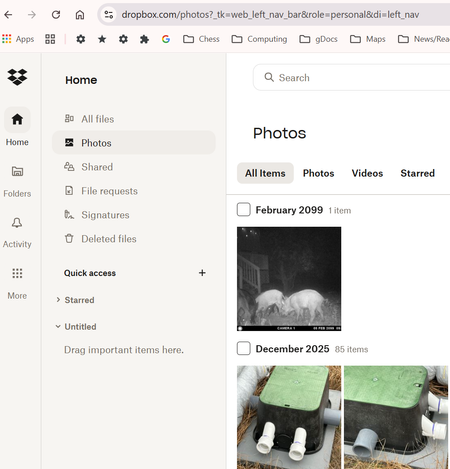
I was surprised to find that the Photos tab in Dropbox online (i.e. at Dropbox.com) contains bookoo pics from wayyyy back. I've always deleted pics from the iPhone after naming and saving the ones I want to keep on my PC (in Dropbox folders of my own (conscious) creation). In Dropbox it says, "Camera uploads is turned off." Don't believe I've ever intentionally told Dropbox to save all photos.125Views0likes4CommentsI renamed one of my folders and now all of its files have disappeared.
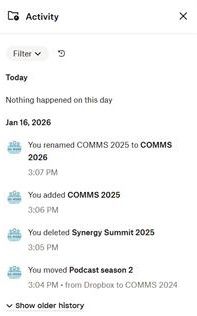
Question or Issue On Fri 16 Jan 2026, I was organising Dropbox and instead of creating a new folder for Comms 2026, I renamed a current folder called Comms 2025 to Comms 2026. Now I can't find the files in that Comms 2025 folder. There are no files in Deleted Files and Activity isn't showing deletion of these files. When viewing all the Dropbox folders, Comms 2026 shows a drop-down sub-folder but I can't click on it. What can I do to find / recover / restore the file? I'm on a Dropbox Plus account.
I can't delete my old backups
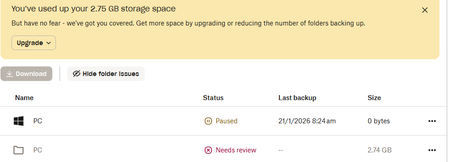
Need help: I looked at a few threads concerning deleting Old Backups but none have solved my issue. See attached screenshot. Somehow I've managed to set up a new backup for my PC which I've paused for now. I have tried countless ways to delete the backups that have filled my Dropbox...no joy. I've gone through the Backup Settings, and I cannot find the old backup to delete: Can anyone see what I need to do for this? Mike152Views0likes7Comments
How can I stream a video to my website from Dropbox online?
Hi Guys, So I will try and explain best I can. This is my website https://www.progressivedreamsmusic.com/ and this is a page on my website where I stream videos https://www.progressivedreamsmusic.com/a-progressive-journey-50/ The video that plays on the above page is hosted on my desktop in my dropbox pubic folder. I use a widget within wordpress (on my site) called FV Flowplayer Video Player that allows me to embed videos like this. What I do is copy the link of the video I want to stream and I paste it in FV Player, I change the end of the link from '?dl=0' to '?raw=1', I am not exactly sure why but without this the video won't play. Anyway, without that out of the way you can see what I am doing, but because over time this will take up lots of space on my desktop I want to know how I can stream a video from my online dropbox account like this? I want to store these very large video files in dropox cloud, maybe a public folder on my online account? Basically I want to not eat up my computers hhd space and instead do this via online instead Can anyne help me ?Solved25KViews1like2Comments