Your workflow is unique 👨💻 - tell us how you use Dropbox here.
Web
1211 TopicsTell Us How You Use Dropbox
No two people use Dropbox in exactly the same way. Some of you rely on it every day for work, others for school, creative projects, or keeping life organized - and we love that. We’d love to hear how you’re using Dropbox today - is it something you use once in a while, is it part of your day to day, are there any features you can’t live without? What workflows have you built that save time or reduce friction? And where do you see opportunities for us to do better? Your tips, ideas, and honest feedback really help us to make sure we can share useful tips, and they help other community members discover new ways to get more out of Dropbox too. Share your experience, favorite features, or suggestions in the comments below. Your voice truly helps shape the future of the Dropbox community 😁 The Dropbox Community Team2.6KViews3likes12Comments
I keep seeing a pop-up message online that keeps appearing each time. Can I stop it?
For the past few days, when I log in to the web version of Dropbox.com, I get a pop-up message that says, "View files you have deleted - You can also easily restore or permanently delete them here." Even if I click the OK button, the message keeps appearing every time I log in. Is there a way to prevent this from happening? Thanks!127Views1like9Comments
I deleted my Dropbox Backup but files still are still accessible through the 'Recents' filter
Hi, In my main account, I've deleted a Backup (proper Backup; a computer that was registered there). Today, when exploring the "Recents" filtering on the Home page, I see the name of that computer, folders and files within are still there! I can even open and visualize them. Even though they were supposed to be wiped; when I delete the whole Backup and confirm, they are not supposed to be stored under the retention period. Also, I don't see them anywhere else; not in Deleted Files; not in dropbox.com/backups, so there is no way to restore them or properly delete them. When selecting those files in questions from the Recents filter, the only options I get are "File Info" and "File Activity", so Dropbox "knows" that those files are supposed to not exist anymore and, hence, it won't let me do anything. When you right click other; existing files there, you get all the options like Open, Share, Delete, etc. In summary, this is clearly a (serious) bug: Those files should have been completely removed when I deleted the Backup They shouldn't show up in Recents list as a leftover Serious privacy issue, as not only they show there as some useless remnants, I get a thumbnail preview of them and I can double click to open! You are clearly storing my data I chose to delete! As a side note, why can't we clear or selectively remove items from the Recents list; nor on the Web or the App? I've seen some posts from years ago. Is this ever going to be addressed? All the other main players (Google Drive, OneDrive, etc.) allow that, so why do I have to see stuff I don't want in my Recents filtering "forever" (or until they get cycled out; which I couldn't find any documentation on how many files you keep there) Thanks.Solved164Views0likes10CommentsHow can I download a large folder to my external usb stick?
Device Macbook Air M2, 2022 Operating System/Browser (if using the web) (macOS Tahoe Version 26.3) Dropbox App Version (243.3.6860) Question or Issue If anyone can hop on a video call and help me download large 'camera uploads' folder (96GB), 26K mostly images/some videos to external usb stick I'll happily transfer $20! First formatted external hard drive to exFAT but tediously slow having to download files as zip in download folder only and then copy to external hard drive. Tried to set up as APFS with no luck. Getting all sorts of error messages every different workaround I try. If anyone could walk me through it via video call I would really appreciate it. Other folders are no issue to copy/transfer.Solved100Views0likes10Comments
I can't change the Dropbox web column headers
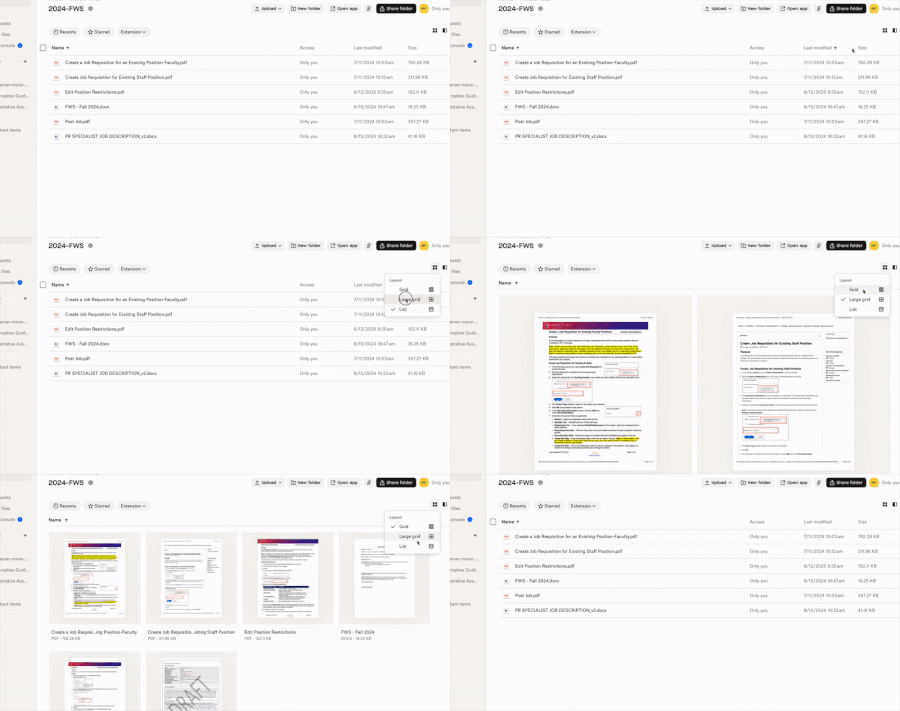
I was able to add Size header to my columns on Dropbox website last year sometime. But now when I go there to switch my List view column headers, I no longer get the inverted caret. However, I get it with Grid view and Large Grid view. Where did it go? It's the same in Safari as in Chrome. Application Affected Dropbox website Device MacBook Pro Operating System/Browser (if using the web) macOS Sequoia 15.7.4 Dropbox App Version (if using the app) NA64Views1like5Comments
Dropbox Basic account is over quota and completely locked
Device Dell laptop Windows 10 Dropbox App Version (if using the app) n/a Question or Issue My Dropbox Basic account is over quota and completely locked. I cannot view or delete files via: - dropbox.com/home - /deleted_files - mobile app - desktop app I am not asking for more storage at the moment. I just need temporary access to delete files and bring the account under quota so I can properly assess my current and future needs. Can a Dropbox staff member advise or escalate? Many Thanks. MW144Views1like12Comments
Upload hangs at 283 of 284 items on Windows 10
This information is not required, but it makes it easier for our Community members and support team to help you. Device Dell laptop Operating System/Browser (if using the web) Windows 10 Syncing Status "Uploading 283 of 284 items" I'm fairly new to Dropbox. I'm trying to use it to back up my Thunderbird Email database, which is almost 15GB. I upgraded to a Personal account. I quickly found that trying to upload the whole DB fails, so I've been uploading folders at a time. I selected multiple folders and files to try to simplify the process, to a total of 296 files in 49 folders, totaling 418MB. Some of these were empty, so they didn't upload. A couple of folders were fairly large (15MB, 18MB), but it seemed to be working. But for the last 15 minutes it's been hung up saying "Uploading 283 of 284 items, 11 seconds left." Should I just cancel it out, and hope the 284th file is isn't significant?65Views0likes7CommentsI'm seeing 2 different date formats after opening file info on my Dropbox account online.
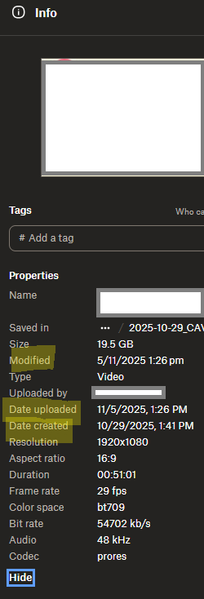
Device PC Operating System/Browser (if using the web) Windows 11 Dropbox App Version (if using the app) Browser Edge Version 143.0.3650.96 (Official build) (64-bit) Question or Issue Hi, in the web browser version of dropbox, when choosing file info, the date are shown in 2 differents formats, that is very confusing to understand when looking at dates like 11/5/2025 and 5/11/2025 for example, which one is month? Modified : day/month/year date upload: month/day/year date created: month/day/year here is a screenshot when you can see95Views0likes4CommentsPlease add a "search" functionality in move
Currently, if I want to move a file from "folder1/" to "folder2/very/deep/one/folderWithUniqueName", the fastest way is to go to "folder1/" to download the file, go to dropbox and search "folderWithUniqueName", then upload my file there and delete my file from "folder1/". Using the move action of the file takes much more clicking and choosing, which is especially painful when some of my folders have more than 30 items. It would be much easier if there is a search feature in the move action of a file/folder. You know, "suggested folder" doesn't work very well :)41Views0likes1Comment