Our Community is in read-only mode until April 8th, learn more here. You can still search existing threads or get help via Dropbox Support, the Dropbox Help Center, or Learn.
Web
8 TopicsSeamless end-to-end encryption, Microsoft Co-Authoring, new Dropbox Replay features and more
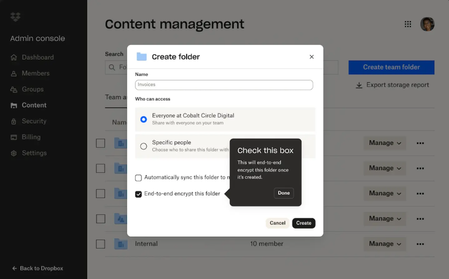
You might have already spoken to some of the team at Dropbox who build Dropbox here on the Community forums, and we are so happy to be able to update you when they have some updates to share! The team have been busy and here are some updates on end-to-end encryption (which we know you’ve been looking forward to), Replay, integrations, Dash and more. Keep reading and don’t forget to let us know what you think! Advanced data protection features add extra layers of security to confidential content with seamless end-to-end encryption and advanced key management If you’ve been using the Dropbox Community for any length of time, you might have seen requests for end-to-end encryption and we have excellent news! It is here! New advanced data protection features from Dropbox provide businesses with sole control over how their data is secured. End-to-end encryption and advanced key management make it easy to protect sensitive and confidential files in Dropbox team folders. This means that no one—including Dropbox—can gain access to their files. Activating end-to-end encryption is as simple as creating a shared team folder and selecting the new encrypted folder option, requiring no technical expertise from the admin or account owner. Files are encrypted when added to the folder and decrypted when a team member is added to the encrypted folder. Only users who have been invited to an encrypted folder can access the files stored within it. Team members quickly get access by invitation to the shared team folder, similar to sharing a regular Dropbox folder. Files are end-to-end encrypted on the team member’s device before they are securely synced with Dropbox servers. No one—including Dropbox—can decrypt the file or access your private key. With advanced key management, teams can set up a unique encryption key as an added layer of security to ensure only members of their organization can access Dropbox files and protect against threats. Keys are automatically rotated every 12 months, and admins can rotate or revoke the key as needed. Dropbox Trust Center also launched today to streamline and accelerate risk assessments of Dropbox products with self-serve, anytime access to our security, reliability, privacy, and compliance information. Prospective and existing customers can streamline internal reviews, audits and risk assessment processes to get value from Dropbox products faster. We know you’ve been asking, so if you want to dive deeper into the security benefits of Dropbox, you can check out https://www.dropbox.com/security. Fast-track video, image, and audio reviews with new features in Dropbox Replay You already know we are Replay’s biggest fans, so if you want to learn more about Replay, we’ve got you too - Replay enables teams to easily share and collaborate on projects from anywhere, including with real-time live reviews and transcriptions—all in one place. With today’s announcement, new functionality helps teams accelerate the feedback process and finish projects faster: Dynamic watermarking: Keep proprietary content protected and prevent unauthorized use by placing watermarks on work shared with collaborators. Watermarks include recipient email, IP address, date, and time of when the file is opened. Added rich media support: Use Replay to review and approve more types of rich media including PDF and PSD files. Custom branding: Configure custom images, banners, logos, and colors within Replay project workspaces. Avid integration: Integration with Avid Pro Tools enables teams to review and approve audio files directly within the Avid platform. For more tips and advice, check out how Calvin uses Dropbox to get feedback here. Find and get to work on content with quick view, quick access, suggested actions, and more on the Dropbox web experience We know, the surface you see when you use Dropbox is very important to you, and now you will see an update to the Dropbox web experience, some small but mighty changes that will improve your day-to-day processes, to help you quickly find what they need and get work done faster. Expect to see changes that include: Dynamic filters that automatically organizes content, for example by project name or theme Quick view to preview files in list layout and smart suggestions related to files being reviewed Favorite files and folders added to an updated left navigation bar for easy access Suggested quick actions for files—such as editing a PDF—that change based on how you work. We know you’ll see these changes, and we want to hear from you about this too, so share your feedback in the comments. Stay organized with new Dropbox integrations with Microsoft 365 and say goodbye to conflicting copies Customers want tools that meet them where they’re working—and it should be seamless to bring the tools they use most into our products. That’s why we recently launched an improved integration with Microsoft Teams that lets you search, preview, upload, and share content stored in Dropbox without leaving Microsoft 365. With this update, you can also use our plugin extension for Copilot for Microsoft 365 to answer questions and generate summaries. Today, we're building on this with even more Microsoft integrations designed to simplify work for teams. Real-Time Co-Authoring (beta): One of Dropbox’s most-requested features ever, Co-Authoring allows multiple team members to collaboratively edit Word, Excel, and PowerPoint files from desktop, web, and mobile, natively within Dropbox. You can also see who’s in the document and where they’re editing in real-time, so everyone is working off the latest version. Now teams can finally put an end to conflicting copies. Dropbox Replay for OneDrive: Bring media files from OneDrive directly into Replay for reviews and approvals. Manage sensitive documents securely and get real-time deal insights with DocSend Advanced Data Rooms DocSend Advanced Data Rooms streamline the entire deal process, from pitching to diligence to signing. Offering the perfect blend of ease, control, and security for deal professionals of all types. DocSend Advanced Data Rooms reduce time spent on administrative tasks and the complexity of your deals, allowing you to focus on closing deals faster. Conduct due diligence with confidence and control: Features like group permissions, visitor verification, and built-in NDAs give you precise control over your most sensitive information. Empower your team with real-time deal insights: Comprehensive data room analytics and page-by-page insights let your team make data-driven decisions. Create and organize your Virtual Data Rooms in minutes: Quickly put your best foot forward with features like data room templates, auto-indexing, and custom branding. With transparent pricing and unlimited data rooms, DocSend is the preferred choice for those seeking a trusted and secure software solution for their deal-making needs. Find what you need instantly across your digital workspace with Dropbox Dash, AI-powered universal search You’ve definitely heard us talking about Dropbox Dash already, but in case you’re new here, Dropbox is building for an AI-first future—not only with Dropbox files, but with everything that makes up the digital workspace. Dropbox Dash (beta) is your AI-powered universal search tool, designed to simplify your workday and give you more time for the work that matters most. Dash instantly searches your connected apps, files and more to find anything across your entire digital workspace in seconds. Ask a question, and Dash can analyze your content to find the answer, summarize key findings from your docs, and much more. Now, Dropbox is improving search and adding new capabilities based on customer feedback: Increased access to Dash: Dash is just a click away on desktop and web. And with an improved Desktop app, it’s easier for customers to find, organize, and share content. Redesigned Start Page: The Start Page, a single dashboard that lets you access universal search, view Stacks—smart, shareable collections of content, and get shortcuts to recent work, offers a new experience that makes it simple to find content, fast. Dash now automatically groups different types of content into Stacks and displays them in a central hub. New connectors: Dash now connects to more than 20 tools and apps customers use for work, including popular new additions like Microsoft OneNote and Zendesk. Dropbox Dash is currently in beta and only available in the U.S. in English. Features will be available on a rolling basis. To learn more, visit https://dash.dropbox.com That was a lot of information in one update, so expect some more updates and tips from us, but if you have anything in particular you’d like to hear from us, tell us!10KViews8likes0CommentsImportant Information about Dropbox Paper: Moving to Web Only Access.
We’re making an important change to how you can access Paper. Starting October 9, 2025 the iOS and Android mobile and beta desktop apps will no longer available for download. Why the change? We’re focusing on giving you the very best Paper experience on the web, making it easier, faster and more seamless than ever. Here’s what you can expect: All your Paper documents will continue to be securely stored. You’ll be able to access your documents anywhere and at any time from paper.dropbox.com. You’ll no longer be able to download the Paper desktop app from the app stores. With the easy-to-use Paper on web, you can: Work anywhere with seamless access across devices and browsers. Enjoy the latest features and improvements thanks to automatic updates. Write, edit, and comment just like before. To get started, simply log in at paper.dropbox.com on your favorite browser. We’ve also created this guide to walk you through this change. And of course, if you have questions, you can reply here or reach out to our support team - we’re happy to help. Thank you for your understanding and support as we make this transition and for being part of our Paper community. We’re excited to continue serving you on the web.396Views0likes2Comments🌟🤝Community Spirit Badge 🤝🌟
Hey everyone! 🌟 It’s Theresa here. You’ve probably seen me hanging out in the Community, jumping into conversations and joining discussions (if you haven’t seen me before, well, hello 👋). And while doing that, I’ve noticed something pretty great (well, we all have here on the Dropbox Community Team) – so many of you are out here making this Community an amazing place. Whether you're helping others, sharing useful tips, or just bringing good vibes ✨, your contributions really stand out. To recognise and celebrate this, we’ve created a brand-new badge… This badge is all about celebrating the people who make this space feel like home. It’s for those who do more than just answer questions – the ones who offer a helping hand 🤝, share great tips 💡, and keep the good vibes flowing. Whether you're solving tricky problems 🧩, sharing useful resources 📚, or just making the Community a fun place to hang out 😃, we see you and we appreciate you. The Community Spirit Badge is a one-time award 🏆, so if you earn it, you know you're doing something special. It's a little extra recognition for those who truly bring the Community to life. We’re so excited 🎊 to launch this new badge and can’t wait to start recognizing the amazing individuals who truly bring the spirit of this Community to life. And if you spot someone who you think deserves the Community Spirit Badge, don’t hesitate to tag me Theresa within the thread. T 💙 (Dropbox Community Manager)857Views5likes0Comments
Retrieve your content more quickly with our new advanced search operators!
Hi Dropbox community! I'm a product manager at Dropbox working on the search experience on dropbox.com. Paid users already have access to advanced search features like full-text search, OCR (searching for text within images), full-text search, and image search (searching for objects within images). However, this can often return a lot of results leading to a poor experience having to wade through and find exactly what you're looking for. So, we're happy to announce that we're adding a few new operators to help you retrieve your files/folders more quickly: title:(new lead) => See results with only the specific words in title of the file title:"new lead" => See results with exact phrase match in title of the file. Note that quotes only work with title searches and can't be used to match on content type:image => Filter results by a certain types like image, video, document, spreadsheet, etc. type:jpg => Filter results by a certain types like file extension like jpg, png, docx, etc. before:2022-01-01 => Allows you to see all content before a certain date. Uses YYYY-MM-DD format. after:2022-01-01 => Allows you to see all content after a certain date. Uses YYYY-MM-DD format. lead AND new => AND operators will show results that contain both words. lead OR new => OR operators will show results that contain either words. To use these operators, login to Dropbox.com, click on the searchbox at the top, and start typing your query. You can learn more about our operators on our help center article here: https://help.dropbox.com/view-edit/search Note that there are some limitations: - This feature is Web only (for now) - Searches may return inaccurate results for contents of a file, certain images, and Paper docs if you're using the old release of Dropbox Paper. - Quotes will only work on file titles, not matches on content (for now) Try it out and let us know what you think! Thanks for your patience as we ship new features to improve your overall Dropbox experience! Rhut4.5KViews7likes2CommentsWeb Videos now supports auto-generated Video Transcriptions + Closed Captioning
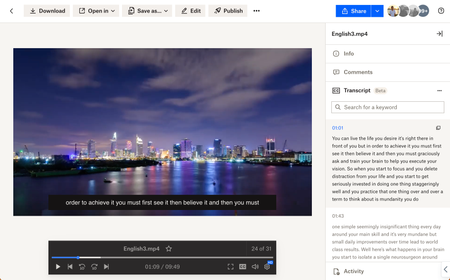
Hey folks! My name is Derrick and I work on a team that improves the file preview and viewing experience at Dropbox. We are excited to announce two features on Dropbox.com to enhance your video viewing experience: video transcriptions and closed captioning. Here’s how to use: Simply upload your video to Dropbox and voila! Your videos will have auto-generated transcripts and closed captioning at your disposal with a click of a button. Even more so - watch videos shared from your colleagues - and copy transcribed segments to instantly quote them in a presentation. Tell me about your experience with our new features! We are all ears. Help Center Article URL: https://help.dropbox.com/view-edit/transcript-closed-captions12KViews9likes9CommentsExciting times on the Dropbox Community - Live conference
We’ve got something really exciting happening on the Community next week 🤗 We’ve been looking forward to this for weeks and we’re delighted to share it with you now. On Tuesday 10th October 2023, you’ll be able to join us right here for a live screening of the keynote presentation from Work in Progress: Perspectives. You can watch all the action live from 9:00am EST 👀 When we’ll be hearing from our CEO and Co-founder Drew Houston, followed by some exciting product updates directly from our Leadership Team. If you’d like a little insight into what lies ahead for Dropbox, including the future of work 👩🏽💻 how AI is helping to transform the tools we use 🤖 and the opportunities this creates, be sure to make a note in your diary now and keep an eye on the Community for more information.1.8KViews3likes1Comment
Enhancements to the Upload Experience on dropbox.com
Enhancements to the Upload Experience on dropbox.com Hi! I’m Alice and my team and I have been hard at work behind the scenes to improve your uploading experience on our website, and we're thrilled to unveil some updates! Before we dive into the details, we want to give a big shoutout to all of you who shared your thoughts and experiences with us. We believe in the power of community, and it was through talking directly with you guys and reading your concerns on this forum that we were able to identify your biggest pain points. So, a heartfelt thank you for your invaluable feedback and insights! One of the major concerns we heard from many of you was the frustrating issue of your computers going to sleep during uploads, causing interruptions and delays. We understood the annoyance and inconvenience this caused (we heard that some of you would set a timer just to remind yourself to jiggle your laptop mouse!) We're thrilled to announce that we now automatically prevent your computers from dozing off during the upload process on major desktop browsers. We also wanted to address those pesky transient errors, like sudden network disconnections, which used to immediately fail your upload. We knew how frustrating it was to see your progress bar reset after a momentary hiccup. As a result, we introduced auto-retries! Our system now detects those transient errors and automatically retries the upload process, giving it multiple chances to succeed. Now if your laptop disconnects from the internet while you’re away making a strong cup of coffee, Dropbox will automatically restart your upload for you once you reconnect. In addition, our engineers also dived into our codebase to really analyze what was causing failed uploads and fixed a variety of issues at their source. However, it is impossible to prevent all uploads from failing, so in the rare occasion that an upload does fail, we wanted to give you more control. That's why we've added a ‘retry’ button that lets you retry a failed upload with just one click instead of needing to take multiple steps to relocate and restart the failed files. Last but not least, we know how frustrating it is when it’s not clear whether your upload is stuck, so we added a new mbs uploaded indicator that will give you confidence that your upload is progressing as expected. We hope you are as thrilled as we are about all these updates and hang on tight because more improvements are coming! Keep talking to us and letting us know how we can improve your Dropbox experience - your painful stories (for example about spending a week uploading a large number of files over unreliable internet!) have been the driving force behind these enhancements. We’re listening! Happy uploading, folks!1.7KViews5likes1Comment
Introducing:: Spaces Icon to dropbox.com
Overview We are introducing the Spaces icon to Dropbox Spaces on dropbox.com, in order to have consistent iconography across the Dropbox desktop app and the Dropbox website. The Spaces icon will be visible in the following sections of the Files tab: List view Grid View Spaces pinned to a folder overview section The Details pane if a Space is selected The Spaces icon will also be added to search results page on dropbox.com in the coming weeks Audience All Teams, all users1.5KViews2likes0Comments