Our Community is in read-only mode until April 8th, learn more here. You can still search existing threads or get help via Dropbox Support, the Dropbox Help Center, or Learn.
dropbox business
519 Topics
Removed from team unexpectedly, team files now in my personal account
Hi, I was part of a Dropbox team and received an email saying I was removed by an administrator. The team owner says she did not remove me and isn’t aware of any changes. Nor does she know how to fix this. After this: A large folder of team video files is now showing inside my personal Dropbox These files are taking up my personal storage This was not the case before, they were only accessible through the team I’m not trying to delete these files. I need things restored to how they were before: I should not be removed from the team These files should not be stored in or counted against my personal account Can someone explain: How I was removed without the owner doing it? Why team files appear to have been transferred into my personal account? How to reverse this so access and storage go back to the original setup? Any help would be appreciated.48Views0likes3Comments
What's the point of the template link?
Our organization previously used Docusign which would allow you to create a link to your document so the signed can access the document directly without having to go through the emailing envelope process. Dropbox Sign implied we could do the same thing. All the dropbox link does is ask the recipient for their email address, then sends them the link to the actual document via email. Doesn't this defeat the whole point of the link and not sending the document via the template envelope? I am trying to make signing easier for people who may not have an email address, which applies to most of my clients. Please help!41Views0likes3Comments
Can I stop external shared link recipients from being prompted to sign up?
Hi, I am trialing dropbox advanced ahead of possible rollout. It works well on the team side, but when i share a link for an external user to browse - once they try to download it aggressively prompts them to sign up with a tiny 'download only' link. Its a deal breaker for us, it looks unprofessional and we know customers will either not download the files or will ask us to share another way. Can it be surprised when using paid versions of dropbox?62Views0likes4CommentsTell Us How You Use Dropbox
No two people use Dropbox in exactly the same way. Some of you rely on it every day for work, others for school, creative projects, or keeping life organized - and we love that. We’d love to hear how you’re using Dropbox today - is it something you use once in a while, is it part of your day to day, are there any features you can’t live without? What workflows have you built that save time or reduce friction? And where do you see opportunities for us to do better? Your tips, ideas, and honest feedback really help us to make sure we can share useful tips, and they help other community members discover new ways to get more out of Dropbox too. Share your experience, favorite features, or suggestions in the comments below. Your voice truly helps shape the future of the Dropbox community 😁 The Dropbox Community Team3.9KViews4likes14Comments
How can we speed up a first-time sync of a team account on a new computer?
Hi everyone! Everytime we replace a laptop, and do a first time setup of Dropbox, it takes FOREVER for our Dropbox Team folders to sync. Menu item at the bottom is stuck at Syncing. No matter who it is. These are new 16" M4 MacBook Pro laptops. Sequoia macOS verison 15.7.x (a mix) with the latest Dropbox install version 241.4.4853 for mac. Any ideas on what we can do to speed things up?83Views0likes3Comments
External users cannot upload to a shared folder they have edit access to
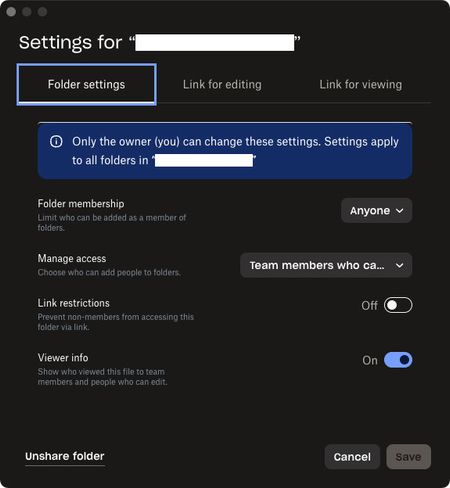
Been trying to get this to work for many years but always give up and use a different service. On my company’s team dropbox I want to create a folder with the purpose of collaborating with outside vendors. I can create invites, confirm access with edit permissions for the outside person, and they can join no problem, but they only ever have download permissions and can’t upload anything to our folder. Am I missing some permission setting? The other method of using a File Request for them to upload something does work but isn’t ideal. These are the settings used for the most recent attempt:284Views0likes5Comments
Feature Request: Support Multiple Dropbox Business/Teams Accounts (Multiple Tenants) in Desktop App
Hi Dropbox team — I’m posting this as both a long-time Dropbox user and a business owner. Today, the Dropbox desktop app only allows seamless use of one Business (Teams) account (plus optionally one Personal account). This creates a major problem for users who legitimately operate across multiple organizations. Real-world use case Many professionals today are involved with multiple companies at the same time, including: Business owners with multiple entities Holding companies with multiple subsidiaries Consultants / advisors supporting multiple clients Board members and fractional executives PE / investment professionals working across portfolio companies In these cases, we often need separate Dropbox Business tenants for security, compliance, and clean separation. The key point I am not asking for a workaround or a discount. I am willing to pay for multiple Dropbox Business subscriptions — but Dropbox currently does not provide a seamless way to run multiple Business accounts in the desktop app. What competitors already support Microsoft OneDrive/SharePoint supports multiple tenants cleanly, for example: OneDrive – Company A OneDrive – Company B Both sync simultaneously and appear natively in File Explorer/Finder. Dropbox currently forces users into clunky workarounds like: Using the browser for the second tenant Switching accounts repeatedly Creating separate OS user profiles Running virtual machines These are not realistic solutions for modern workflows. Why this matters This limitation is not a “nice-to-have.” It is a core enterprise usability issue and increasingly a deciding factor for businesses choosing between Dropbox and Microsoft 365. Dropbox is losing a valuable segment of customers who are willing to purchase multiple accounts — but cannot do so efficiently due to desktop client limitations. Requested solution Please add support for: Multiple Dropbox Business/Teams accounts logged in simultaneously Separate synced folders per tenant Seamless switching and visibility in Finder/File Explorer Clear tenant labeling and separation Even supporting 2+ Business tenants would solve a massive problem for many professionals. Bottom line Dropbox is an excellent product, but this is a fundamental gap. Many of us want to keep using Dropbox and expand our usage across multiple businesses — but we need Dropbox to support the reality of multi-tenant work. Thanks for considering this — I would strongly encourage Dropbox to prioritize this feature. Edward Cook Co-Founder, McCarthy Cook & Co. We were the first landlord of Dropbox's HQ at China Basin in SF and owner of Castro Station in Mountain View where you used to work. Come back to the office! You will be closer to your PAYING customers! I'm happy to double the amount we pay you monthly for new and better access and continue with Dropbox while you pursue true productivity gains harnessing AI104Views1like1Comment
I'm unable to add any new licenses to my team
Hi, I already have 48 licences. I need to invite more members / add more licences. it is not allowing me to add more licenses and keep giving me below errors: "Something went wrong on our end. Close and try again." or "Failed to load pricing information" Any help would be appreciated. Ticket id already raised = 2606894581Views0likes1Comment
How can I unlink a Dropbox Business account if I can no longer access this work account?
Good morning, I am using the Dropbox Desktop app and I would like to link my new Business Dropbox. Unfortunately, my previous' employers business Dropbox is still linked, but I can no longer sign in to this account to unlink it. Is there a work around that does not require me to sign in to my old business dropbox? Thank you!82Views0likes2Comments