We’re Still Here to Help (Even Over the Holidays!) - find out more here.
notifications
31 Topics
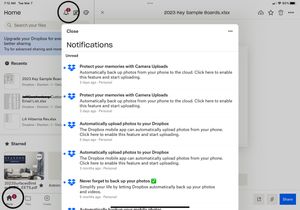
New message notifications will not go away
I have several “unread” messages from Dropbox which when opened or marked as read the “2” displayed above the icon will not go away. The marked as read button does nothing and there appears to be no way to delete the messages ? Using app on new iPad Pro.Solved14KViews9likes64Comments
Constant update notifications
I am getting frequent notifications to update my Windows desktop Dropbox app, requesting permission to make changes to my system. It doesn't matter whether I respond yes or no, nothing happens after that. It just keeps happening over and over again.Solved18KViews5likes10Comments
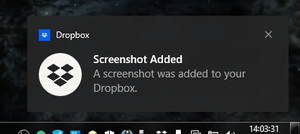
Add an option to choose between the removed "Screenshot Added" notification or the quick actions.
I've gotten really used to seeing this notification every time I took a screenshot and it'd help me know if I saved a screenshot or not and i'm noticing it's gone and there's a new feature that I assume replaced this which is to show quick actions after screenshot, but I like the Screenshot Added notification more because it's just a notification, while the quick actions are a seperate window, and I don't want to switch windows back every time I take a screenshot, so I feel like if there was a way to choose in the Screenshots menu whether if you want there to be a notification informing you after saving a screenshot or if you want the quick actions. I would love for there to be an option to choose between those two.96Views1like2CommentsDropbox icon in menu bar for Mac showing red circle with the number 1
Hi. I'm a long-time Dropbox user. I've had an account since 2012. I have a personal/free account. I use Dropbox on a Mac. I have been having issues with my Mac for months so today I erased the drive and reset it to the Mac's factory settings. I've spent the rest of the day installing some of my most-used apps, including Dropbox. Dropbox seems to be working. It's syncing my files. But the icon in the menubar has a little red circle with a "1" in it. I don't know how to get rid of it or what it's trying to tell me. When I click on the menubar icon under "Activity" is a message saying "Dropbox for macOS now ready. Update Dropbox to use on the latest version of macOS" and there's a link that says "Get Started.' I was thinking maybe the red circle with the "1" is displayed because I need to click the "Get Started" link and follow the steps. Well, I've clicked the link and followed the steps now 3 times and the circle with the red "!" has not disappeared nor has the message under "Activity" telling me to "Get Started." So I don't know what I'm doing wrong and I've never had this problem before. So I could use some help. Should I just ignore that little circle with the "1" or do I need to do something else to get rid of it? Thanks.1.5KViews1like4Comments
iOS App not showing push notifications when files are added to a shared folder.
Not getting notifications when a new file is added To a shared folder by other users in folder. iOS software and Dropbox iOS app updated to current versions and all settings in iOS for app notifications are on, as well as settings within Dropbox app are all on. Just trying to get notifications when someone in a shared folder adds or deleted a file etc. thanks!Solved3.8KViews1like5Comments