Our Community is in read-only mode until April 8th, learn more here. You can still search existing threads or get help via Dropbox Support, the Dropbox Help Center, or Learn.
security
34 Topics
Can you password protect folders in Dropbox?
Hi folks, The Dropbox website at https://www.dropbox.com/features/share/password-protection clearly states that it is possible to password protect a folder in Dropbox, and has an animation on the page that seems to show this happening in a couple of simple steps. However, my version of Dropbox (the basic personal free version) looks nothing like that, and this Dropbox forum has a number of (possibly out of date) posts stating it's not possible to password protect a folder. Can this be done, or do I need to look for a different product? The options I seem to have around sharing and security seem to have are very limited. Even in a free version, I'd expect to be able to add layers of good security! Thanks, GlenSolved35KViews1like13Comments
Can I store adult content in my Dropbox account?
Hello everyone, I have two questions: 1, I wonder if I could store porn/adult contents (videos, photos...) on my account? I am willing to purchase a premium plan to store them for a long term. And I am not going to share the adult contents to anyone, not public, just private use. All contents I downloaded on Internet, of course not child por*n or something illegal like that, just regular porn. 2, If I purchased for 1 year premium and I uploaded many videos and photos on my account, after 1 year I stop renewing the premium, what would happen? Can I continue playing videos, seeing photos online, downloading content on web browsers? or I have to renew my premium plan to see and download them? Thanks in advance!!!Solved25KViews3likes2Comments
How to share a folder with external users?
I am the admin of our business account and want to achieve the following folder/permissions structure. Unfortunately I can't figure out how to do this with Dropbox. (All users need to be able to edit. ) Top Level Folder (editable by team member 1, team member 2, external user 1, external user 2) Sub-folder 1 Sub-folder 2 Sub-folder 3 Sub-folder 4 (also editable by external user 3, external user 4) Sub-folder 5 Sub-folder 6 Simply put: a couple of people on my team and a few externals need access to a top level folder.... and a couple of other external users need access to only a sub-folder. What is the best way to achieve these folder/permissions between my team members and external users?? ThanksSolved15KViews0likes13CommentsSecurity of Dropbox links
It occurred to me today when I Ducksearched to find a public Dropbox link https://www.dropbox.com/s/br7d9jigsldnvjy/ [1] that Dropbox appears to be practicing Security Through Obscurity. What prevents brute-force attacks from guessing the br7d9jigsldnvjy part of the URL to find any shared file from anyone? [1] https://www.dropbox.com/s/br7d9jigsldnvjy/Dropbox1.png, found at https://www.mymagicfundas.com/dropbox-share-files-folders/Solved8.2KViews0likes9Comments
Security concern: my full name appears on public folder links!
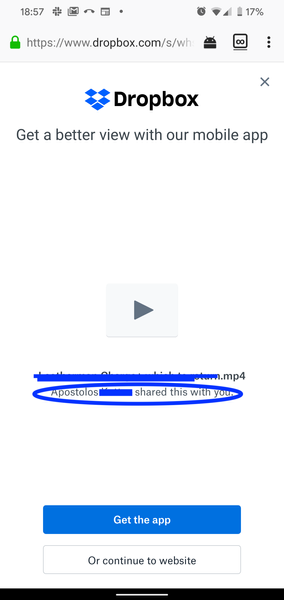
I recently shared a video from my public Dropbox folder - I copy/pasted a link to the video. When I shared the video w a friend, they pointed out that my full name shows up on the video link!! That's very concerning seeing that it's in the public folder which I would expect the Dropbox team to take appropriate precautions for maintaining my privacy - especially if I shared a file from my public folder. Interestingly that doesn't come up when I check on my laptop. But I just checked the link on my phone, and I see my full name! See attach a screenshot below.. (I blocked out my last name and the file name, but you can see my name shows up in the circled area) Does anyone know to remove my full name when sharing a link like this through my public Dropbox folder?6.7KViews2likes3CommentsRemoving external user from all shared folders
There seems to be no way of removing all access of an external user to files/folders shared to him. Lets say you have a team folder with "Projects", and in this folder you have hundreds of subfolders shared with different external collaborators. One user has been invited to 70 of the subfolders, and you need to remove his access to everything. As far as i see, there is no other way to remove this user but to go through every one of the 70 folders and manually remove him. If this isn't possible, it should really be a high priority feature request.5.6KViews10likes4Comments