Our Community is in read-only mode until April 8th, learn more here. You can still search existing threads or get help via Dropbox Support, the Dropbox Help Center, or Learn.
setting up the apps
1166 Topics
"Updating 42 files" on Dropbox icon for over a year and two Dropbox folders in Library
Application Affected Dropbox Mac: Device MiniMacM4, 2024 Operating System/Browser (if using the web) MacOS 26.3.4 Dropbox App Version (if using the app) 244.4.6580 Question or Issue I’ve had the same “Updating 42 files” on my monitor tab icon for over a year. after syncing new addition, it reverts to this notice. There is nowhere I can find what or where these 42 files are to be found. With the disaster of the mixed main filer location since it was moved into the Library, where I now have two folders residing, Things are getting more complicated and less reliable, a situation that seems to go hand in hand everywhere I encounter ‘more complicated.’ In Preferences>Sync>Dropbox folder updates “You are using Dropbox on File Provider. To opt out ... 1st question: how to get rid of “Updating 42 files 2nd question; how to have a single Library folder? Do I have to compare the two folders, file at a time? Cuz that would be a real PIA and I could lose data as several people in this forum have already experienced. files copied with zero info. 3rd question. Does anybody try these new systems out in real world situations? Jay [removed per the Community Guidelines], Kenwood CA50Views0likes1Comment
macOS File Provider: Dropbox cannot relink to existing CloudStorage folder
Application Affected Dropbox on Windows PC and iMac Sequoia Device Windows PC and iMac Sequoia Operating System/Browser (if using the web) Latest Windows, iOS 15.7.4 After a routine restart, the Dropbox desktop app lost its login state and now cannot relink to the existing File Provider folder at ~/Library/CloudStorage/Dropbox; instead the installer tries to create a new Dropbox folder. I have been successfully using Dropbox with the macOS File Provider configuration (CloudStorage location) for several months. My Dropbox folder has consistently been located at: /Users/xyz/Library/CloudStorage/Dropbox I did not reinstall the Dropbox application and I did not intentionally sign out or attempt to relink my account. The issue appears to have started after a routine computer restart, at which point the Dropbox desktop client seemed to lose its login state. When I start the app now, the first thing I see is a “Welcome to Dropbox” message and the menu bar icon indicates that the application is “Waiting to be linked to a Dropbox account.” My existing Dropbox folder remains intact. The folder at /Users/xyz/Library/CloudStorage/Dropbox still contains all my files. The .dropbox marker file is present in that folder. All files are also visible and intact on dropbox.com. When I attempt to sign in through the desktop app, the following occurs. The app asks me to sign in with Dropbox. After signing in, the setup process shows the message “There’s already a folder named Dropbox.” If I select “Choose Another Location” and point to the existing folder, the dialog says “A folder named ‘Dropbox’ will be created inside the folder you select.” This suggests the installer is trying to create a new Dropbox folder rather than adopt the existing File Provider folder. Because of that message I have not proceeded, since it appears it would create a nested structure such as: /Users/xyz/Library/CloudStorage/Dropbox/Dropbox Currently the Dropbox icon appears in the menu bar but is greyed out and the client shows the state “Waiting to be linked to a Dropbox account.” To summarize: I was already using the CloudStorage/File Provider location successfully for months. I did not reinstall Dropbox. I did not intentionally unlink the account. The existing Dropbox folder and files are still present and intact. The client appears unable to relink to the existing File Provider folder and instead tries to create a new one. During the setup flow the client also displayed the message that the desktop app cannot sync over 500,000 files. I am not sure if this is related. However, only about 150–200k files are synced locally on my iMac. I also discovered the identical situation on my Windows PC starting at about the same time, which suggests this may be related to my Dropbox account rather than the individual devices or operating systems. Could someone advise how to safely relink the Dropbox client to the existing File Provider folder at: /Users/xyz/Library/CloudStorage/Dropbox without creating a second Dropbox folder? I rely heavily on Dropbox for daily work, so I would greatly appreciate guidance. Thank you.125Views0likes5CommentsLogged out of the Dropbox app and back in and now I have a 'Dropbox (old)' and a 'Dropbox' folder
Application Affected Synching files Device PC Operating System/Browser (if using the web) Windows 11 Dropbox App Version (if using the app) Windows Desktop Question or Issue Had a funny problem with the Windows Explorer status icons not all being corrected, and saw a recommended to "simply" sign out of Dropbox and sign back in. Simple enough. Which I did. I then got a pop up asking me (telling me really) to rename my Dropbox folder. I said OK, and I now have a Dropbox and Dropbox (old) in the User directory. All of my files are in (old). None are in new. Every link on my PC to my old files is now of course broken. I paused syncing because I am worried Dropbox is going to try and create an entirely new copy of all of my files in the new Dropbox folder. Does anyone know what it going on here? And how to put things back to they way they were before? Why on earth would a logout/login totally reorganize all of my files??? I'm kind of dead in the water right now so any help would be greatly appreciated. Dropbox support seems to be non-existent.383Views0likes15CommentsTell Us How You Use Dropbox
No two people use Dropbox in exactly the same way. Some of you rely on it every day for work, others for school, creative projects, or keeping life organized - and we love that. We’d love to hear how you’re using Dropbox today - is it something you use once in a while, is it part of your day to day, are there any features you can’t live without? What workflows have you built that save time or reduce friction? And where do you see opportunities for us to do better? Your tips, ideas, and honest feedback really help us to make sure we can share useful tips, and they help other community members discover new ways to get more out of Dropbox too. Share your experience, favorite features, or suggestions in the comments below. Your voice truly helps shape the future of the Dropbox community 😁 The Dropbox Community Team3.9KViews4likes14CommentsI don't know if I'm using the Dropbox desktop app or not
I am using an iMac running OS 14.1.2. I downloaded the Dropbox desktop app. It shows up in my application folder, and I have an icon in my dock. However, if I click on the Dropbox app icon in my dock, all I get is a regular Mac window that says Dropbox at the top, and includes two files. One is a .url item, and the other is a .pdf item, both about getting started with Dropbox. I never get the word Dropbox in the upper lefthand corner of my finder. I never have Dropbox menu items. The only time I have interfaced with Dropbox at all is while in Safari. Am I using this app? I don't think so, and I don't know why. Things I see mentioned regarding the app are nowhere in sight. Somehow, while in Safari, I did manage to get a backup going. Based on the progress so far, my 750 GB of data is going to take about 15 days to upload. Does that seem right? All input will be most appreciated.Solved1.5KViews0likes2Comments
Not getting 6 digit code to set up Dropbox on new iPad
Application Affected Dropbox Device iPad Pro Operating System/Browser (if using the web) iPad OS 26.3 Dropbox App Version (if using the app) trying to set it up on this iPad, I have it on my other devices (all apple) Question or Issue In trying to set up Dropbox on this iPad, it says to log in and then it will email my primary email a 6 digit code. I am not getting the coded and I am getting other emails from Dropbox104Views0likes4Comments
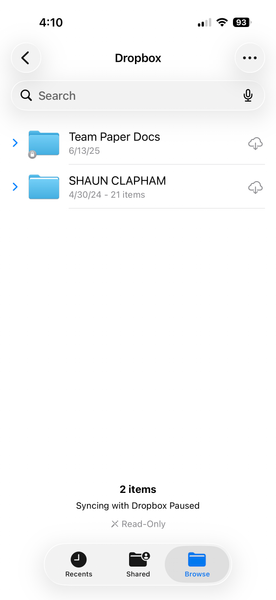
I'm trying to add Dropbox as a location in Files app, but it says syncing is paused.
I cannot use dropbox as a location to select files from on iphone ios 26.2.1 I have restarted, installed everything over and over. Removed preview app, and nothing. Application Affected dropbox on iphone Device iphone 17 pro ios 26.2.1 Operating System/Browser (if using the web) files iphone app Dropbox App Version (if using the app) 460.2.2 Question or Issue Need a solution150Views0likes2CommentsList of not-synced folder when using Dropbox Selective Sync
When using Dropbox Selective Sync how I can see a list or generate a report of the folders I do not see on this device (i.e. I do not sync to this device)? I know in the Dropbox Selective Sync Panel I can click through all the folder and subfolders to find the ones I do not sync, but a list in a text or PDF file would be more helpful when I'm going to recreate the same sync behaviour on another machine.161Views1like4CommentsFile Provider version disconnected and now I'm not eligible for that version
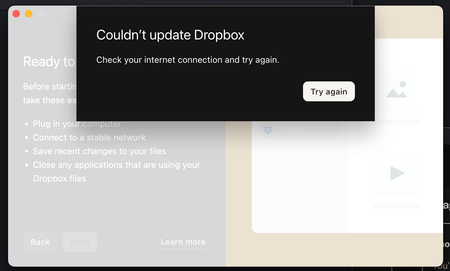
Application Affected Dropbox Desktop App Device Mac Studio Operating System/Browser (if using the web) macOS 15.3 Dropbox App Version (if using the app) 239.4.8301 Question or Issue I was forced to upgrade and switch to "File Provider" which was a complete nightmare, regardless, I got it installed and everything was working fine. I just returned from being out of town and "Dropbox" is no longer in the Locations portion of Mac Finder. Further, it appears that File Provider has completely "unlinked" itself. When I tried to connect again, it said "Couldn't update Dropbox, Check your internet connection". I installed a new version, and now it says I'm ineligible for File Provider. Number of files on hard drive: 330,623Solved192Views0likes5CommentsExciting news — we’ve launched the new Sync & Storage Dashboard in the Dropbox desktop app!
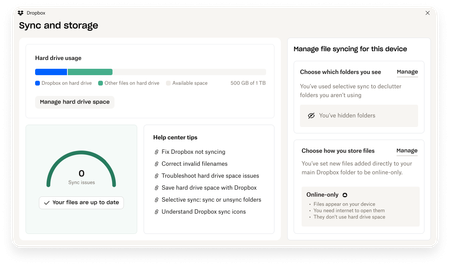
This dashboard makes it easier than ever to keep your files organized and your computer running smoothly. With just a click, you can: Get a real-time view of your sync status Quickly spot and resolve any syncing issues Monitor and manage how much disk space your Dropbox files are using Adjust your selective sync and storage preferences To open the dashboard, click the Dropbox icon in your taskbar (Windows) or menu bar (Mac), then select your avatar and choose Sync & storage. We’re excited for you to try it out! Please let us know your thoughts and how we can make it even better!9.2KViews6likes14Comments