We’re Still Here to Help (Even Over the Holidays!) - find out more here.
space and storage
180 Topics
Allow a personal account to have more than 3 TB, or more than 4 TB with the add on
Hello, I'm a graphic designer with over 15 years of workload. This obviously equates to extreme files sizes. I was disappointed to learn Dropbox don't offer a package for single users over 3TB. I work solely and require more cloud space and don't want to have to upgrade to a 'per user' plan as this isn't cost effective. This option has to become available soon.62KViews188likes221Comments
Is it safe to delete dropbox cache old files?
$ dropbox version Dropbox daemon version: 99.4.501 Dropbox command-line interface version: 2019.02.14 I'm running Fedora 32 on my main workstation with a 'normal' Dropbox installation, but a fairly small SSD drive. My disk hit 100% today when someone in our team dumped many Gb of data into a shared folder. I used the CLI to `dropbox exclude path/to/huge/files` and they did get removed from my drive (great!) but my disk still appeared full. Investigating, I found 297 files occupying 15Gb in ~/Dropbox/.dropbox.cache/old_files. I don't know if they are related to this problem, their modification times are from 5 days ago. They all have machine-readable names like 16ca69b67850264f29600d17d921b732 but I can tell they're the original files that were in the shared folder. I don't see any kind of "clean cache" command in the CLI help. Is it safe to delete these files? Thank you!Solved56KViews1like7Comments
How can I cancel my computer backup?
I apparently selected pc backup when I installed Dropbox and naturally I'm out of storage on my Dropbox account now. I don't want and have no need to have my pc backed up to it. I have the desktop app but am not able to find the preferences section to stop it from backing up. I did try just deleting My PC from Dropbox but a message comes up and says if I delete "My PC" it says it will be removed from my Dropbox and from the computer. If I delete it in Dropbox, does that mean I'll lose everything on my laptop too? Sorry if it sounds like a newbie question but I am. 🙂 Any help stopping the PC backup would be greatly appreciated.Solved25KViews2likes58Comments
How can I stream a video to my website from Dropbox but from dropbox online?
Hi Guys, So I will try and explain best I can. This is my website https://www.progressivedreamsmusic.com/ and this is a page on my website where I stream videos https://www.progressivedreamsmusic.com/a-progressive-journey-50/ The video that plays on the above page is hosted on my desktop in my dropbox pubic folder. I use a widget within wordpress (on my site) called FV Flowplayer Video Player that allows me to embed videos like this. What I do is copy the link of the video I want to stream and I paste it in FV Player, I change the end of the link from '?dl=0' to '?raw=1', I am not exactly sure why but without this the video won't play. Anyway, without that out of the way you can see what I am doing, but because over time this will take up lots of space on my desktop I want to know how I can stream a video from my online dropbox account like this? I want to store these very large video files in dropox cloud, maybe a public folder on my online account? Basically I want to not eat up my computers hhd space and instead do this via online instead Can anyne help me ?Solved24KViews1like2Comments
Changing a file to online only does not work. Nothing happens.
Hey! I've had a problem few weeks now. Even I've tried to put almost everything online only -mode, nothing happens in the hard drive storage. Any ideas what could be wrong? Last month everything worked like a charm. Thanks!Solved20KViews2likes17Comments
If I delete photos on my phone gallery, will they remain on Dropbox?
Trying to start fresh after factory reset I don't want old photos on device phone gallery app I rather have old photos that are backed up on Dropbox cloud storage and keep phone gallery free for new photos not photos that are backed up on device Do not want to share phone storage for old photos and videos I would like to have phone storage for new stuff only and cloud storage for old stuff only If I delete photos on phone it will delete that same photos on cloud I do not want that I do not want old stuff on phone it would be pointless of cloud storage if old things are on my phone no point in online storageSolved13KViews1like9Comments
Upload Error (server error) - Tried Multiple Browsers
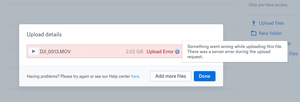
Hi, I've been trying to upload a collection of 15 .mov files and the last 3 files will not upload. I keep getting an error (shown attached) saying there's an upload error (server error). I have space remaining, I have tried multiple browsers and computers, I have tried to uplaod to different folders within my account, and I have made sure the file is playable and not currupt on my computer. Can anyone help? ThanksSolved12KViews0likes5CommentsCan't Move the Dropbox Folder to Ext4 or NTFS partition
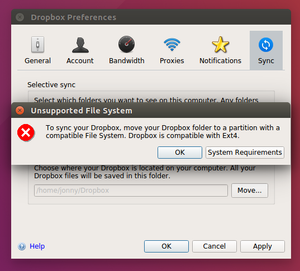
I'm using Ubuntu 16.04 LTS. In response to the change in dropbox file system support, I created a new partition on my hard drive to store my dropbox files in. It's 2 GB larger than my maximum dropbox space. My main partitions are all Ext4, but my home partition is encrypted which apparently doesn't work. This new partition was made without any obvious encryption option. Trying to move the dropbox folder, using dropbox > preferences > sync > dropbox folder location, and selecting a folder on my new partition returns a system incompatability error (see screenshot) I reformatted the partition to NTFS, but dropbox refuses to move the folder, with the same vague error. I looked through the circuitous FAQs this error links to, as far as I can see there's no other special circumstances to my setup. I'm just a guy using linux who doesn't want to reinstall his entire OS, and is about ready to cancel his dropbox subscirption.Solved11KViews0likes11Comments
Very confused with regards to Smart Sync
Hi all, I just upgraded my account to Business with the 5TB storage. Prior to this I was using the basic plan which only comes with 2GB. I would use dropbox to upload files (such as videos, and music) from my Mac to my iPhone for auditioning. Now that I've upgraded, i'm very confused on how Smart Sync works. In essence does it backup whatever folders you tell it too, then make changes based on how you change the original files? What is the main difference between Smart Sync and Local only? (I read the article on it but however still confused) My goal with the upgrade is to use Dropbox as central storage, for my team, as well as for personal storage. I would prefer for dropbox to not make changes based on how I edit files on my system. I would like to be in total control of how files on Dropbox itself are edited/deleted. Can anybody point me in the right direction? I've dug through countless articles, watched some outdated videos, and looked in the community but still haven't fully found an answer to how I can accomplish this. Any suggestions greatly appreciated!!Solved11KViews0likes2Comments