Our Community is in read-only mode until April 8th, learn more here. You can still search existing threads or get help via Dropbox Support, the Dropbox Help Center, or Learn.
upload
30 Topics
Data Migration from Sharepoint/OneDrive to Dropbox.
Hello I am new to Dropbox and I am currently setting up Dropbox (former Sharepoint/OneDrive user). I can't find a lot of information on how to migrate from Sharepoint/OneDrive to Dropbox almost all the information are the other way around. Are there some best practices or guidlines I can follow and use. Do tools for data migration from Dropbox exists? The only information I could find was movebot and Storage Guardian. Are there any reviews and helpful tips? Good to know: I have a lot of data 1.5 TB + which I want to migrate without loss. I would be really thankful I someone can provide me with detailled information about this topic or even a guidline. Thanks a lot.Solved3.4KViews1like2Comments
Can't add Dropbox as a place on a Microsoft Office app on Android tablet
Microsoft wont add Dropbox as a place I use dropbox on Desktop and Apple devices with a different account. It works fine with excel to save documents. For the last 6 months my android devices have worked great as well. However, recently, when trying to save an edited excel document that I’ve opened with dropbox on my android device, it does not give me the option to save the document to Dropbox folders once I’ve edited and click “save as”. After clicking “add a place” then Dropbox, and then signing in, it loads and takes me back to excel, yet it still doesn’t show up. No error message, just isn’t an option. Click add a place again, and can click dropbox as an option again, sign in, ect. It’s an endless loop. I have tried uninstalling both apps, disconnecting Microsoft and excel from the dropbox’s connected apps, other troubleshooting. nothing working so far. If you know a solution, please advise. thanks!Solved268Views0likes3Comments
Issue with DaVinci Resolve upload location in Dropbox folder & feedback
Hi Dropbox Support Team, I’d like to report an issue I’m experiencing when using Dropbox in combination with DaVinci Resolve, as well as suggest a potential improvement. In my workflow, I edit videos in DaVinci Resolve and store my project folders inside Dropbox. I collaborate with clients and project partners directly inside these folders and use Dropbox comments for feedback, which ideally should appear inside DaVinci Resolve’s timeline. However, when I export a video from DaVinci Resolve and enable the option “Upload to Dropbox”, the application behaves unexpectedly: it creates two versions of the file. One version is correctly saved in the project folder I selected during export (which is also synced via Dropbox), but DaVinci Resolve additionally uploads another copy into the root folder of my Dropbox account. The issue is that only the copy in the root folder becomes linked to Resolve’s comment integration, meaning comments and feedback are associated with the wrong instance of the file. This leads to confusion and unnecessary duplicates in my storage. Suggested improvement: It would be extremely helpful if the “Upload to Dropbox” functionality would upload the file only to the folder selected during export, rather than defaulting to the root directory. This way, the file used for collaboration, feedback, and timeline comment syncing would be consistent and properly organized within the designated project folder. This change would significantly improve efficiency and clarity when collaborating with clients inside structured Dropbox project directories. Thank you very much in advance for your support and consideration. Integration Affected Davinci Resolve212Views0likes2Comments
Uploading Microsoft Files from iPad Pro gets stuck on "upload pending".
Hello, I opened a Microsoft Excel file from the Dropbox app on my iPad Pro and I saved it after I made changes and it will not upload the new version into Dropbox, it just says "Upload Pending". I tried deleting the Dropbox app and deleting the Excel app off the iPad and I tried turning it off and back on and I also tried switching to a different network and nothing has worked so far. Please help! Thank you!3.7KViews1like6Comments
How can I transfer everything from OneDrive to Dropbox?
Hi everyone, I've been searching and searching a way to transfer all my cloud from Onedrive to Dropbox for a long while now, but I can't find a way to do it other than downloading 1,5TB of data from Onedrive and uploading it to Dropbox manually. Can you please advise me an easier way? I want to get rid of Onedrive entirely and close my account. The weird thing is, In Onedrive, there is an option in my storage page which asks me if I want to transfer anything from Dropbox as well as some other cloud services. It's just one click and takes me to my Dropbox very easily to select what to import from Dropbox, but not visa versa; it doesn't allow me to transfer anything from Onedrive to Dropbox. If one-way integration is possible for Onedrive, why can't I find anything to do it on Dropbox? Thanks a lot for responses in advance.Solved2.2KViews1like4CommentsCan I backup my WhatsApp chat messages directly to Dropbox?
Hi Is there a way of directly backing up my WhatsApp (messages only) to my Dropbox. I cannot find a way of doing this as my WhatsApp only appears to show Google storage as the only storage available for this particular backup ThanksSolved3.5KViews0likes4Comments
I'm not seeing all of my Dropbox folders after connecting my account to Epson scanner
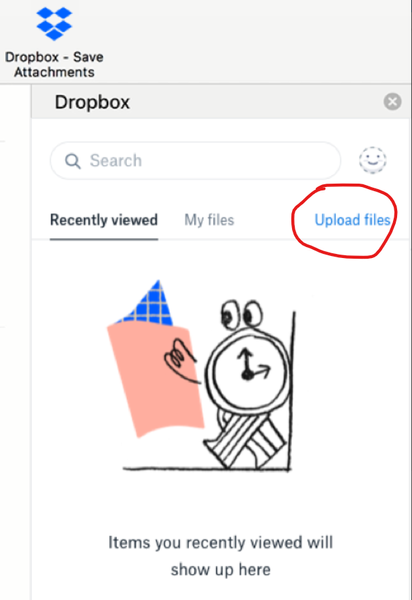
I integrated DROPBOX with my EPSON RR-600W scanner. I have many options to save a scan, including DROPBOX. All I had to do was sign into DROPBOX in the Epson Scansmart application with my DROPBOX ID and password. However, when I go to store the document, the software only shows one folder, DROPBOX. The other folders in my DROPBOX do not populate. Does anyone know if this is correct or if there is a workaround? Thanks StevenSolved2.9KViews0likes4CommentsDropbox for Outlook - Missing Option to upload files
Dropbox, I installed the Dropbox add-in on the Outlook client, and noticed that it does have the Upload files option as advertised from the following link below. I have reinstalled the add-in many times and still the option does not appear. And yes, my Outlook client does meet the requirements. Please confirm if this option is still available. https://appsource.microsoft.com/en-us/product/office/wa104381346?tab=overview1.1KViews0likes5Comments