We're making some changes to the Dropbox Community 👩💻 - Find out more here.
windows
23 Topics
'Last Modified' column not showing date & time
When using Dropbox on a desktop, the "Last Modified" column now displays messages such as "10 minutes ago," "22 hours ago," and "last month." I found having it show the actual dates and times to be more useful. Is there a way to change the format of the column back to the way it was?Solved413Views2likes12Comments
I got a popup on my device asking me to upgrade, even though notifications are off.
I have always left "Do not disturb" to on and disabled all app notifications in my windows 11 system settings. Today Dropbox posted a big popup in the center of the screen while I was doing something else. It was a notification that my free account was full and offered an option to upgrade or clear up space but no option to immediately close the window. It was also permanently on the foreground over top of other windows. I can't find any options to disable this from happening. All notifications in the desktop app are already set to off. This type of behaviour is totally unacceptable. If I can't find a solution and it happens again I will have to uninstall.546Views2likes7Comments
Remove Dropbox from Windows' context menu
I come again with to ask for an option to remove Dropbox entries from Window's context menu. The reason is I am visually impaired and I must use tools to have greater fonts showed in my screen. I must use also the magnifying glass and other availability resources. Then the 7 (seven!) context menu options that Dropbox has added to my Windows File Explorer context menú (in teh upper part of it) makes my context menu so difficult to access the bottom options of the list that I have serious problems to do my job. Believe me this should absolutely be an option the user should be able to deal with, and not an option forced by Dropbox. The topic was already raised in a previous post (Add option to remove Dropbox options from context menu) by Martsssssss and upvoted by six more people (see below) but has been closed by reasons I cannot understand (Inactivity?) It would be great to have it reopened and taken very seriously. Handicapped people like me will greatly thank it.610Views1like5Comments
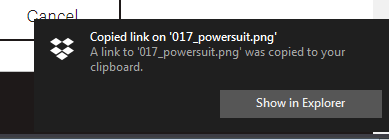
How can I disable the push notification when copying Dropbox link from PC
I don't want dropbox to tell me I just copied I file. I know I did, because I just told it to. How do I disable that? I've already gone to Windows' Action Center and disabled Dropbox' icon and notifications there, I disabled every notification in preferences->notifications for the PC program. Yet I keep seeing them. How do I get rid of this for good?Solved2.6KViews1like5Comments