Our Community is in read-only mode until April 8th, learn more here. You can still search existing threads or get help via Dropbox Support, the Dropbox Help Center, or Learn.
Forum Discussion

adj7388
2 years agoExplorer | Level 3
Backups do not display on website.
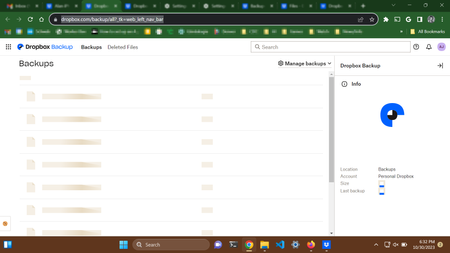
I cannot display my backups on the website. The URL that is not working: https://www.dropbox.com/backup/all?_tk=web_left_nav_bar See screenshot below. That is what I see at the above URL. Here'...

Megan Dropbox Community Moderator
2 years agoDropbox Community ModeratorHey adj7388, I'd be happy to help!
Out of curiosity: do you try to follow the link directly, or do you click the waffle icon -top left- in order to access your Backups?
Let me know more!

adj7388
2 years agoExplorer | Level 3
Using the waffle icon in the upper left.
By the way, I forgot to mention: I recently upgraded from Windows 10 to Windows 11. Not sure why that would matter, but thought I would mention it.
- Megan2 years ago
Hi adj7388, and I am assuming you also get the same results when you try to access the link directly?
- adj73882 years agoExplorer | Level 3
Yes, same result accessing the URL directly or via the waffle menu. In all browsers.
And here's what I see in the javascript console in Chrome:
About View, Download, and Export

Get support with viewing, downloading, and exporting files and folders from your Dropbox account.
The Dropbox Community team is active from Monday to Friday. We try to respond to you as soon as we can, usually within 2 hours.
If you need more help you can view your support options (expected response time for an email or ticket is 24 hours), or contact us on X, Facebook or Instagram.
For more info on available support options for your Dropbox plan, see this article.
If you found the answer to your question in this Community thread, please 'like' the post to say thanks and to let us know it was useful!


