2025 sparked some incredible conversations across our community 👩💻. Discover the highlights and see what’s ahead in 2026.
Forum Discussion

Mani26750
3 years agoExplorer | Level 4
What is the brown box icon on the left bottom corner of my files when using the desktop app?
Hello,
On several files, I have a brown icons in left bottom corner of my files.(see below)
in fact, in the same folder, there are green logos on fils but sometime there are brown logo
...
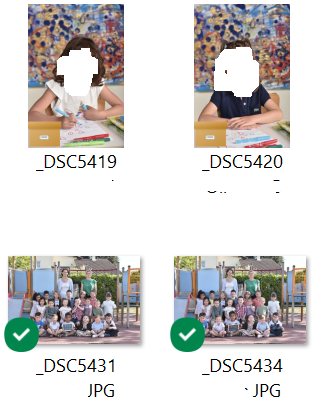
- 3 years ago
The brown logo isnt a Dropbox one. My guess is you've enabled the Briefcase function in Windows: https://www.techmesto.com/how-to-enable-briefcase-feature-in-windows-10
This is not supported in Dropbox and Dropbox can only sync/use/work with files that are in its own directory. So to use them you need to move the files directly in to Dropbox rather than just linked.

Mark Super User II
3 years agoSuper User IIThe brown logo isnt a Dropbox one. My guess is you've enabled the Briefcase function in Windows: https://www.techmesto.com/how-to-enable-briefcase-feature-in-windows-10
This is not supported in Dropbox and Dropbox can only sync/use/work with files that are in its own directory. So to use them you need to move the files directly in to Dropbox rather than just linked.

Mani26750
3 years agoExplorer | Level 4
Thank your for your reply but I don't understand one thing.
Indee ; you have written : "So to use them you need to move the files directly in to Dropbox rather than just linked. "
Files in dropboxs come from a supplier ans files were in the dropbox cloud
I have synchronisae them to have files on my computers few day ago
Then , Yesteraday or the day before yesterday, I have did a copy past on some files and it seem that this logo appears for this action.
So I don't understand when you say "So to use them you need to move the files directly in to Dropbox rather than just linked. beacause for me they are already
Thank you for your help
About View, download, and export

Need support with viewing, downloading, and exporting files and folders from your Dropbox account? Find help from the Dropbox Community.
The Dropbox Community team is active from Monday to Friday. We try to respond to you as soon as we can, usually within 2 hours.
If you need more help you can view your support options (expected response time for an email or ticket is 24 hours), or contact us on X, Facebook or Instagram.
For more info on available support options for your Dropbox plan, see this article.
If you found the answer to your question in this Community thread, please 'like' the post to say thanks and to let us know it was useful!


