We’re Still Here to Help (Even Over the Holidays!) - find out more here.
Forum Discussion

Mani26750
4 years agoExplorer | Level 4
What is the brown box icon on the left bottom corner of my files when using the desktop app?
Hello,
On several files, I have a brown icons in left bottom corner of my files.(see below)
in fact, in the same folder, there are green logos on fils but sometime there are brown logo
...
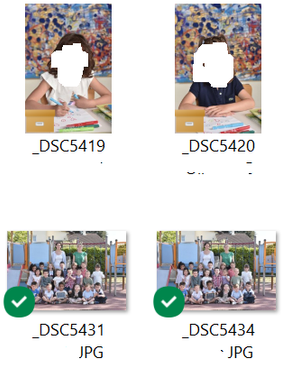
- 4 years ago
The brown logo isnt a Dropbox one. My guess is you've enabled the Briefcase function in Windows: https://www.techmesto.com/how-to-enable-briefcase-feature-in-windows-10
This is not supported in Dropbox and Dropbox can only sync/use/work with files that are in its own directory. So to use them you need to move the files directly in to Dropbox rather than just linked.


Kim chao
4 years agoExplorer | Level 3
Hi,May i ask have you fix this now?I also got this with my win11 computer,it's super annoying and I have tried many methods,but both of them dons't work,unless uninstall the onedrive
- Nancy4 years ago
Dropbox Community Moderator
Hi Kim chao, I hope you’re doing great!
Since this icon isn’t related to Dropbox, I’m afraid you’ll need to get in touch with Microsoft for further support.
If you need something else though, give me a nudge.
- Kim chao4 years agoExplorer | Level 3
Hi,Nancy,
thanks for your reply, since many people said that this is caused by the onedrive, I have tried to unlink and uninstall the onedrive from my computer,but the files in my dropbox still has this brown box icon,and I still hard to sync files with dropbox,and even it will lead the crush of my windows explorer


About View, download, and export

Need support with viewing, downloading, and exporting files and folders from your Dropbox account? Find help from the Dropbox Community.
The Dropbox Community team is active from Monday to Friday. We try to respond to you as soon as we can, usually within 2 hours.
If you need more help you can view your support options (expected response time for an email or ticket is 24 hours), or contact us on X, Facebook or Instagram.
For more info on available support options for your Dropbox plan, see this article.
If you found the answer to your question in this Community thread, please 'like' the post to say thanks and to let us know it was useful!


