We’re Still Here to Help (Even Over the Holidays!) - find out more here.
Forum Discussion

Stevord
2 years agoHelpful | Level 6
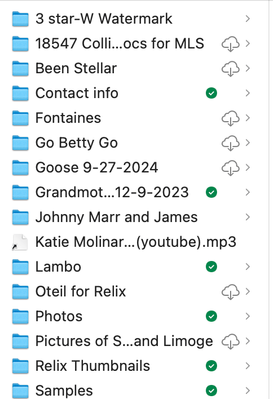
Dropbox folders icons keep changing on Mac.
I'm on a macbook pro and on Sonoma 14.6.1 I have a number of folders containing photos for my clients to download.
Normally, i get the little green check mark box showing it's all done. But for t...

Megan Dropbox Community Moderator
2 years agoDropbox Community ModeratorHey Stevord, let's jump right into this!
As a first step, would you mind clarifying the Dropbox version you're using on your Mac? If you hover over your little Dropbox icon, next to your WiFi, you should be able to locate that.
Also, do you use Dropbox with File Provider? If so, then your Dropbox folder should be located under ~/Library/CloudStorage.
Keep me posted!

Stevord
2 years agoHelpful | Level 6
Thanks.
Dropbox version 208.4.5824
And i'm attaching a screen shot of the 'sync' page.
Hope this helps.
- Walter2 years ago
Thanks for the additional information and the screenshot too Stevord
Could you try the latest, stable version of the app from this page and let us know if this persists?
As for the expected changes with the Dropbox desktop app for Mac OS on File Provider, you can have a look here.


About View, download, and export

Need support with viewing, downloading, and exporting files and folders from your Dropbox account? Find help from the Dropbox Community.
The Dropbox Community team is active from Monday to Friday. We try to respond to you as soon as we can, usually within 2 hours.
If you need more help you can view your support options (expected response time for an email or ticket is 24 hours), or contact us on X, Facebook or Instagram.
For more info on available support options for your Dropbox plan, see this article.
If you found the answer to your question in this Community thread, please 'like' the post to say thanks and to let us know it was useful!


