We’re Still Here to Help (Even Over the Holidays!) - find out more here.
Forum Discussion

kmccauley
3 years agoExplorer | Level 4
Dropbox is no longer capable of downloading files automatically.
The update to V175.4.5569 has broken Dropbox for me (MaxOS Ventura). My workflow is to put dozens of GB of raw images onto dropbox, and then edit and organize them on one of two different comput...

Hannah Dropbox Community Moderator
3 years agoDropbox Community ModeratorSorry to jump in here, kmccauley.
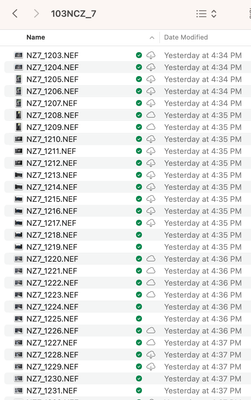
Can you please click on the Dropbox icon in your menu bar, then on your initials/profile pic, then on "preferences" and then on "sync" and send us a screenshot of what you see there?

kmccauley
3 years agoExplorer | Level 4
Sure:
- Walter3 years ago
Hey kmccauley, sorry to jump in here and thanks for your patience while we checked this with the team.
This should be fixed in the 177 version of the desktop app (it's not out yet), so make sure to keep the desktop app up to date.
I hope this helps!
- kmccauley3 years agoExplorer | Level 4
Thank you for the response, I look forward to that update
- kmccauley3 years agoExplorer | Level 4
I'm on version 178 now, and it's still terrible. I left my laptop open overnight in hopes it would download 40GB of photos from my other computer, but it just gives up and stops downloading for no reason.
I really miss the old dropbox, which worked, but I guess those days are over.

About View, download, and export

Need support with viewing, downloading, and exporting files and folders from your Dropbox account? Find help from the Dropbox Community.
The Dropbox Community team is active from Monday to Friday. We try to respond to you as soon as we can, usually within 2 hours.
If you need more help you can view your support options (expected response time for an email or ticket is 24 hours), or contact us on X, Facebook or Instagram.
For more info on available support options for your Dropbox plan, see this article.
If you found the answer to your question in this Community thread, please 'like' the post to say thanks and to let us know it was useful!


