Our Community is in read-only mode until April 8th, learn more here. You can still search existing threads or get help via Dropbox Support, the Dropbox Help Center, or Learn.
Forum Discussion

asakul
5 years agoHelpful | Level 6
Dropbox user folder "My Mac (User Name)" hidden in finder
I recently had to restore my Mac from Time Machine, and for some reason after doing this, the main dropbox folder (with desktop, documents, downloads, etc) is now hidden in finder. This is also keepi...

Walter Dropbox Community Moderator
5 years agoDropbox Community Moderator
asakul
5 years agoHelpful | Level 6
Please do! Thanks
 asherdm4 years agoExplorer | Level 3
What was the solution to this issue?
- asakul4 years agoHelpful | Level 6
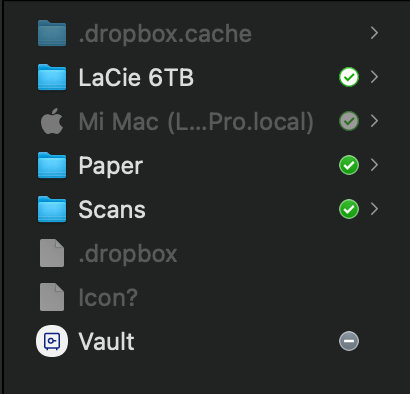
The solution from Dropbox's end was essentially "we can see the Documents folder syncing on our end, so it should be fine", even though I still can't add the folder to my backups (see photo below). But I am able to access everything from the web and do rewinds from there, so it does seem like it is syncing and backing up.
I just wish that I could add it to my backups in this UI, so I have a little reassurance; I'm kind of afraid to make any changes though because I don't want to risk losing my files.

About View, Download, and Export

Get support with viewing, downloading, and exporting files and folders from your Dropbox account.
The Dropbox Community team is active from Monday to Friday. We try to respond to you as soon as we can, usually within 2 hours.
If you need more help you can view your support options (expected response time for an email or ticket is 24 hours), or contact us on X, Facebook or Instagram.
For more info on available support options for your Dropbox plan, see this article.
If you found the answer to your question in this Community thread, please 'like' the post to say thanks and to let us know it was useful!


